






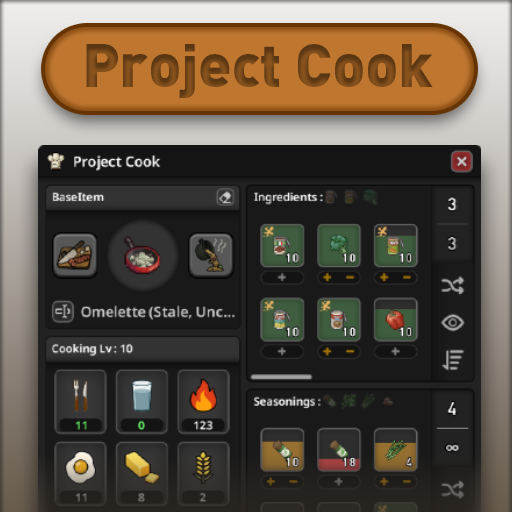
About Project Cook [B42]
From Steam WorkshopCompatible with Project Zomboid Build 42.10–42.22 — SP / MP Project Cook adds a dedicated cooking interface while keeping the underlying cooking and crafting rules as close to vanilla as possible.…
Compatible with Project Zomboid Build 42.10–42.22 — SP / MP
Project Cook adds a dedicated cooking interface while keeping the underlying cooking and crafting rules as close to vanilla as possible.
Its main focus is Base Cooking: evolved recipes where you start with a base item and add compatible ingredients or seasonings — soups, stews, salads, stir-fries, burgers, sandwiches, pasta-style meals, and more.
It also includes a Cooker panel for nearby appliances and Cooking By Recipes for regular crafting-style recipes.
[hr]
Required Mod & Load Order
Project Cook requires [B42] NeatUI Framework.
- [B42] NeatUI Framework
- Project Cook
- Project Cook Pixel Icon Pack — optional
Load the Pixel Icon Pack after Project Cook.
[hr]
Base Cooking

Use this tab for vanilla-style evolved-recipe cooking.
- choose or automatically detect a valid base item
- browse ingredients from your inventory, equipped bags, and nearby containers
- handle ingredients and seasonings separately
- double-click an ingredient or use + to queue additions
- right-click stacks to choose a specific item
- fill supported containers from nearby water sources
- empty supported recipe containers and recover the empty container
- rename finished food
- inspect cooking and nutrition information when available
Foods of the same type are separated when their state matters:
- Fresh / Stale / Rotten
- Raw / Cooked / Burnt
- Frozen / Thawed
Project Cook also distinguishes full portions from leftovers that only provide a partial portion.
Portion policies:
- Full portions only
- Full portions first
- Partial portions first
Amount filters can show all items, intact items only, items with at least one full portion, or partial portions only.
Nearly depleted seasonings are handled more safely to avoid invalid leftover food values.
Filters, Sorting & Nutrition

Visibility filters cover states such as Frozen, Stale, Rotten, Burnt, and compatible but currently unavailable items.
Sorting includes Hunger, Thirst, Boredom, Unhappiness, Weight, and nutrition values when the character is allowed to know them.
Nutrition knowledge improves with Cooking skill:
- Cooking 2: categories
- Cooking 4: rough values
- Cooking 6: closer estimates
- Cooking 8: exact values
- Nutritionist: full nutrition details and nutrition sorting
Frozen Food
The sandbox option Allow cooking with frozen food is disabled by default.
When enabled, frozen ingredients can be used directly in Base Cooking and Cooking By Recipes. The food remains frozen; Project Cook only bypasses the thawing restriction for its own cooking actions.
Cooker — WIP
The Cooker tab manages nearby ovens, microwaves, barbecues, fireplaces, campfires, and other supported cookers.
Depending on the appliance, you can turn it on or off, adjust supported settings, add fuel, insert or remove propane tanks, move food into the cooker, return food to its previous container, and browse nearby food through All Containers.
Cooker controls use action-based labels and tooltips such as Turn on / Turn off, while the current state is also shown visually.
The normal inventory and loot interfaces remain fully available.
Cooking By Recipes — WIP
This tab handles regular crafting-style cooking recipes.
Recipes such as Saucepan with Pasta or Saucepan with Rice can be prepared here, through vanilla Crafting, or through Neat Crafting.
Large recipe collections are cached and processed efficiently to reduce repeated work with large mod lists.
Interface & Settings
Project Cook includes persistent local UI settings for:
- UI scale from 80% to 200%
- Auto / Small / Medium / Large text size
- window, panel, and slot opacity
- title-bar height and Top / Bottom position
- independent Pinned / Auto-collapse behavior for the main window and Settings
The interface adapts to different resolutions and UI scales. The Settings window stays within the screen, adds vertical scrolling when needed, and keeps Reset Defaults accessible.
The main Project Cook window also remembers its position between game sessions.
A standard Project Zomboid key binding is included: Ctrl+B — Open / close Project Cook
The binding can be changed normally through the game's Key Bindings options.
Performance
Project Cook caches ingredient groups, recipe data, container state, and frequently reused UI information to reduce unnecessary rescanning and per-frame work, especially with large inventories, many nearby containers, or large modded recipe lists.
Build Support & Localization
Project Cook has been reviewed against Build 42.22, including evolved recipes, HandcraftLogic, MP timed actions, inventory/container APIs, cooker behavior, Tutorial mode changes, and newer crafting tags.
Compatibility handling is retained for older supported Build 42 versions.
Translations are included for all 28 supported languages and have been reviewed against vanilla Build 42.22 terminology where applicable.
Compatibility
Project Cook mainly uses vanilla cooking, crafting, inventory, timed-action, and evolved-recipe systems.
Mods that register ingredients through vanilla evolved recipes should normally be detected automatically. Regular craft recipes may instead belong in Cooking By Recipes, vanilla Crafting, or Neat Crafting.
Highlights
From source dataFootprint
Rated a light load on a server.
Last update
Its author last shipped an update 4d ago.
Project Cook [B42] on Nxeon
From our catalogue- One-click install
- Supported on Nxeon Project Zomboid servers. We download it from Steam Workshop, place it, and restart the server.
- Server load
- light
- Smallest plan we suggest
- Project Zomboid — 6 GB (6 GB RAM). This follows our own load rating above, not a benchmark.
- Latest build
- 2026-10-31, released 2026-10-31
Game versions by loader
| Loader | Game versions | Newest |
|---|---|---|
| Workshop |
From 4 recorded builds of Project Cook [B42].
Recent builds
| Build | Released | Game versions | Loaders |
|---|---|---|---|
| 2026-10-31 | 2026-10-31 | n/a | Workshop |
| 2026-10-12 | 2026-10-12 | n/a | Workshop |
| 2026-10-10 | 2026-10-10 | n/a | Workshop |
| 2026-09-29 | 2026-09-29 | n/a | Workshop |
Dependencies
- Required: NeatUI Framework [B42]
Declared by the newest build that lists any. Required ones are installed with it on one-click installs.
Run Project Cook [B42] on a Project Zomboid server
Pick a server or deploy a new one above; it is installed in one click.
What kind of mod it is
From the catalogQuality of life & UI
Small conveniences, tweaks and interface improvements players notice straight away.
Compatibility
- Game
- Project Zomboid
Verified at the source
- ✓Steam WorkshopOfficial listing, checked 2026-11-01Open ↗
- ✓AuthorRocco, as published on Steam Workshop
- ✓LicenseNot published by the sourceFree















