About Project Russia 0.9.93 Alpha (41 build)
From Steam Workshop42 build bemo version of Project Russia Beta - https://steamcommunity.com/sharedfiles/filedetails/?id=3734334068 https://i.ibb.co/Wsf5Hpb/21321313.gif When playing on our map for a long time, make a…
42 build bemo version of Project Russia Beta - https://steamcommunity.com/sharedfiles/filedetails/?id=3734334068

When playing on our map for a long time, make a backup of the mod version and your save! When updating the mod, your houses may become black, entire chunks of towns will be distorted, and your stuff will definitely suffer due to loss of cabinet textures. New content will not be added to your save if you started playing on an older version. New towns will only be on a new save, or if you delete the old generated chunks in the game files, but this is done the hard way. This is the logic of the game, there is nothing we can do about it. The only thing we can do is stop updating our mod, which you won't like. So sorry, thanks for your attention.
 Project Russia is a mod that combines many cities of different authors into one big map.
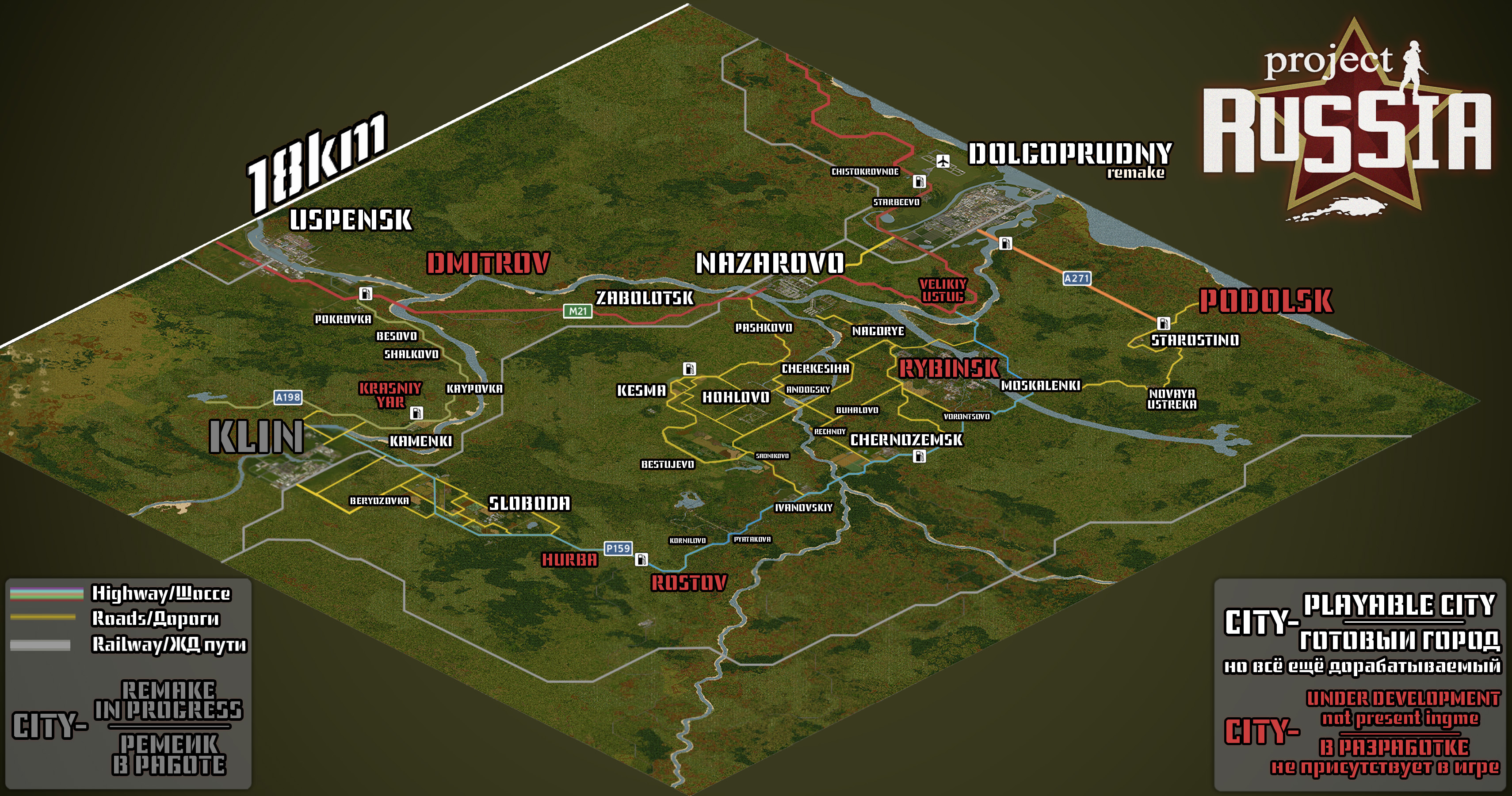
3600 cells (each cell is 300 meters squared) Entire map to scale 324 square kilometers
At the moment, playable cities are shown in white on the map, while red are unplayable cities.

- A 324km^2 semi-fictional map
- Large Russian cities
- Typical Russian villages located all over the map
- Rivers that traverse the whole map
- Early 90s setting
- The terrain of our map is fictional. But some of the cities are real. That is, the location of cities is arbitrary, we did not rely on a certain zone from the real world.
Links
Full PR map in 3D (Fan work(not ours), may update with delays) https://pzfans.com/project-zomboid-maps/?map_name=Project_Russia
Full map of Project Russia in 2D: (view in browser or download) https://drive.google.com/file/d/16HXMK0tyAFw8rKLpzaaX8LSa56FotJ3J/view?usp=sharing
Full map of Dolgoprudny Remake in 3D: (view in browser or download) https://drive.google.com/file/d/1f3IGvHx6jClCpEiNC78Aj2SF77U9Sk3i/view?usp=sharing
Full map of Moskalenki in 3D: (Download/view) https://drive.google.com/file/d/1zOQ234DtpVHlDHrFNZsC35r_ILlObzrJ/view?usp=sharing
Discord mod server: https://discord.gg/JHuakWasYW
Discord server of cars, guns, items, clothes, etc: https://discord.gg/jqtDTxDRnV
 HOW TO START A MAP IN MULTIPLAYER? 1) Server through the game: !!!!!Use the settings from the picture on the mod page!!!!! 2)Dedicated server -Just make a server. -Open the save folder of the zomboid server. (by standard it's C:\Users<Username>\Zomboid\Server) -Open the file <name of server settings in the game>.ini. -Find the lines beginning with: -Mods= -Map= -WorkshopItems= -find the same lines in the ini file of the dedicated server and replace them with the following lines -profit projectrussiaafn FOR MULTIPLAYER, Y FOR SINGLEPLAYER -It should look like this: Mods=projectrussiaafn;projectrussia;P.A.R.C;PRclothes;PRitemtest;PSIPNoSpam;PSItemPack;rusmedia1993n Map=Bolotnoe;Cherkesiha;Chernozyomsk;DolgoprudnyPR;Hohlovo;Klin;Kumenki;Nagorye;Nazarovo;Project Russia;Rybinsk;Uspensk;Ivanovskiy;Muldraugh, KY WorkshopItems= 2639141128;2734164805;2939885154;2891251749;2919445152;2938263039

Dolgoprudny, Rybinsk - I_ALT_I Nazarovo - ZUBLUDOK Klin, Uspensk - UKG Cherkesiha, Hohlovo, Zabolotsk - Yisdoge Radio and TV - Yisdoge All features submod - Yisdoge, Huel and Lemes Kamenki - Yes Daddy Bolotnoe - Tsikuta Chernozyomsk - RomaPozitiv Nagorye and other locations - Huel PSA, PSIP, PR Clothes - Huel and Lemes PARC - Lemes Playtesting - KeNTouKJlag4uK, Boris Barbudo Specials thanks to Daddy dirkiedirk for allowing us to use parts of his tilesets
Conflicting Mods: -Britta mods (incompatible with our weapon and clothing mods) -Some car mods (There may be glitches with wheels due to our car mod) -Paw Low loot (There are problems with picking up items on servers) -Criowinter (Only works in All Features version without weather modification) -Hydrocraft (Some books from the mod do not spawn.) In Hydrocraft never dies- spawns. -All locations from PR, but in a separate version (Klin or other Russian map mods) -WeBuildZ: Barricade (Conflict with tails from our mod) -All mods for tiles (Disable all mods for tiles before playing on PR) -Interactive mod for streams (lags terribly and crashes with minimap)
Workshop ID: 2639141128
Workshop ID: 2639141128 Mod ID: projectrussiaafn Mod ID: projectrussiaafnw Mod ID: projectrussiaafy Mod ID: projectrussia Map Folder: Bolotnoe Map Folder: Cherkesiha Map Folder: Chernozyomsk Map Folder: DolgoprudnyPR Map Folder: Hohlovo Map Folder: Ivanovskiy Map Folder: Klin Map Folder: Kumenki Map Folder: Nagorye Map Folder: Nazarovo Map Folder: Project Russia Map Folder: Rogachovo Map Folder: Rybinsk Map Folder: Uspensk
Highlights
From source dataFootprint
Rated a light load on a server.
Last update
Its author last shipped an update 17 mo ago.
Project Russia 0.9.93 Alpha (41 build) on Nxeon
From our catalogue- One-click install
- Supported on Nxeon Project Zomboid servers. We download it from Steam Workshop, place it, and restart the server.
- Server load
- light
- Smallest plan we suggest
- Project Zomboid — 6 GB (6 GB RAM). This follows our own load rating above, not a benchmark.
- Latest build
- 2025-05-31, released 2025-05-31
Game versions by loader
| Loader | Game versions | Newest |
|---|---|---|
| Workshop |
From 1 recorded build of Project Russia 0.9.93 Alpha (41 build).
Dependencies
- Required: P.A.R.C Pack All Russians Cars
- Required: [B41] P.S.A Post-Soviet Armory
- Required: P.S.I.P
- Required: Discontinued - Project Russia Media [0.3.0]
- Required: [B41] P.S.C Post-Soviet Clothing
Declared by the newest build that lists any. Required ones are installed with it on one-click installs.
Run Project Russia 0.9.93 Alpha (41 build) on a Project Zomboid server
Pick a server or deploy a new one above; it is installed in one click.
What kind of mod it is
From the catalogBuilding & decoration
Blocks, furniture, decorations and building tools.
Compatibility
- Game
- Project Zomboid
Verified at the source
- ✓Steam WorkshopOfficial listing, checked 2026-11-01Open ↗
- ✓AuthorALT, as published on Steam Workshop
- ✓LicenseNot published by the sourceFree