






About Proximity Inventory B42.20+ | We are so back
From Steam WorkshopNow Updated to work with B42! Check out the new keybinds in the options! Proximity Inventory Are you tired of having to manually loot a pile of 300 zombies to find some damn cigarettes? Are you tired…
Now Updated to work with B42! Check out the new keybinds in the options!
Proximity Inventory
Are you tired of having to manually loot a pile of 300 zombies to find some damn cigarettes? Are you tired of getting lost in the 30th box of this damn warehouse to find a sledgehammer? Are you forgetting where you put those 12g shotgun shells?
Me too! I'm tired of all of this! And this is why this mod is for YOU!
From now on, you can see the content of ALL the containers close to you on a single page! And not only that! You can get stuff OUT of these containers from that single page! Try it now! And experience the comfort of the "Proximity Inventory"!
No more wasting time clicking and scrolling. Enjoy your loot FAST!
Options
Using the sandbox options - Zombie Only Mode: Enable this if you want the Proximity Inventory to work only on zombies
Using the Mod Options - Highlight Toggle: Enable or the disable the prox inv highlight - Enable Proximity Inventory: Enable or disable prox inv only for your client, other clients are unaffected
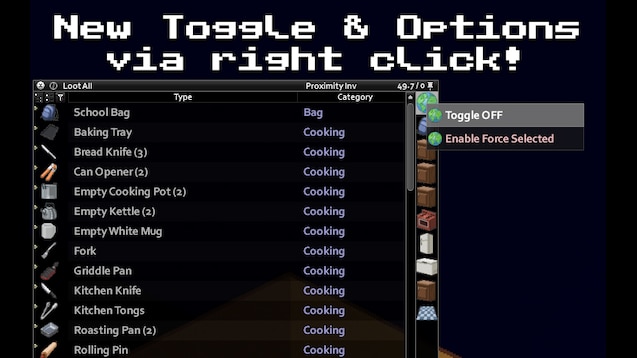
[h1] Rick click Features [/h1]: Toggle -> Now, you have to toggle the proximity inventory on and off. (Check the screenshots) Highlight -> when toggled, Proximity Inventory it will highlight all the containers loaded by the proximity inventory. Force Selected -> This options forces the Proximity Inventory to be always selected
Compatibility: Works on 41.73 and above (?) Works in MP Can be added mid-game Can be added mid-game on a server
For Donations: https://paypal.me/massimomxUK
Extra Credits: - JS for improved icons and translation
Permissions:
Ask for permission This mod can only be added to and extended with the express permission from the original creator. Having received permission, credit must be given to the original creator, both within the files of the mod and wherever the mod roams online. If no permission is received you may not alter the mod, and it must be treated as a mod that is 'On Lockdown'. [img=http://projectzomboid.com/images/MODS_03.png]
Workshop ID: 2847184718 Mod ID: ProximityInventory
Highlights
From source dataFootprint
Rated a light load on a server.
Last update
Its author last shipped an update 2 mo ago.
Proximity Inventory B42.20+ | We are so back on Nxeon
From our catalogue- One-click install
- Supported on Nxeon Project Zomboid servers. We download it from Steam Workshop, place it, and restart the server.
- Server load
- light
- Smallest plan we suggest
- Project Zomboid — 6 GB (6 GB RAM). This follows our own load rating above, not a benchmark.
- Latest build
- 2026-08-30, released 2026-08-30
Game versions by loader
| Loader | Game versions | Newest |
|---|---|---|
| Workshop |
From 1 recorded build of Proximity Inventory B42.20+ | We are so back.
Run Proximity Inventory B42.20+ | We are so back on a Project Zomboid server
Pick a server or deploy a new one above; it is installed in one click.
What kind of mod it is
From the catalogQuality of life & UI
Small conveniences, tweaks and interface improvements players notice straight away.
Compatibility
- Game
- Project Zomboid
Verified at the source
- ✓Steam WorkshopOfficial listing, checked 2026-11-01Open ↗
- ✓AuthorMxswat FRV Enthusiast, as published on Steam Workshop
- ✓LicenseNot published by the sourceFree















