






About PZ-ClothingUI - Clothing items grid view (B41 + B42 Updated)
From Steam WorkshopPZ-ClothingUI - Clothing items grid view Info This mode provides alternative graphical UI for equipped clothing items. Features Draggable button to display equipped items in an overview window (drag…
PZ-ClothingUI - Clothing items grid view
Info
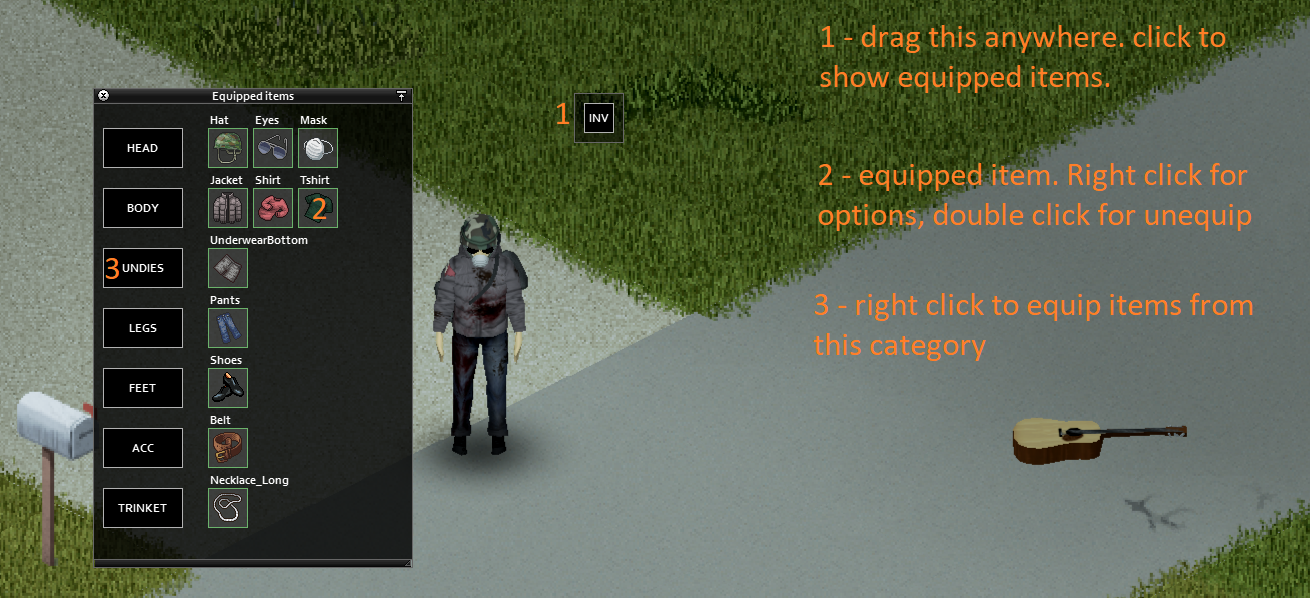
This mode provides alternative graphical UI for equipped clothing items.
Features
- Draggable button to display equipped items in an overview window (drag by grey border)
- Items are displayed in categories (right click category button or item icon for equip possibilities)
- Left mouse double click on item icon for quick unequip
- Item tooltips on mouse hover
- (Build 42 only) Configurable hotkey for toggling the window
Options / configuration
For full guide click here. Configuration is done via MOD OPTIONS. It's optional but recommended for anyone with different than FullHD resolution. [olist] [*] Start the game and enable the Options mod (Don't forget to enable it also on your save file) [*] Load into Single Player Game [*] Open game settings, click on tab Mods (Doesn't show in the Multiplayer games!) [*] Configure the mod to you liking (To be able to see the changes, you need to open/close the Clothing UI window) [/olist]
Configure your view in SP games and than load to MP, even though the mod is not enabled in MP. The config is loaded.
Multiplayer
Multiplayer is supported if server has allowed this mode. See https://github.com/rempAut/PZ-ClothingUI#multiplayer-support
Languages
Translations are now possible. Supported languages:
- English (EN)
- Russian (RU) - Русский
- Chinese (CN) - 简体中文
- German (DE) - Deutsch
- Spanish (ES) - Español
- French (FR) - Français
- Brazilian Portuguese (PTBR) - Português Brasileiro
- Thai (TH) - ไทย
- Turkish (TR) - Türkçe
The mode is not text-heavy, so if you want to help with translating, see https://github.com/rempAut/PZ-ClothingUI#how-to-add-translation
Bug reports
See this guide how to report bug.
Development
See the dev progress here https://github.com/rempAut/PZ-ClothingUI If you want to report a BUG or make a Feature request, please consider using github. Otherwise, you can still use discussions here on Steam.
Manual installation
You can find and download all releases here.
Hotfixes
- If you cannot see the button, try to delete clothingui.ini inside C:\Users\[yourname]\Zomboid\Lua
Workshop ID: 2695471997 Mod ID: myclothinguimod
Workshop ID: 2695471997 Mod ID: myclothinguimod
Highlights
From source dataFootprint
Rated a light load on a server.
Last update
Its author last shipped an update 8 mo ago.
PZ-ClothingUI - Clothing items grid view (B41 + B42 Updated) on Nxeon
From our catalogue- One-click install
- Supported on Nxeon Project Zomboid servers. We download it from Steam Workshop, place it, and restart the server.
- Server load
- light
- Smallest plan we suggest
- Project Zomboid — 6 GB (6 GB RAM). This follows our own load rating above, not a benchmark.
- Latest build
- 2026-03-17, released 2026-03-17
Game versions by loader
| Loader | Game versions | Newest |
|---|---|---|
| Workshop |
From 1 recorded build of PZ-ClothingUI - Clothing items grid view (B41 + B42 Updated).
Dependencies
- Required: Mod Options (Build 41)
Declared by the newest build that lists any. Required ones are installed with it on one-click installs.
Run PZ-ClothingUI - Clothing items grid view (B41 + B42 Updated) on a Project Zomboid server
Pick a server or deploy a new one above; it is installed in one click.
What kind of mod it is
From the catalogQuality of life & UI
Small conveniences, tweaks and interface improvements players notice straight away.
Compatibility
- Game
- Project Zomboid
Verified at the source
- ✓Steam WorkshopOfficial listing, checked 2026-11-01Open ↗
- ✓AuthorRamp, as published on Steam Workshop
- ✓LicenseNot published by the sourceFree















