







About PZ Pulse
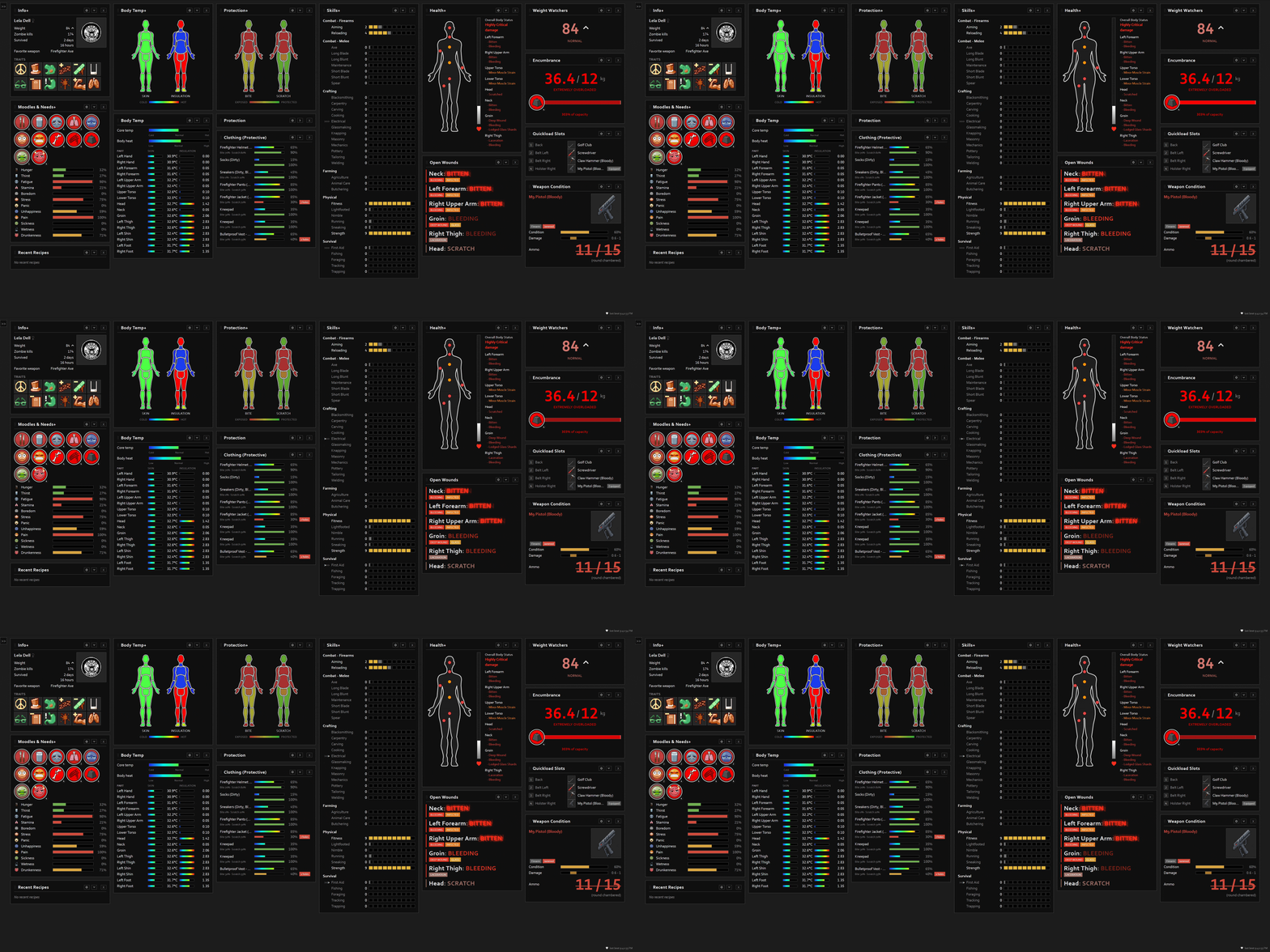
From Steam WorkshopPZ Pulse is a live status dashboard to keep track of your character's numerous details. Open it in any browser to have everything you need visible at a glance. Choose panels Most panels are a…
PZ Pulse is a live status dashboard to keep track of your character's numerous details. Open it in any browser to have everything you need visible at a glance.
Choose panels
Most panels are a somewhat faithful recreation of the in-game character window:
- Info - name, profession, traits, weight, favorite weapon, kills, time survived
- Skills/XP - every skill, level + progress to next, with level-up and XP flashes
- Health - overall + per-body-part damage and wound flags
- Protection - bite/scratch defense per body part from your clothing
- Body Temperature - core temp, body heat, and per-part skin temp / insulation
- Moodles & Needs - the full HUD moodle stack plus hunger, thirst, fatigue, stress, panic, etc.
Extra panels beyond the character window:
- Weapon Condition - in-hand durability, sharpness, jam/ammo/chamber, attachments
- Clothing - per-garment condition, holes, and protection - a keep-or-toss view
- Quickload Slots - your equipment-hotbar loadout
- Encumbrance - carry load vs. capacity with the HeavyLoad tier
- Open Wounds - a worst-first triage list of active, untreated injuries
- Recent Recipes - a transient note when you learn something new
Customizable
- Drag panels by their title bar to move them between columns or reorder them.
- Choose the column count and show/hide any panel.
- Per-panel font and icon sizes, animation toggles, and flash timings.
- Layout is saved in your browser, so your preferences stick.
How to use
- Enable the mod and load a save.
- Open the mod's options screen and use the Copy dashboard URL button, then paste it into your browser's address bar and bookmark it.
- Drag the page to your second monitor (press F11 to fullscreen it).
- It updates in real time, the refresh rate is adjustable via the in-game mod options.
This is NOT online
- The heartbeat / data lives in your Zomboid\Lua\PZ_Pulse folder.
- The webpage lives in your mod folder.
- It makes no network connections. It contacts no servers.
Can I share it to my phone / tablet / laptop / OBS?
- Here is a script for this on github
- It's on GitHub because Steam forums strip slashes from posts.
- Windows will give you security warnings and you will have to say ok.
- Only run this on private networks.
Translation?
- The game translates many of the words for free.
- For the rest here's a: Language Pack
Can I have a panel that does X?
- Anyone can add a panel with their own mod, and it does not need any permission from me.
- There is a small API for it, plus a complete demo panel to copy and rename:
- PZ Pulse extension API on GitHub
- Your mod adds one Lua table and (optionally) a small .js file. Your panel then gets the same title bar, drag, collapse, hide and font-size controls as the built-in ones.
- Example: FireBjorne's Nutrition Panel is a separate mod that draws itself inside PZ Pulse.
Notes
- Read-only - unfortunately it cannot be interactive.
- Needs a second monitor (or a spare window) to be useful.
- Project Zomboid Build 42 only.
- No dependencies.
- Singleplayer and multiplayer.
Steam Workshop Meta
- At your earliest convenience:
- A similar mod for the map: PZ Map
- Check out: my other mods.
- A crisp high-five to FireBjorne for good ideas.

Workshop ID: 3753700423 Mod ID: PZ_Pulse
Highlights
From source dataFootprint
Rated a light load on a server.
Last update
Its author last shipped an update 20d ago.
PZ Pulse on Nxeon
From our catalogue- One-click install
- Supported on Nxeon Project Zomboid servers. We download it from Steam Workshop, place it, and restart the server.
- Server load
- light
- Smallest plan we suggest
- Project Zomboid — 6 GB (6 GB RAM). This follows our own load rating above, not a benchmark.
- Latest build
- 2026-10-14, released 2026-10-14
Game versions by loader
| Loader | Game versions | Newest |
|---|---|---|
| Workshop |
From 2 recorded builds of PZ Pulse.
Recent builds
| Build | Released | Game versions | Loaders |
|---|---|---|---|
| 2026-10-14 | 2026-10-14 | n/a | Workshop |
| 2026-09-22 | 2026-09-22 | n/a | Workshop |
Run PZ Pulse on a Project Zomboid server
Pick a server or deploy a new one above; it is installed in one click.
What kind of mod it is
From the catalogQuality of life & UI
Small conveniences, tweaks and interface improvements players notice straight away.
Compatibility
- Game
- Project Zomboid
Verified at the source
- ✓Steam WorkshopOfficial listing, checked 2026-11-01Open ↗
- ✓Authorqwerto, as published on Steam Workshop
- ✓LicenseNot published by the sourceFree















