






About Random Zombies - Day and Night
From Steam WorkshopAdd distribution of different type of zombies with two separate distribution sets, one for the day and one for the night. Also a special schedule is available in which you can choose how the zombies…
Add distribution of different type of zombies with two separate distribution sets, one for the day and one for the night. Also a special schedule is available in which you can choose how the zombies act when there is rain, snow or fog. Works on both single player and multiplayer.
You can decide:
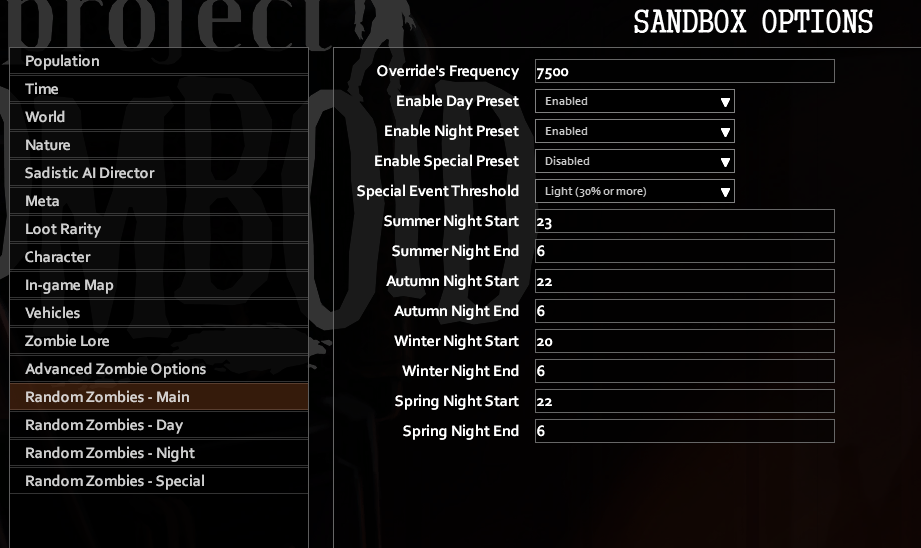
- When the mods should consider the time being "night" for each season
- if you want zombies to behave differently in a specific weather (rain, snow, fog) and on which intensity (any, light, average, heavy) of the selected weather.
- Specifically, if you want only some presets to be enabled (day, night, rain)
- For each preset, which kind of zombies are more or less common between Crawlers, Shamblers, Fast Shamblers, Sprinters
- For each preset, how many zombies are going to be flimsy, average or tough in terms of health
- For each preset, if there is a percentage of "smart" zombies that can open doors and long memory. They *will* hunt you down!
HOW IS THIS WORKING?
The mod will check at the start of your single player session or server start and determine if it's "day", "night" or "special". "Special" will always have priority over day/night if it's enabled. Then proceed to load the values you decided in the relative preset.
The "Frequency Override" determine how often the zombies in the current active cells are being overridden with the values you selected in the mod. It's in milliseconds which means that the default 7500msc translate to 7.5 seconds.
Until the override runs, the zombies in a cell will behave according to the "proper zombies" settings.
Every in game hour, the mod will check again the day/night/special event and update the preset. Be aware that the mod will not update the preset every hour in case the current preset is already the one that should be assigned. I considered updating more often to catch the special event as soon as it start but don't want to complicate the logic too much for now. Look at it as "the zombies need some time to get "influenced by the weather" and you have that time to prepare accordingly :)
An example of the SandboxVars configuration block is available here: https://pastebin.com/raw/XUJ60mQj
FAQ
- What I need to do to enable this mod? By default the day and night distribution is already enabled if you installed and activated the mod. Check that you activated it by opening your "mods" section in game after subscribing. For the details on the default distribution you can check the screenshots in this same page.
- How do I check if the mod is working? The mod works on both solo and multiplayer (hosted and dedicated servers). If you see something like this on your server/game logs, the mod has loaded and is working as it should. If there is some error happening, you should be able to see it in your server logs or in `C:\Users\[YOURUSERNAME]\Zomboid\Logs\[SOME_DATE_TIME]_DebugLog.txt` for game hosted locally, either single or multiplayer.
- Can I have the special preset trigger for more than one weather pattern? Unfortunately not. The reason is that I wanted to keep the mod's logic simple and already there are parts that are quite complex. Adding the possibility to have multiple weather detected or all of them would make for a much more complex logic to cover all possible combinations and not just in the code. Also the interface for the options would be quite hellish. This is the main reason I've added support for plugins. So that if you want a niche or specific combination, you can write your own logic and have it load up with higher priority over the regular presets and triggers. However, the plugin example here will do exactly that if you want to try.
- What are the percentages for the weather pattern intensity? When selecting the special schedule's trigger, you can select the intensity on which the preset actually get triggered. Intensity in the code goes from 0 to 1, using the decimals. The values used as thresholds are: -- Any means Intensity > 0.0 -- Light means Intensity > 0.3 -- Average means Intensity > 0.5 -- Heavy means Intensity > 0.7
- What if I have multiple plugins with overlapping triggering conditions? Plugins will require this mod to work (duh!). What determine the priority in the plugins loaded, in case there are more than one, is the order in which they are loaded. A typical order with multiple plugins will be something like: -- [other mods] -- rzf_plugin_a -- rzf_plugin_b -- randomzombiesfull -- [other mods] Assuming plugin_a and plugin_b share the same trigger (let's say "rain and fog") the lower in the list will be the one that gets activated.
BUGS!?
Please report bugs here, following the instructions provided. If you don't follow the instructions, I won't be checking on the bug report. I'm sorry to be this harsh but I need to have some clear indication of what/where to check for a bug as this is a free product that I made in my free time and it's a limited resource :)
SOURCE CODE I believe that open source helps immensely in improving a product, no matter the nature. Also, you could just subscribe the mod and get the source code anyway :D
So here is the official repository for it. Contribution and feature requests are welcome. The latter will always be considered as long as they fit the scope of the project. Cheers!
Build 42 Update
Highlights
From source dataFootprint
Rated a light load on a server.
Last update
Its author last shipped an update 2 yr ago.
Random Zombies - Day and Night on Nxeon
From our catalogue- One-click install
- Supported on Nxeon Project Zomboid servers. We download it from Steam Workshop, place it, and restart the server.
- Server load
- light
- Smallest plan we suggest
- Project Zomboid — 6 GB (6 GB RAM). This follows our own load rating above, not a benchmark.
- Latest build
- 2024-07-24, released 2024-07-24
Game versions by loader
| Loader | Game versions | Newest |
|---|---|---|
| Workshop |
From 1 recorded build of Random Zombies - Day and Night.
Run Random Zombies - Day and Night on a Project Zomboid server
Pick a server or deploy a new one above; it is installed in one click.
What kind of mod it is
From the catalogQuality of life & UI
Small conveniences, tweaks and interface improvements players notice straight away.
Compatibility
- Game
- Project Zomboid
Verified at the source
- ✓Steam WorkshopOfficial listing, checked 2026-11-01Open ↗
- ✓AuthorCrius, as published on Steam Workshop
- ✓LicenseNot published by the sourceFree















