






About sDayZ - New Icons And Preset
From Steam WorkshopFixed B42.21.0 ✅ Supports up to 4 local players (split-screen). Each player has their own saved settings. Two icon styles: New and Old — switch anytime from the mod menu. Bar fill direction:…
Fixed B42.21.0 ✅
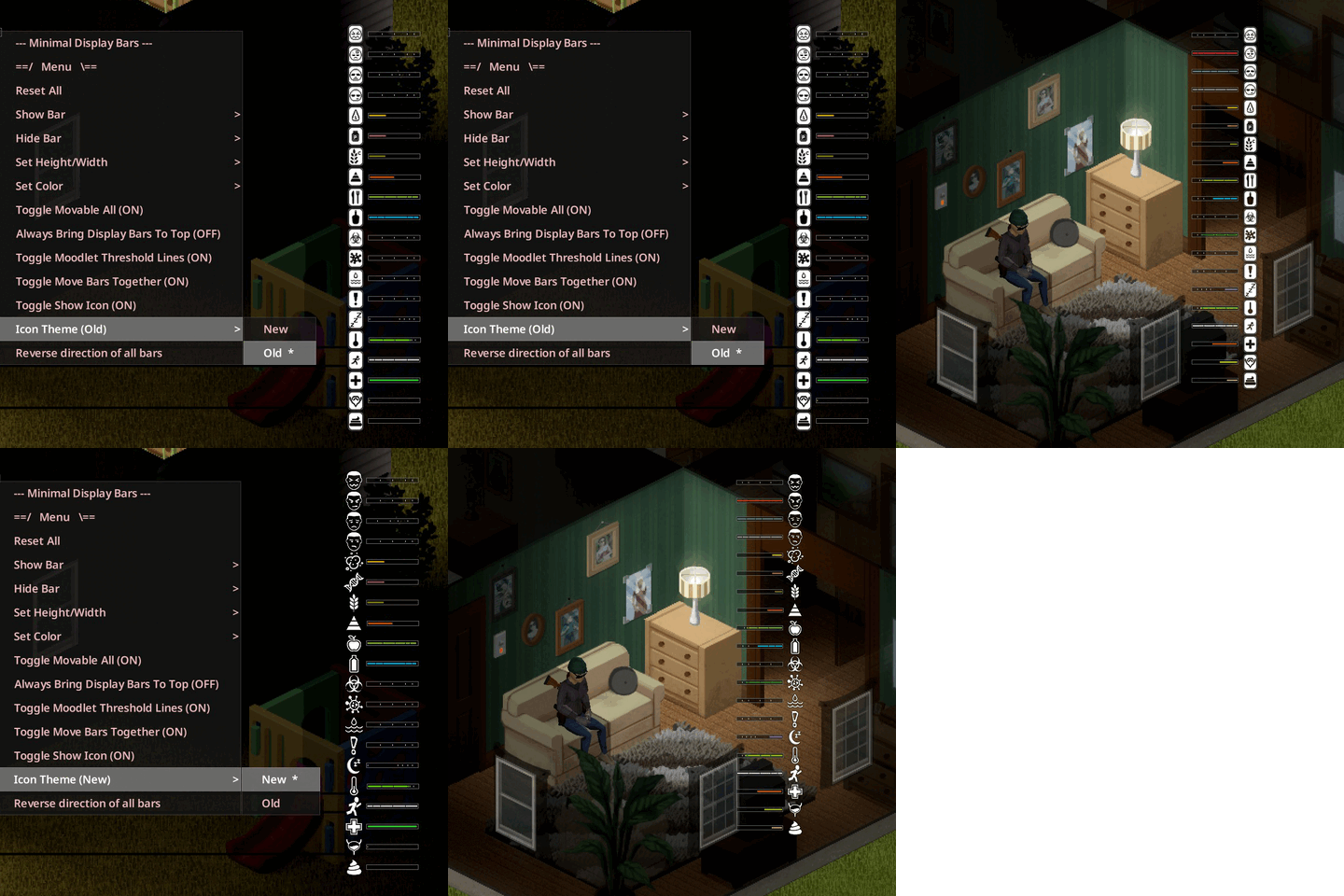
Supports up to 4 local players (split-screen). Each player has their own saved settings. Two icon styles: New and Old — switch anytime from the mod menu. Bar fill direction: Horizontal: left → right or right → left Vertical: bottom → top or top → bottom
Icon placement: left, right, top, or bottom. Change each bar’s color. Lock bars so they don’t move by accident. Move all bars together. Hide any bars you don’t want. Fully customizable layout: position, size, orientation, and more.
Right-click the mod menu button (or any bar) to open the options.
Icon Theme "Old" 


Icon Theme "New" 


-> MDB - Excrementum Addon. (B41/B42) (For players using the Excrementum mod.) 📌 https://steamcommunity.com/workshop/filedetails/?id=3724119012  Thank you Nihilist Penguin. 👍 https://steamcommunity.com/profiles/76561198005669324
-> MDB - Defecation And Urination Addon (B41) (For players using the Urination and Defecation mods.) 📌 https://steamcommunity.com/workshop/filedetails/?id=3724165122  Thank you Johngood. 👍 https://steamcommunity.com/profiles/76561197994740135
-> Minimal Display Bars. (All code credits belong to the original author.) 📌 https://steamcommunity.com/workshop/filedetails/?id=2004998206  Thanks ATPHHe. 👍 https://steamcommunity.com/profiles/76561198001763646
-> Artwork for the First Icons.  Thanks Izzy. 👍 https://steamcommunity.com/profiles/76561198878763046
Workshop ID: 2799152712 Mod ID: sDayZ.MinimalDisplayBars41 Mod ID: sDayZ.MinimalDisplayBars42
Highlights
From source dataFootprint
Rated a light load on a server.
Last update
Its author last shipped an update 20d ago.
sDayZ - New Icons And Preset on Nxeon
From our catalogue- One-click install
- Supported on Nxeon Project Zomboid servers. We download it from Steam Workshop, place it, and restart the server.
- Server load
- light
- Smallest plan we suggest
- Project Zomboid — 6 GB (6 GB RAM). This follows our own load rating above, not a benchmark.
- Latest build
- 2026-10-15, released 2026-10-15
Game versions by loader
| Loader | Game versions | Newest |
|---|---|---|
| Workshop |
From 2 recorded builds of sDayZ - New Icons And Preset.
Recent builds
| Build | Released | Game versions | Loaders |
|---|---|---|---|
| 2026-10-15 | 2026-10-15 | n/a | Workshop |
| 2026-09-03 | 2026-09-03 | n/a | Workshop |
Run sDayZ - New Icons And Preset on a Project Zomboid server
Pick a server or deploy a new one above; it is installed in one click.
What kind of mod it is
From the catalogQuality of life & UI
Small conveniences, tweaks and interface improvements players notice straight away.
Compatibility
- Game
- Project Zomboid
Verified at the source
- ✓Steam WorkshopOfficial listing, checked 2026-11-01Open ↗
- ✓AuthorJFcK, as published on Steam Workshop
- ✓LicenseNot published by the sourceFree















