About Share Tents
From Steam Workshophttps://media1.giphy.com/media/wRhSi68hscY8xNOlXS/giphy.gif Now sleep safely in the tent! This mode allows you to enter the tent. Features supported inside the tent: 1. Zombie event: - Sometimes…

Now sleep safely in the tent!
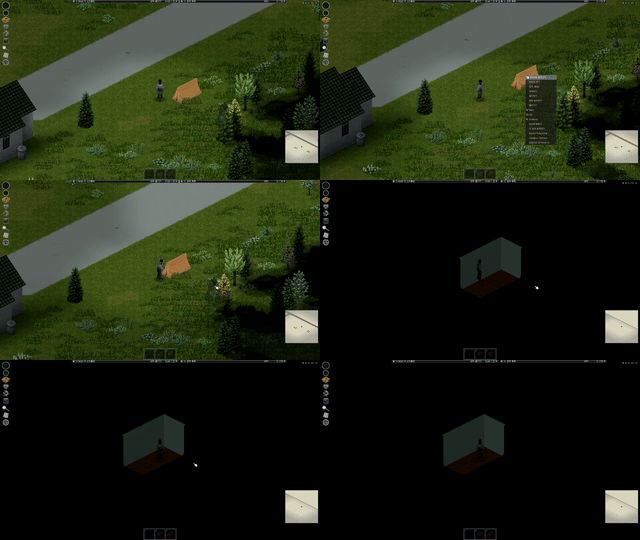
This mode allows you to enter the tent.
Features supported inside the tent:
1. Zombie event:
- Sometimes zombies make footsteps outside the tent. - At this time, you should not move in the tent. - If you moved, the zombie would come inside. (It doesn't come right in as soon as it moves. There's a certain probability.) - It can be disabled through sandbox settings.
2. Electrical connection:
- When the world enters the tent with the electricity out, you can right-click to connect the electricity.
3. Support for rain in the tent:
- If it rains outside the tent, the sound of rain can be heard inside the tent. - It can be disabled in the sandbox settings.
4. Support for tent expansion:
- Usually, if you break the tent wall and leave, you will return to the outside position of the tent, but if you disable "ShareTentsBlockOut" through the sandbox option, you can move to a large flatland. - I can make or decorate the tent I want.
5. Sharing inside the tent:
- No matter when, where and what tent you set up, you can always enter the same tent inside. - Multi-play supports 5 rooms, so you can choose to enter before entering the tent.
FAQ
1. Is it possible to play multiplayer?
- Yes, it's possible.
2. I found a bug, what do I do?
- Please leave comments.
3. Can I add it in the middle of the game?
- Yes, it's possible. *If you only see a black screen and keep getting teleported outside the tent, please check https://www.reddit.com/r/projectzomboid/comments/xks9db/adding_maps_to_existing_sp_save/
How to apply the mode
#Single Play:
- Apply it like normal mode and place the mode order so that [Share Tents] mode is upward in map mode.
#Multi-play:
- Apply it like normal mode and place the mode order so that [Share Tents] mode is the top of the map mode, go into the server settings and place the [camping] map at the top of the map settings.
What is "Share Tents Real"?
- The interior size of the tent is 2 x 4. - There is no basic furniture inside the tent.
What is "Share Tents Small"?
- The interior size of the tent is 1 x 2. - There is no basic furniture inside the tent.

Workshop ID: 3225119469 Mod ID: shareTents Mod ID: shareTentsReal Mod ID: shareTentsSmall Map Folder: camping Map Folder: camping Map Folder: camping
Highlights
From source dataFootprint
Rated a light load on a server.
Last update
Its author last shipped an update 2 yr ago.
Share Tents on Nxeon
From our catalogue- One-click install
- Supported on Nxeon Project Zomboid servers. We download it from Steam Workshop, place it, and restart the server.
- Server load
- light
- Smallest plan we suggest
- Project Zomboid — 6 GB (6 GB RAM). This follows our own load rating above, not a benchmark.
- Latest build
- 2024-06-16, released 2024-06-16
Game versions by loader
| Loader | Game versions | Newest |
|---|---|---|
| Workshop |
From 1 recorded build of Share Tents.
Run Share Tents on a Project Zomboid server
Pick a server or deploy a new one above; it is installed in one click.
What kind of mod it is
From the catalogBuilding & decoration
Blocks, furniture, decorations and building tools.
Compatibility
- Game
- Project Zomboid
Verified at the source
- ✓Steam WorkshopOfficial listing, checked 2026-11-01Open ↗
- ✓AuthorGIK, as published on Steam Workshop
- ✓LicenseNot published by the sourceFree