






About Survivor Briefing
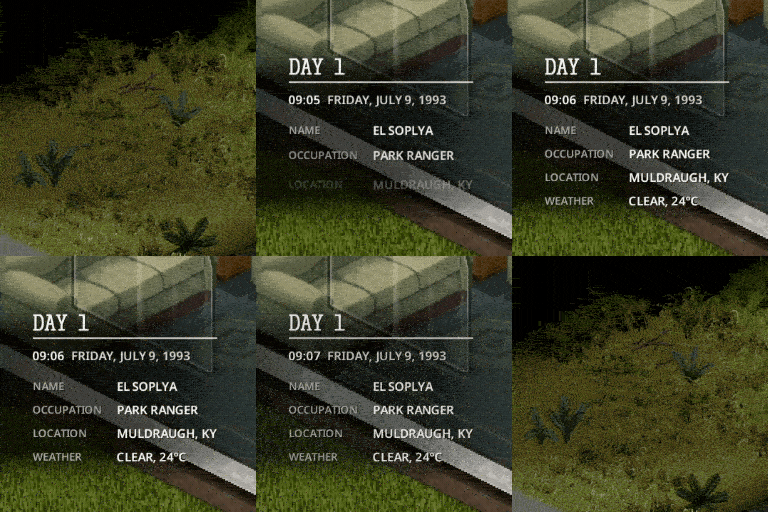
From Steam WorkshopSurvivor Briefing A short briefing at the start of each chapter of your survival: what day it is, the time, who you are, where you are, the weather and your kills. Pick one of 17 looks, each with its…
Survivor Briefing
A short briefing at the start of each chapter of your survival: what day it is, the time, who you are, where you are, the weather and your kills. Pick one of 17 looks, each with its own sound. It fades in, stays a few seconds, fades out, and never blocks your clicks.
Looks

 [img]https://i.imgur.com/FoW0a22.gif[/gif]
Try them all on your own character: Options > Mods > Survivor Briefing > Preview the looks.
My notes
Up to three notes of your own, a title and five lines each, shown at the bottom of your briefings in that world (the last tile above). Write them with My notes in the mod's options.
What it shows
- Day of survival, time and date (the clock keeps running)
- Name and occupation
- The town you're in, or how far you are from the nearest one, and a landmark nearby
- Weather and temperature
- Zombies killed, and bandits killed with the Bandits mod
- Optional: day of the outbreak, server day, characters lost
Turn on Only what your character can know and you need a watch for the exact time, and a digital one for the date and temperature.
When it shows up
When a survivor starts, when you load a save, once a day (midnight, any hour you pick, or sunrise) and when you wake up. Optional: entering a town, closing the pause menu, or a key of your choice.
Options
Everything is in Options > Mods > Survivor Briefing: look, position (any corner, centre, top or bottom centre), text size, time on screen, motion, sound volume, every line and trigger on its own and much more.
[hr][/hr]
- Multiplayer: each player sees only their own briefing, with their own settings.
- Safe to add or remove mid-save. Nothing is written to your save.
- Modded maps: town names come from the map's own labels. Map makers can add places with SurvivorBriefing.addTown and SurvivorBriefing.addLandmark.
- Languages: English, Ukrainian, Russian, Spanish, French, Brazilian Portuguese, Simplified Chinese (thanks to 歪比巴伯~), Turkish (thanks to xeotN) and Italian (thanks to Nycotex).
- Fonts and sounds: free fonts, licences included; the sounds were made for this mod.
[hr][/hr] Also check out my other mods in my collection!
Your support is much appreciated!

Workshop ID: 3808944882 Mod ID: SurvivorBriefing
Highlights
From source dataFootprint
Rated a light load on a server.
Last update
Its author last shipped an update today.
Survivor Briefing on Nxeon
From our catalogue- One-click install
- Supported on Nxeon Project Zomboid servers. We download it from Steam Workshop, place it, and restart the server.
- Server load
- light
- Smallest plan we suggest
- Project Zomboid — 6 GB (6 GB RAM). This follows our own load rating above, not a benchmark.
- Latest build
- 2026-11-04, released 2026-11-04
Game versions by loader
| Loader | Game versions | Newest |
|---|---|---|
| Workshop |
From 8 recorded builds of Survivor Briefing.
Recent builds
| Build | Released | Game versions | Loaders |
|---|---|---|---|
| 2026-11-04 | 2026-11-04 | n/a | Workshop |
| 2026-10-31 | 2026-10-31 | n/a | Workshop |
| 2026-10-24 | 2026-10-24 | n/a | Workshop |
| 2026-10-21 | 2026-10-21 | n/a | Workshop |
| 2026-10-17 | 2026-10-17 | n/a | Workshop |
| 2026-10-15 | 2026-10-15 | n/a | Workshop |
Run Survivor Briefing on a Project Zomboid server
Pick a server or deploy a new one above; it is installed in one click.
What kind of mod it is
From the catalogQuality of life & UI
Small conveniences, tweaks and interface improvements players notice straight away.
Compatibility
- Game
- Project Zomboid
Verified at the source
- ✓Steam WorkshopOfficial listing, checked 2026-11-04Open ↗
- ✓AuthorEl-Soplya, as published on Steam Workshop
- ✓LicenseNot published by the sourceFree















