







About The Shortcut [B42]
From Steam WorkshopBuild Support: B42.12.3+ — SP / MP — Build 42 only Fast shortcuts for items, crafting recipes, and building projects The Shortcut adds a customizable shortcut bar for the things you use most in…
Build Support: B42.12.3+ — SP / MP — Build 42 only
Fast shortcuts for items, crafting recipes, and building projects
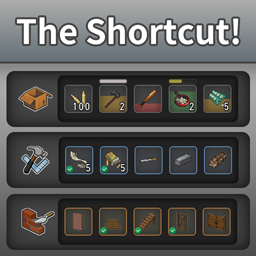
The Shortcut adds a customizable shortcut bar for the things you use most in Project Zomboid.
Add items, crafting recipes, or building projects to your shortcut pages, then access them without repeatedly searching through inventories and menus.
- Double-click a shortcut to use, craft, or build when possible.
- Right-click to open the relevant vanilla menu or context menu.
- Customize the number of rows and columns, slot size, transparency, position, and hotkey.
- Create layouts from compact bars up to 16x16 slots.
Required: NeatUI Framework
Load order: NeatUI Framework → The Shortcut
[hr]
Item Shortcuts

Drag items from your inventory directly into shortcut slots.
- Double Click — perform supported actions such as drinking, eating, smoking, or reading.
- Right Click — open the item's normal context menu.
- The shortcut remains configured even when you temporarily have none of that item.
- Condition, fluid/resource state, freshness, and other supported item states can be reflected directly in the shortcut.

[hr]
Crafting Shortcuts

Open the crafting interface and use the + button to add a recipe.
- Double Click — craft immediately when the requirements are met.
- Green checkmark — the recipe is currently available.
- Right Click — open the crafting interface with that recipe selected.
- Mouse Over — view basic recipe information.
[hr]
Building Shortcuts

Building projects can also be added from the Build interface using the + button.
- Double Click — start placement when the project can currently be built.
- Green checkmark — requirements are currently met.
- Red preview — the project cannot currently be placed or built.
- Right Click — open the Build interface with the project selected.
- Mouse Over — view basic project information.
[hr]
Controls & Settings

Default hotkey: TAB
Use the hotkey to show or hide The Shortcut. Move the mouse wheel over the panel to switch between shortcut pages.
The Settings page lets you configure:
- Rows and columns
- Slot size
- Control widget direction
- Panel and slot transparency
- Hotkey
- Panel position
- Reset options
Layouts can be adjusted from a small shortcut bar to a large 16x16 grid.
[hr]
Configuration
Current versions store settings in:
C:\Users\<YourUser>\Zomboid\Lua\ShortcutConfig.txt
Older releases used:
ShortcutConfig.lua
The old Lua configuration is still recognized for migration, but ShortcutConfig.txt is the current format.
Shortcut configurations are kept when an assigned item is temporarily unavailable. This also makes existing configurations safer when an item belongs to a mod that has been disabled or changed.
[hr]
Languages
The Shortcut includes translations for all regular languages currently provided by Project Zomboid Build 42:
Argentine Spanish, Catalan, Chinese (Simplified), Chinese (Traditional), Czech, Danish, Dutch, English, Finnish, French, German, Hungarian, Indonesian, Italian, Japanese, Korean, Norwegian, Polish, Portuguese, Portuguese (Brazil), Romanian, Russian, Spanish, Spanish (Chile), Spanish (Mexico), Thai, Turkish, and Ukrainian.
Translations have been reviewed against vanilla terminology where applicable.
[hr]
Compatibility
- Supports Project Zomboid Build 42.12.3 and newer Build 42 versions.
- Currently reviewed for the B42.21 branch.
- Supports single-player and multiplayer.
- Requires NeatUI Framework.
- Does not add items, recipes, traits, map content, or permanent world data.
Possible conflicts are most likely with mods that heavily replace or rewrite the vanilla inventory, crafting, building, or UI systems.
Vanilla Moodles
The Shortcut does not hide the vanilla moodles shown on the right side of the screen.
If you want to customize or replace that display, Modern Status can be used alongside The Shortcut.
[hr]
Performance & Gamepad
The Shortcut includes throttled item, crafting, and building checks to reduce unnecessary UI work.
Very large layouts such as 16x16 naturally require more UI elements, so smaller layouts are recommended if you notice an FPS impact.
Gamepad navigation is not currently implemented. The mod is primarily designed for mouse and keyboard.
[hr]
Troubleshooting
If the panel disappears, settings do not save, slots unexpectedly reset, or only default slots appear:
- Close Project Zomboid.
- Unsubscribe from The Shortcut and allow Steam to remove the Workshop copy.
- Subscribe again.
- Verify Project Zomboid through Steam > Properties > Installed Files > Verify integrity of game files.
If necessary, back up and remove:
C:\Users\<YourUser>\Zomboid\Lua\ShortcutConfig.txt
and the old:
ShortcutConfig.lua
Then launch the game again to generate a clean configuration.
For compatibility testing, try a new save with only:
- NeatUI Framework
- The Shortcut
If it works there, add other mods back in small groups.
Bug Reports
Highlights
From source dataFootprint
Rated a light load on a server.
Last update
Its author last shipped an update 23d ago.
The Shortcut [B42] on Nxeon
From our catalogue- One-click install
- Supported on Nxeon Project Zomboid servers. We download it from Steam Workshop, place it, and restart the server.
- Server load
- light
- Smallest plan we suggest
- Project Zomboid — 6 GB (6 GB RAM). This follows our own load rating above, not a benchmark.
- Latest build
- 2026-10-12, released 2026-10-12
Game versions by loader
| Loader | Game versions | Newest |
|---|---|---|
| Workshop |
From 2 recorded builds of The Shortcut [B42].
Recent builds
| Build | Released | Game versions | Loaders |
|---|---|---|---|
| 2026-10-12 | 2026-10-12 | n/a | Workshop |
| 2026-09-30 | 2026-09-30 | n/a | Workshop |
Dependencies
- Required: NeatUI Framework [B42]
Declared by the newest build that lists any. Required ones are installed with it on one-click installs.
Run The Shortcut [B42] on a Project Zomboid server
Pick a server or deploy a new one above; it is installed in one click.
What kind of mod it is
From the catalogQuality of life & UI
Small conveniences, tweaks and interface improvements players notice straight away.
Compatibility
- Game
- Project Zomboid
Verified at the source
- ✓Steam WorkshopOfficial listing, checked 2026-11-01Open ↗
- ✓AuthorRocco, as published on Steam Workshop
- ✓LicenseNot published by the sourceFree















