






About TwisTonFire - Map Improvements
From Steam Workshophttps://imgur.com/BaUyxax.png https://imgur.com/RQYClYI.png Newest Additions https://imgur.com/97biOAn.png https://imgur.com/nQDIhso.png https://i.imgur.com/TDg8f8q.gif https://imgur.com/RQYClYI.png…


Newest Additions


TwisTonFire - Map Improvements
Make the vanilla World Map cleaner, more flexible, and more comfortable to use.
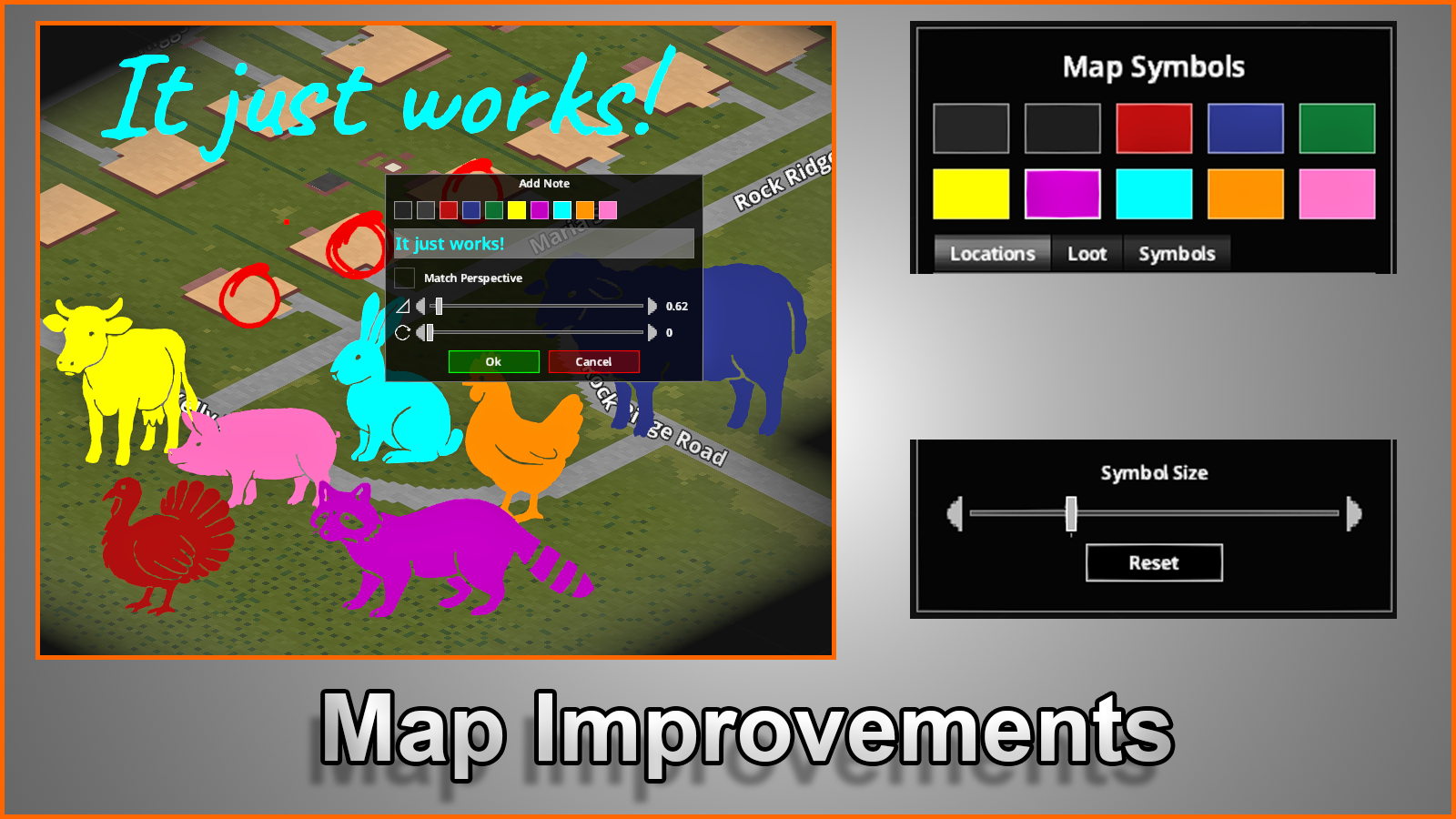
Resize symbols, scale the complete symbol interface, mix additional colors, draw directly on the map, create dedicated sketch paper, and safely manage your map markings.
The mod uses focused patch-style changes wherever possible instead of replacing complete vanilla files.


Features
Improved Map Symbols Interface
- Cleaner Map Symbols layout with a more organized and responsive interface.
- Map Symbol Size Slider for quickly changing the size of placed map symbols.
- Persistent symbol size: the mod remembers your last selected size.
- Custom default size: save your preferred symbol size and restore it with the Reset button.
- Complete UI Scale setting: resize the entire Map Symbols interface from 75% to 140%.
- Separate UI Scale window with Save and Reset controls.
- Custom-font safe layout that adapts to larger fonts and longer translations.
More Colors and Writing Tools
- Additional mixed colors for map symbols and map notes:
- [list]
- Yellow
- Purple
- Cyan
- Orange
- Pink
[*]Consistent color selection between the Map Symbols menu and the Add/Edit Note window.
[*]Vanilla-friendly pen requirements: regular colors require their matching pen.
[*]Mixed colors require both matching pens. For example, purple requires a red and blue pen.
[*]Improved writing-tool support for compatible modded pens, markers, crayons, and other items using the proper writing tags. [/list]
Additional Map Symbols
Seven new animal location symbols are included:
- Chicken
- Cow
- Pig
- Rabbit
- Sheep
- Turkey
- Raccoon
Sketch Tools
Draw directly on the World Map using a movable Sketch Tools panel.
- Freehand Tool for drawing naturally with your mouse.
- Straight Line Tool for creating clean and precise lines.
- Brush Erase Tool for removing only the sketch marks touched by the eraser.
- Adjustable Stroke Size for thinner or thicker markings.
- Adjustable Stroke Density for changing the spacing and smoothness of your strokes.
- Map color integration: sketches use the currently selected Map Symbols color.
- Writing-tool requirements: drawing requires a pen, pencil, or compatible writing tool.
- Eraser requirement: removing sketch marks requires an eraser.
- Undo and Redo for up to 20 sketch actions.
- Accurate cursor preview that matches the actual size and visibility of the placed sketch marks.
- Zoom-based sketch visibility: sketch marks can automatically disappear when the map is zoomed out.
- Adjustable visibility threshold through the native Mod Options menu.
- Performance-aware drawing that automatically adjusts stroke spacing on maps containing very large numbers of sketch marks.
Persistent and Safe Sketch Tools UI
- The Sketch Tools panel remembers its position between game sessions.
- The panel automatically adapts to custom fonts and longer translations.
- Long button labels are safely shortened instead of breaking the UI.
- The panel is clamped to the visible screen and cannot be permanently moved outside the display.
Sketch Paper Map
Prepare a dedicated Sketch Paper Map from a regular Sheet of Paper.
This provides a clean paper surface that can be used for drawings, plans, routes, notes, or anything else you want to sketch without using the main World Map.
Improved Map Reset Options
The vanilla map reset action now opens a safer selection menu.
Choose exactly what should be removed:
- Remove Sketch Marks
- Removes only markings created with the Map Improvements Sketch Tools.
- Remove Player Symbols
- Removes player-created map symbols and notes while keeping explored map memory.
- Full Map Reset
- Removes player-created symbols and resets the complete explored map memory, matching the original vanilla action.
Each destructive action includes a separate confirmation window to prevent accidental map deletion.
Translations
Translation files are included for 27 languages:
Arabic, Catalan, Chinese (Simplified), Chinese (Traditional), Czech, Danish, Dutch, English, Filipino, Finnish, French, German, Hungarian, Indonesian, Italian, Japanese, Korean, Norwegian, Polish, Portuguese, Portuguese (Brazil), Romanian, Russian, Spanish, Thai, Turkish, and Ukrainian.
Compatibility
This mod is compatible with mods that add additional map symbols.
Do not combine it with another mod that adds its own Map Symbol Size Slider.
Map Improvements already contains its own localized and persistent Symbol Size Slider and changes the surrounding symbol interface layout.
Supported Game Modes
[table] [tr] [th]Mode[/th] [th]Build 42.19[/th] [th]Build 42.20[/th] [/tr] [tr] [td]Singleplayer[/td] [td]✅[/td] [td]✅[/td] [/tr] [tr] [td]Multiplayer[/td] [td]✅[/td] [td]✅[/td] [/tr] [/table]
The current version requires Build 42.19 or newer.
Highlights
From source dataFootprint
Rated a light load on a server.
Last update
Its author last shipped an update 2 mo ago.
TwisTonFire - Map Improvements on Nxeon
From our catalogue- One-click install
- Supported on Nxeon Project Zomboid servers. We download it from Steam Workshop, place it, and restart the server.
- Server load
- light
- Smallest plan we suggest
- Project Zomboid — 6 GB (6 GB RAM). This follows our own load rating above, not a benchmark.
- Latest build
- 2026-08-30, released 2026-08-30
Game versions by loader
| Loader | Game versions | Newest |
|---|---|---|
| Workshop |
From 1 recorded build of TwisTonFire - Map Improvements.
Run TwisTonFire - Map Improvements on a Project Zomboid server
Pick a server or deploy a new one above; it is installed in one click.
What kind of mod it is
From the catalogQuality of life & UI
Small conveniences, tweaks and interface improvements players notice straight away.
Compatibility
- Game
- Project Zomboid
Verified at the source
- ✓Steam WorkshopOfficial listing, checked 2026-11-01Open ↗
- ✓AuthorTwisTonFire, as published on Steam Workshop
- ✓LicenseNot published by the sourceFree















