






About Xen's Enhanced GUI
From Steam WorkshopXEG | Xen's Enhanced GUI (Standalone) XEG is a modular UI overhaul for Project Zomboid Build 42. It gives you a cleaner, more compact and easier interface, from the main menu to the last loot run,…
XEG | Xen's Enhanced GUI (Standalone)
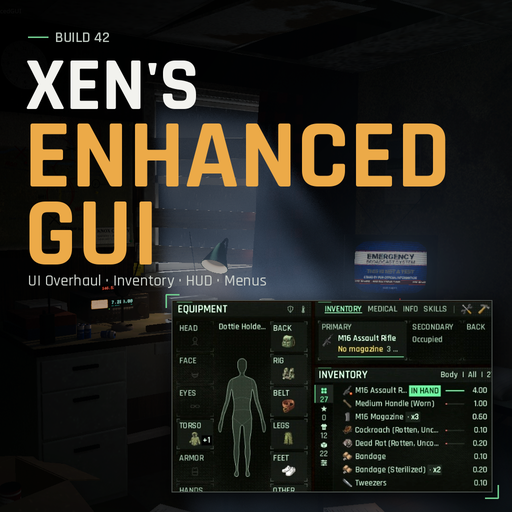
XEG is a modular UI overhaul for Project Zomboid Build 42. It gives you a cleaner, more compact and easier interface, from the main menu to the last loot run, with lots of quality-of-life features. Every part can be switched off on its own.
Press I to open XEG. You can change the key under Options > Mods.[/quote] [hr][/hr] [h2]Reimagined Menus[/h2] A new main menu, load screen, character creation, spawn and loading screens in the same clean style. With ZombieBuddy installed, the main menu sits in a live 3D safehouse room with a flickering lamp, a TV and rain on the window, and the camera moves with you between screens. Without ZombieBuddy you get the same menus over a normal background.[h2]Unified Interface & Inventory[/h2] Equipment, inventory, loadout, nearby containers, survivor status, crafting and building, all in one workspace.
[h2]Docking Layout[/h2] Build your own workspace. Dock panels side by side, stack them as tabs or let them float, resize them, and save a layout for each screen resolution. You can even share layouts with a code.
[h2]Survival HUD in Third Person (Project Viewpoint)[/h2] A redesigned survival HUD that shows what matters in a clean, compact layout.
[h2]Survival HUD in Isometric View[/h2] The same HUD in normal isometric play. Your survival stats and gear are always one glance away.
[h2]Survivor Status[/h2] Your character's condition, body stats, traits and survival records in one place.
[h2]M-BHS (Mini Body Health System)[/h2] A small health window that shows every wound at a glance.
[h2]Crafting & Building[/h2] Search, categories, favourites, and a clear view of what you can make right now. Nearby containers count too.
[h2]Compass[/h2] A heading bar or a round dial. Show it all the time, or only while you carry a compass if you like it immersive.
[h2]Moodle Rework[/h2] Easier-to-read moodles, coloured by how serious each one is. Resize them and choose icons or text.
[h2]Auto-hide HUD[/h2] The HUD fades out when you don't need it and comes back when you do.
[h2]Themes[/h2] 7 colour themes, a custom font, and adjustable size and transparency.

More themes are in the settings! [hr][/hr] [h2]Features[/h2] [list] [*]Everything in one place: gear, inventory, nearby containers and your survivor's condition side by side. [*]Faster looting: click a container or open a car trunk and it's right there. Drag items anywhere, even onto the ground. [*]List or grid: show your items as a detailed list or as stash-style item cells. [*]Appliance buttons: turn ovens, microwaves and other appliances on and off from the container window. [*]Simple medical: every wound at a glance, with the supplies you have to treat it. [*]Skills that tell you more: levels, XP progress, XP boosts from your profession, traits and skill books, and a flash when you gain XP or level up. [*]Crafting and building you can find things in: search, favourites, and what you can make right now. [*]Cleaner HUD: health, thirst, hunger and your weapon in one compact bar that stays out of the way. [*]Reworked moodles: easier to read, with colours that show how serious each one is. [*]Mini map: a themed mini map with a player arrow. Round or square, movable and resizable. [*]Compass: on screen all the time, or only when you carry one. [*]Docking layout: arrange, tab, float and resize panels, with saved layouts, undo and share codes. [*]Reimagined menus: main menu, load screen, new game screens and loading screen, with an optional live 3D main menu room. [*]XEG Customization: one settings screen for every XEG option, reachable from the main menu, with search and instant preview. [*]One consistent look: right-click menus, item tooltips and chat match the rest of the UI. [*]14 languages: English, Turkish, German, French, Spanish, Brazilian Portuguese, Russian, Polish, Italian, Ukrainian, Simplified Chinese, Traditional Chinese, Japanese and Korean. XEG follows your game language. [*]Make it yours: 7 colour themes, a custom font, adjustable size and transparency. [*]Take only what you want: every part can be turned off, which gives you the vanilla version back. [*]Standalone: no required mods, and even better with Project Viewpoint in first and third person. [/list] [hr][/hr] [h2]Compatibility[/h2] [table] [tr][td]Game version[/td][td]Project Zomboid Build 42[/td][/tr] [tr][td]Status[/td][td]Beta, in active development[/td][/tr] [tr][td]Required mods[/td][td]None[/td][/tr] [tr][td]Multiplayer[/td][td]Supported[/td][/tr] [tr][td]ZombieBuddy[/td][td]Optional, turns on the 3D main menu room[/td][/tr] [tr][td]Project Viewpoint[/td][td]Optional, supported in first and third person[/td][/tr] [tr][td]Proximity Inventory[/td][td]Supported[/td][/tr] [tr][td]Immersive Looting[/td][td]Supported[/td][/tr] [/table] XEG works with mods that don't replace the vanilla Build 42 UI. Mods that replace the same windows (inventory, health, HUD, main menu) may clash. If one does, turn off that part of XEG. Settings: XEG Customization in the main menu, or Options > Mods > Xen's Enhanced GUI. Hover any option to see what it does. [h2]Translations[/h2]
Highlights
From source dataFootprint
Rated a light load on a server.
Last update
Its author last shipped an update 4d ago.
Xen's Enhanced GUI on Nxeon
From our catalogue- One-click install
- Supported on Nxeon Project Zomboid servers. We download it from Steam Workshop, place it, and restart the server.
- Server load
- light
- Smallest plan we suggest
- Project Zomboid — 6 GB (6 GB RAM). This follows our own load rating above, not a benchmark.
- Latest build
- 2026-10-31, released 2026-10-31
Game versions by loader
| Loader | Game versions | Newest |
|---|---|---|
| Workshop |
From 6 recorded builds of Xen's Enhanced GUI.
Recent builds
| Build | Released | Game versions | Loaders |
|---|---|---|---|
| 2026-10-31 | 2026-10-31 | n/a | Workshop |
| 2026-10-26 | 2026-10-26 | n/a | Workshop |
| 2026-10-26 | 2026-10-26 | n/a | Workshop |
| 2026-10-22 | 2026-10-22 | n/a | Workshop |
| 2026-10-21 | 2026-10-21 | n/a | Workshop |
| 2026-10-14 | 2026-10-14 | n/a | Workshop |
Run Xen's Enhanced GUI on a Project Zomboid server
Pick a server or deploy a new one above; it is installed in one click.
What kind of mod it is
From the catalogQuality of life & UI
Small conveniences, tweaks and interface improvements players notice straight away.
Compatibility
- Game
- Project Zomboid
Verified at the source
- ✓Steam WorkshopOfficial listing, checked 2026-10-31Open ↗
- ✓AuthorXen, as published on Steam Workshop
- ✓LicenseNot published by the sourceFree















