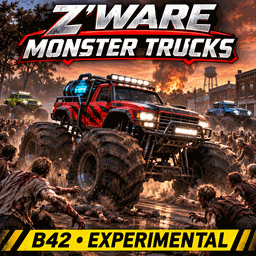
About Z'Ware Monster Truck Series [B42] - EXPERIMENTAL
From Steam WorkshopZ'Ware Monster Truck Series - EXPERIMENTAL | v0.1.121 R2 What if one has access to monster trucks in the zombie apocalypse? This mod seeks to answer that question. EXPERIMENTAL RELEASE: v0.1.121 R2…
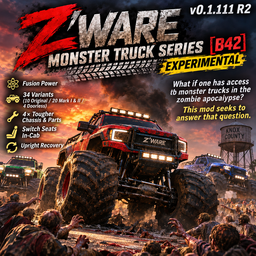
Z'Ware Monster Truck Series [B42] - EXPERIMENTAL | v0.1.121 R2
What if one has access to monster trucks in the zombie apocalypse?
This mod seeks to answer that question.
EXPERIMENTAL RELEASE: v0.1.121 R2 (Resized Bodies, Suspension Damping & In-Cab Seat Switching)
Thirty-four monster trucks. Fusion power. Built for the apocalypse. Take on Knox Country with oversized, four-wheeled monster trucks, from the original ten to newer Mark I, Mark II, and doorless variants. This is an experimental Build 42 release for community testing and feedback. Please back up important saves.
Meet the fleet The original ten: Trailblazer, Ironhide, Nightstalker, Apex, Revenant, Frontier, Outrider, Nightfire, Warpath, and Shadow.
The next ten designs, each in Mark I and Mark II forms: Mini Mauler, FJ Overlord, Gladiator Goliath, Bronco Brawler, Scarab Smasher, Beetle Bruiser, VX Nomad, VX Rampage, H3 Havoc, and Juke Juggernaut.
Four more choices: doorless Bronco Brawler and Gladiator Goliath, each in Mark I and Mark II form.
Updated vehicle sizes (v0.1.115 onward) The 24 Mark I, Mark II, and doorless trucks have been re-proportioned to better match their real-world donor bodies. Shorter donors such as the Mini, Beetle, and Scarab now have shorter body lengths and wheelbases, while the shared monster-truck wheel width remains. The original ten and the longer Gladiator chassis retain their established proportions. These changes affect vehicle handling as well as appearance.
Updated drive mechanics (v0.1.117-v0.1.121 R2) Short-wheelbase trucks received wheelbase-aware steering, spring, center-of-mass and anti-lock adjustments. Suspension damping now reaches the installed suspension parts instead of relying on mismatched vanilla damping values. This R2 test moderates compression/damping to 5.5/6.5 across all 34 trucks, seeking a balance between launch bucking and jolts when crossing bodies. Drive Tuning includes live damping adjustment. Launch-trace messages in console.txt can help diagnose remaining pitch/bounce issues. Braking, corpse traversal and zombie impacts remain experimental; no guarantee of rollover prevention is implied.
How to find a truck The mod adds rare truck entries to ordinary vehicle spawn zones. Explore roads, parking lots, and other vehicle-spawn locations, especially newly generated areas of the map. Trucks may not appear in already explored chunks. Spawn chances depend on world settings and other vehicle mods. Natural spawns across the expanded fleet have not yet been confirmed through broad player testing, so please report where you find one.
How to drive and manage fusion power 1. Approach a Monster Truck and use its right-click options to open the Z'Ware Fusion Control Screen. 2. Review reactor state, stored energy, and selected drive mode. 3. Choose fusion or gasoline operation through the available controls. 4. Put compatible fusion materials into the Fusion Feed compartment and use the dashboard's processing controls to replenish energy. The dashboard also includes experimental fuel processing options and hood controls. 5. Store normal supplies in the separate Truck Cargo/Trunk compartment. The roof-rack storage is separate from cargo and Fusion Feed. The vehicle scripts specify 200 capacity for each of these compartments.
Gasoline is a fallback when you are not using fusion power. Exact compatible feed materials and consumption behavior may evolve during testing. Corpse processing is experimental: please report intake behavior and whether carried items are preserved.
Open and close the hood The vehicle menu and fusion dashboard include hood controls. Opening the hood is intended to reveal the fusion hardware. Stop the vehicle before operating the hood. Visual state and animation behavior remain experimental.
Switching seats without exiting All 34 trucks now define native in-cab seat-switch transitions for every available seating position. Two-seat models allow switching between both front seats. Four-seat models allow switching between front and rear seats in either direction, without exiting the truck. While inside, open the standard Project Zomboid vehicle radial menu (normally V), choose Change Seat, and select an unoccupied seat. This is the native VehicleSwitchSeat path, not a scripted exit-and-reenter workaround. Build 42.21 in-game and multiplayer verification is still pending; please report any truck or seat pair that causes an exit.
How to summon a truck for testing 1. Right-click empty ground in an open area away from walls and obstacles. 2. Open the Z'Ware Monster Truck Spawn menu. 3. Choose a truck model and summon it on flat terrain.
Summoning is an optional development/testing convenience. If you prefer survival discovery, use naturally spawned vehicles instead. Availability of individual entries across all variants should be reported if a menu item is missing.
How to right an overturned truck Manual upright recovery is included. Right-click next to an overturned Z'Ware truck (or use the recovery option from inside when available), then select the flip/upright action. The option can refuse unsafe circumstances and reports a reason. This is manual recovery, not automatic self-righting; verify it on a backed-up save.
How to remove a summoned truck 1. Back up your save and empty any important truck cargo, including roof rack and Fusion Feed. 2. Right-click the ground nearby and open Z'Ware Monster Truck Management. 3. Select the truck by name/vehicle ID and confirm removal.
WARNING: Removal permanently deletes the selected truck and anything stored in it. The management feature is experimental and has experienced vehicle-detection errors during development; success is not guaranteed on every save.
Highlights
From source dataFootprint
Rated a light load on a server.
Last update
Its author last shipped an update 1d ago.
Z'Ware Monster Truck Series [B42] - EXPERIMENTAL on Nxeon
From our catalogue- One-click install
- Supported on Nxeon Project Zomboid servers. We download it from Steam Workshop, place it, and restart the server.
- Server load
- light
- Smallest plan we suggest
- Project Zomboid — 6 GB (6 GB RAM). This follows our own load rating above, not a benchmark.
- Latest build
- 2026-11-03, released 2026-11-03
Game versions by loader
| Loader | Game versions | Newest |
|---|---|---|
| Workshop |
From 2 recorded builds of Z'Ware Monster Truck Series [B42] - EXPERIMENTAL.
Recent builds
| Build | Released | Game versions | Loaders |
|---|---|---|---|
| 2026-11-03 | 2026-11-03 | n/a | Workshop |
| 2026-10-27 | 2026-10-27 | n/a | Workshop |
Run Z'Ware Monster Truck Series [B42] - EXPERIMENTAL on a Project Zomboid server
Pick a server or deploy a new one above; it is installed in one click.
What kind of mod it is
From the catalogVehicles & ships
Cars, boats, aircraft, ships and other things to drive or fly.
Compatibility
- Game
- Project Zomboid
Verified at the source
- ✓Steam WorkshopOfficial listing, checked 2026-11-03Open ↗
- ✓AuthorChocoBro, as published on Steam Workshop
- ✓LicenseNot published by the sourceFree