







About ZombieBuddy
From Steam WorkshopA framework that enables advanced Java mods for Project Zomboid. What it does: ZombieBuddy is required by some mods to work. If a mod tells you to install ZombieBuddy, follow the instructions below.…
A framework that enables advanced Java mods for Project Zomboid.
What it does: ZombieBuddy is required by some mods to work. If a mod tells you to install ZombieBuddy, follow the instructions below.
Installation (One-Time Setup)
Step 1: Subscribe to ZombieBuddy on Steam Workshop
Step 2: Installation is required ONLY ONCE for ZombieBuddy itself.
🪟 Windows:
Option A: Automated Installer (Recommended)
- Download the latest ZombieBuddyInstaller.exe from GitHub Releases
- Run the installer and choose Install or update ZombieBuddy.
- Choose what launch mode to patch:
- [list]
- Both (recommended): patches Normal Launch and Alternate Launch.
- Normal Launch: then choose ProjectZomboid64.json, Steam launch options, or both.
- Alternate Launch: patches ProjectZomboid64.bat.
[*] The installer shows every system change first and asks for confirmation before applying it. [*] If Steam launch options need to be changed, the installer will ask you to close Steam at that point. [*] The same installer can also uninstall ZombieBuddy later: run it again and choose Uninstall ZombieBuddy. [/list]
Option B: Manual Installation
- Copy ZombieBuddy.jar and zbNative.dll from:
- [code]C:\Program Files (x86)\Steam\steamapps\workshop\content\108600\3619862853\mods\ZombieBuddy\libs\[/code]
- to your Project Zomboid folder:
- [code]C:\Program Files (x86)\Steam\steamapps\common\ProjectZomboid\[/code]
- Open Project Zomboid's launch options in Steam
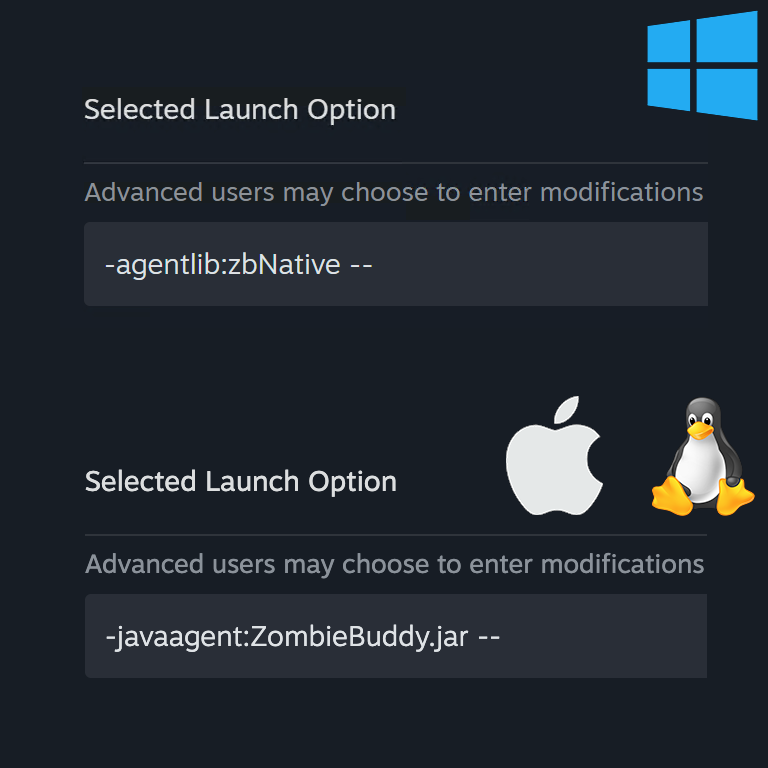
- Add this launch option: [code]-agentlib:zbNative --[/code]
- ⚠️ IMPORTANT: The -- at the end is mandatory - do not omit it!
- If you use the game's Alternate Launch option on Windows, set the ProjectZomboid64.bat _JAVA_OPTIONS line to: [code]SET _JAVA_OPTIONS=-agentlib:zbNative[/code]
🍎 macOS / 🐧 Linux:
- Copy ZombieBuddy.jar from the mod's libs/ directory to:
- [list]
- macOS: ~/Library/Application Support/Steam/steamapps/common/ProjectZomboid/Project Zomboid.app/Contents/Java/
- Linux: ~/.steam/steam/steamapps/common/ProjectZomboid/projectzomboid/
[*] Open Project Zomboid's launch options in Steam [*] Add this JVM argument: -javaagent:ZombieBuddy.jar -- [*] ⚠️ IMPORTANT: The -- at the end is mandatory - do not omit it! [/list]
Step 3: After this setup, all mods that require ZombieBuddy will work automatically!
Uninstall
- Disable the agent first: Open Project Zomboid → Properties → clear the Launch Options line
- Delete zbNative.dll and ZombieBuddy.jar from your Project Zomboid install directory
- Unsubscribe from ZombieBuddy on Steam
⚠️ Security Warning ⚠️
Java mods enabled through ZombieBuddy have unrestricted access to your system. Only install mods from sources you trust.
No jar will sneak in. Whenever a Java mod ships a new or updated JAR, ZombieBuddy shows a native dialog with the mod id, file path, last-modified date, and SHA-256 fingerprint. Nothing is loaded until you click Yes. You can choose to remember the decision (per-mod, per-hash) or keep it session-only. Persisted allow/deny choices are written to JSON (mod id → { sha256 → true|false }) at:
- Windows: %USERPROFILE%\.zombie_buddy\mod_approvals.json
- macOS / Linux: ~/.zombie_buddy/mod_approvals.json
If a previously-approved JAR changes on disk (hash mismatch), you will be prompted again. Tip: hold Shift during game load to force the approval dialog to appear, even for previously approved Java mods.
Java Mod Policy
Controls what happens when an unknown/changed JAR is seen. Pass as a policy=... argument:
- prompt (default) - ask me each time via a native dialog.
- deny-new - silently skip any JAR that isn't already approved.
- allow-all - load every JAR without prompting. Not recommended.
Examples (block form, these go into Steam launch options):
-agentlib:zbNative=policy=deny-new --            (Windows)
-javaagent:ZombieBuddy.jar=policy=deny-new --    (macOS / Linux)
FAQ
- Is it a virus?
- No.
- How to start game in debug mode?
- [code]
- -agentlib:zbNative -- -debug
- OR
- -javaagent:ZombieBuddy.jar -- -debug
- [/code]
- Do I need to repeat manual installation after I upgrade/downgrade/validate game?
- No, if you use the default launcher and have agentlib in Steam launch options.
- Yes, if ZombieBuddy stops loading.
- Works on MP?
- Yes.
- Save compatibility?
- Safe to add or remove on existing saves.
- I clicked the wrong button in the approval dialog. How do I reset it?
- Open mod_approvals.json (path above), under 'mods' find your mod id, then remove or edit the SHA-256 key you want to reset (or change true/false), save, and restart.
- Can I see which Java mods were loaded or blocked?
- Yes - install Zed's Better ModList and the status is shown next to each JAR path in the mod list.
- Supported game versions?
- B41, B42.12-B42.21
- Can I hide ZB watermark?
- Yes, in ModOptions. During game boot it is always visible.
- WHY ALL LINKS ARE REMOVED FROM THIS PAGE AND COMMENTS DISABLED???!!!
- Steam does that while it checks a newly uploaded mod version for viruses, I suppose. Everything should return to normal in 10..30 minutes, depending on how busy their system is.
Links
Highlights
From source dataFootprint
Rated a light load on a server.
Last update
Its author last shipped an update 31d ago.
ZombieBuddy on Nxeon
From our catalogue- One-click install
- Supported on Nxeon Project Zomboid servers. We download it from Steam Workshop, place it, and restart the server.
- Server load
- light
- Smallest plan we suggest
- Project Zomboid — 6 GB (6 GB RAM). This follows our own load rating above, not a benchmark.
- Latest build
- 2026-10-03, released 2026-10-03
Game versions by loader
| Loader | Game versions | Newest |
|---|---|---|
| Workshop |
From 2 recorded builds of ZombieBuddy.
Recent builds
| Build | Released | Game versions | Loaders |
|---|---|---|---|
| 2026-10-03 | 2026-10-03 | n/a | Workshop |
| 2026-05-07 | 2026-05-07 | n/a | Workshop |
Run ZombieBuddy on a Project Zomboid server
Pick a server or deploy a new one above; it is installed in one click.
What kind of mod it is
From the catalogQuality of life & UI
Small conveniences, tweaks and interface improvements players notice straight away.
Compatibility
- Game
- Project Zomboid
Verified at the source
- ✓Steam WorkshopOfficial listing, checked 2026-11-01Open ↗
- ✓AuthorZed, as published on Steam Workshop
- ✓LicenseNot published by the sourceFree















