






About FSO - Filtration Status Overview
From Steam WorkshopFeatures Set up and view status for up to 12 filtration units (gas & liquid) at a glance You can change the name/label of each box in the settings to match the filtration gas/liquid you want to track…
Features
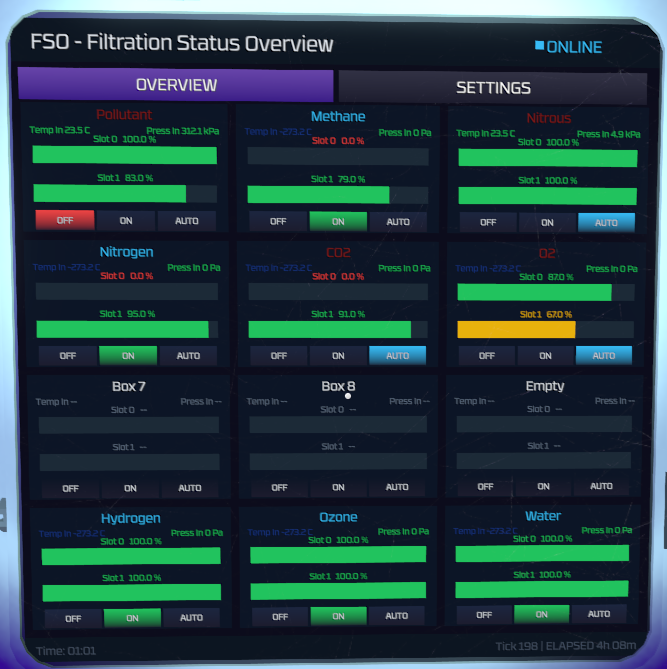
- Set up and view status for up to 12 filtration units (gas & liquid) at a glance
- You can change the name/label of each box in the settings to match the filtration gas/liquid you want to track which also acts as a easy device on/off label (light blue is on, dark red is off)
- Shows input temperature & pressure and slot 0/1 filter status with a bar and percentage
- Top left shows status of filtrations checked. If a filtration throws an error it will show you in which network/unit it happend
- Additional buttons to remote control your filtration unit - turn in on/off or on auto mode (auto will turn off filtration if input pressure is under treshhold you set up in the settings for that box)
- Easy setup through dropdowns in the settings
- NO code changes necessary
Setup
- Disable Code limits in the IC10 Editor Mod settings
- If the code doesn't load in game it may be due to steam workshop. You can check the lines in the code / it should be 1391 lines of code. If Steam workshop doesn't give you the full code you can get it on my GitHub: FSO - Filtration Status Overview
Highlights
From source dataFootprint
A 190 KB download, rated a light load on a server.
Last update
Its author last shipped an update 6 mo ago.
FSO - Filtration Status Overview on Nxeon
From our catalogue- One-click install
- Not available. One-click install isn't available for this game's mods yet. Download it and upload it to your server in Files.
- Server load
- light
- Smallest plan we suggest
- Stationeers — 4 GB (4 GB RAM). This follows our own load rating above, not a benchmark.
- Latest build
- 2026-04-05, released 2026-04-05, 190 KB
Game versions by loader
| Loader | Game versions | Newest |
|---|---|---|
| Workshop |
From 1 recorded build of FSO - Filtration Status Overview.
Dependencies
- Required: IC10 Editor
- Required: StationeersLua [StationeersLaunchPad]
- Required: ScriptedScreens [StationeersLaunchPad]
Declared by the newest build that lists any. Required ones are installed with it on one-click installs.
Run FSO - Filtration Status Overview on a Stationeers server
Deploy a server above, then upload the file in Files.
What kind of mod it is
From the catalogListed on Steam Workshop as “Workshop”
Technology & automation
Machines, power, logistics and automation.
Compatibility
- Game
- Stationeers
- File size
- 190 KB
Verified at the source
- ✓Steam WorkshopOfficial listing, checked 2026-10-08Open ↗
- ✓Author3xp, as published on Steam Workshop
- ✓LicenseNot published by the sourceFree









