







About Pretty Good Furnace - Core
From Steam WorkshopIt's a pretty good furnace. This is a set of scripts specifically designed to run on the Scripted Screens mod, using StationeersLUA and the vector plugin for that mod. Together, they control the…
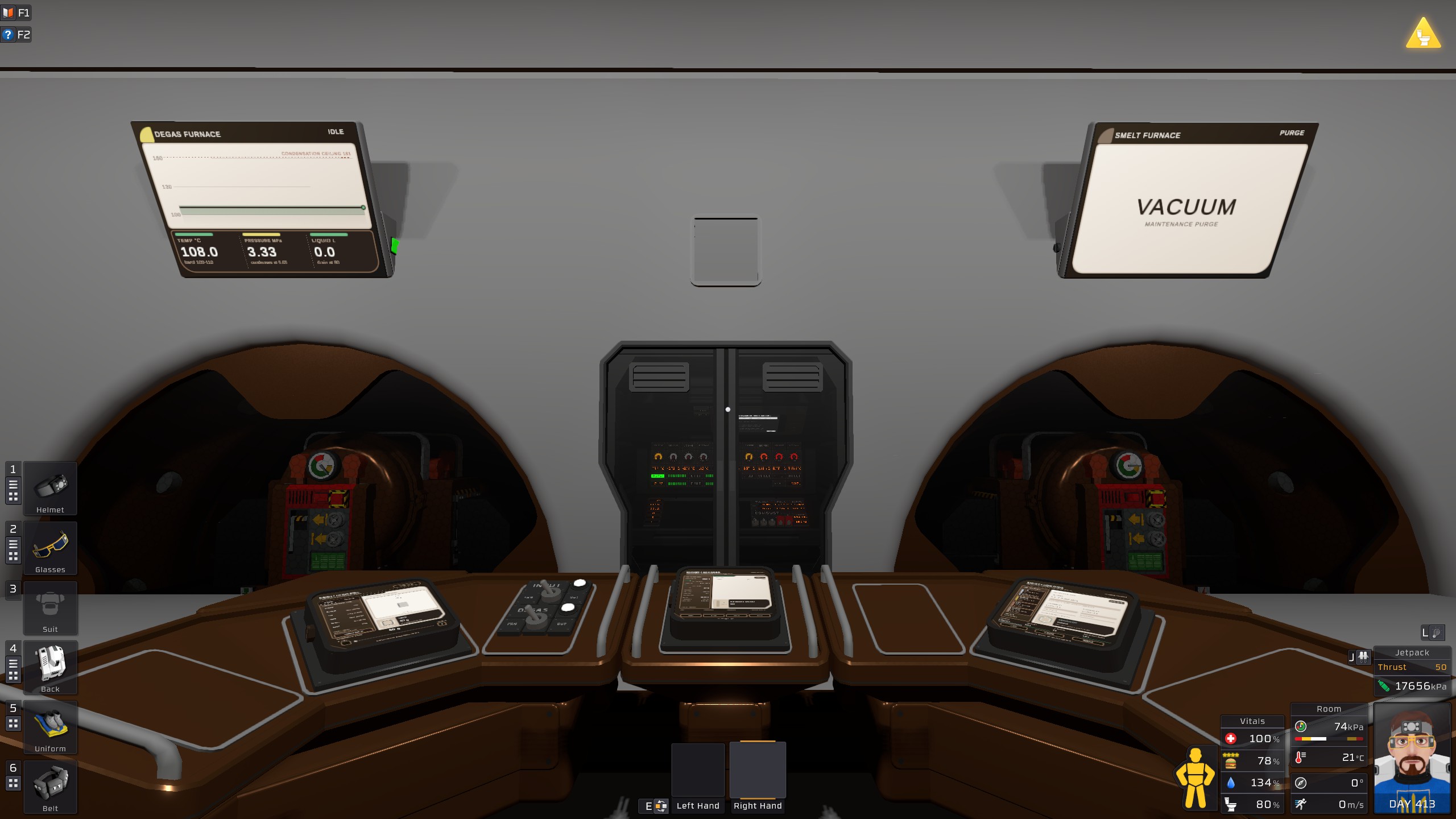
It's a pretty good furnace. This is a set of scripts specifically designed to run on the Scripted Screens mod, using StationeersLUA and the vector plugin for that mod. Together, they control the operation of a dual-furnace setup, with one dedicated degassing furnace and one hot-gas smelting furnace.
Comprehensive setup guide here, and also ingame once you've set up this script in a console.
Features
- One-click smelting. Select the ore and weight you want from a responsive interface and the rest will proceed automatically.
- No fuel usage and the bare minimum of waste gas usage. The degassing furnace takes whatever cool and warm gases you can feed it in order to reach the proper temperature. The smelting furnace reuses the same gas forever.
- Cool gas output, at least relative to most furnaces. Degassed ore and furnace waste is output at a default temperature of 110C, making it easy to cool down.
- Extreme safety features prevent any combustion. We hate combustion here. Degas cobalt and silver all you want, the furnace will detect and handle the various combustible gases so that there is never autoignition. Residual methane and oxygen are safely isolated down a special processing line.
- Device setup by name. Choose each device from the appropriate prefabs on your network, shown by its in-game name. Every device is badged Required, Recommended or Optional, and the ? next to each one opens an interactive flowchart showing where it sits.
- Direction toggles for the flip-flops and turbopumps, so you can build however you need to and tell the script to sort it out.
- One settings page for all the scripts: packet sizes, timeouts, pressures, temperatures and more.
- Status board with the live state of the Dispenser, Manager and Smelter (idle, working, waiting, fault) and whether each display is running.
- Setup checklist of the chute and pipe connections and gas fills the scripts can't see for themselves, written using your own device names.
- Process tab with explanatory notes on the furnace's energy math built in.
- Wide-screen layouts on computers and modded screens, up to 4:1.
- Settings are stored on a config chip, so they survive reloading any script. RESET CHIP on the Settings page starts over.
Some pretty good scripts
All scripts are present in a collection for easy installation. Grab all of them.
- Core (this script): configuration, status and setup.
- Dispenser: pick a recipe and an amount; it dispenses ore and ingots from the vending machine in packets and restacks partial stacks. It can also eject items directly or send them through degassing only.
- Manager: runs the degas furnace. It heats each packet with warm gas, deals with pollutant gases and sends clean gas on.
- Smelter: runs the smelting furnace, bringing it up through the gas tiers (utility, mild, medium, hot) to each recipe's required temperature and pressure.
- Degas Display and Smelt Display (optional): large read-only screens showing each furnace.
Core and the Dispenser, Packet Manager and Smelter are required. The displays are optional, but do download the displays.
Requirements
Take a look at the extended guide for full device requirements. To get you started with the ingame help, provide the below:
- Four consoles or computers on one data network, one each for Core, the Dispenser, the Packet Manager and the Smelter. Add one extra for each display you want.
- An IC housing named "Chain Config", with any chip in it. This will store the configuration settings in its stack, but you can use the actual IC code for whatever you want as long as it doesn't touch the stack or the sp register.
- A second IC housing with a chip for the Shared Job Memory. The same caveats about stack use apply here.
[table] [tr][th]Device[/th][th]Required[/th][th]Recommended[/th][th]Optional[/th][/tr] [tr][td]Advanced furnace[/td][td]2[/td][td]-[/td][td]-[/td][/tr] [tr][td]Vending machine[/td][td]1[/td][td]-[/td][td]-[/td][/tr] [tr][td]Stacker[/td][td]1[/td][td]-[/td][td]-[/td][/tr] [tr][td]Digital flip flop[/td][td]1[/td][td]2[/td][td]-[/td][/tr] [tr][td]Pipe analyzer[/td][td]5[/td][td]5[/td][td]2[/td][/tr] [tr][td]Turbo volume pump[/td][td]5[/td][td]3[/td][td]2[/td][/tr] [tr][td]Volume pump[/td][td]1[/td][td]1[/td][td]-[/td][/tr] [tr][td]Gas sensor[/td][td]2[/td][td]-[/td][td]2[/td][/tr] [tr][td]Active vent[/td][td]2[/td][td]-[/td][td]-[/td][/tr] [tr][td]Occupancy sensor[/td][td]-[/td][td]-[/td][td]2[/td][/tr] [tr][td]IC housing with chip[/td][td]2[/td][td]-[/td][td]2[/td][/tr] [/table] Recommended devices add features: the pre- and post-degas diverter flip-flops, degas intake pipe analyzer, an extra output buffer for oxygen and methane, a feed of cool 20C gas, and the mild (Hastelloy) and hot (Stellite) gas tiers. Optional devices add extras such as script-based job queueing and a hot-chamber gas line.
Quick start
[olist] [*]Build the "Chain Config" IC housing, load this script on a console on the same network, and press INITIALISE. [*]On the CHUTES, DEGAS and SMELT tabs, choose a device for every Required role. Tap ? next to a device for its flowchart. [*]Work through the SETUP checklist. Once every item is ticked it shrinks to a small ? tab. [*]Load the other scripts on their consoles. Each one shows what it still needs until its devices are chosen, then starts on its own. [/olist]
Highlights
From source dataFootprint
Rated a light load on a server.
Last update
Its author last shipped an update 4d ago.
Pretty Good Furnace - Core on Nxeon
From our catalogue- One-click install
- Not available. One-click install isn't available for this game's mods yet. Download it and upload it to your server in Files.
- Server load
- light
- Smallest plan we suggest
- Stationeers — 4 GB (4 GB RAM). This follows our own load rating above, not a benchmark.
- Latest build
- 2026-10-12, released 2026-10-12
Game versions by loader
| Loader | Game versions | Newest |
|---|---|---|
| Workshop |
From 2 recorded builds of Pretty Good Furnace - Core.
Recent builds
| Build | Released | Game versions | Loaders |
|---|---|---|---|
| 2026-10-12 | 2026-10-12 | n/a | Workshop |
| 2026-10-11 | 2026-10-11 | n/a | Workshop |
Dependencies
- Required: Pretty Good Furnace - Smelt Control
- Required: Pretty Good Furnace - Packet Manager
- Required: Pretty Good Furnace - Ore Dispenser
- Required: ScriptedScreens [StationeersLaunchPad]
- Required: ScriptedScreens Vector [StationeersLaunchPad]
Declared by the newest build that lists any. Required ones are installed with it on one-click installs.
Run Pretty Good Furnace - Core on a Stationeers server
Deploy a server above, then upload the file in Files.
What kind of mod it is
From the catalogTechnology & automation
Machines, power, logistics and automation.
Compatibility
- Game
- Stationeers
Verified at the source
- ✓Steam WorkshopOfficial listing, checked 2026-10-16Open ↗
- ✓AuthorTMarkos, as published on Steam Workshop
- ✓LicenseNot published by the sourceFree









