






About TTAC - Trade, Track and Contact
From Steam WorkshopFeatures: Fully automated trader search, find and contact optional target/specific trader tracking Status overview with everything you need to know for the dish operations optional gas/liquid…
Features:
- Fully automated trader search, find and contact
- optional target/specific trader tracking
- Status overview with everything you need to know for the dish operations
- optional gas/liquid pump/regulator control including the Landingpad ATMO's
Overview:
- Status display for the dish, tracking, controller and the current tracked contact
- Control panel for the Landingpad Gas/Liquid In/Outputs including pump/pressure regulator control for each gas/liquid
- Safe usage buttons - Use one gas group in/out and all others will vanish
Contacts:
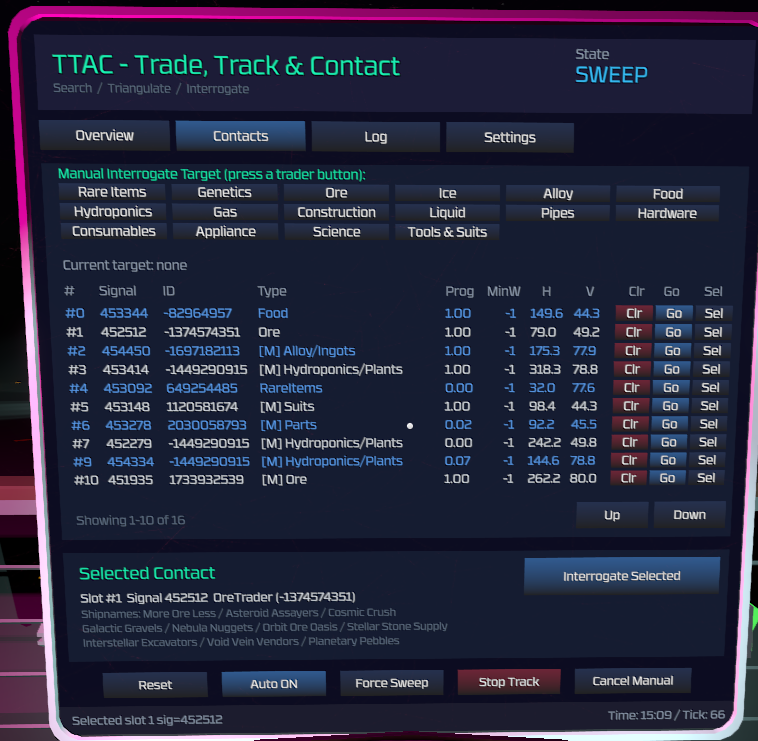
- Overview of saved contacts which had been found in the search process
- Buttons to clear a slot (Clr), track a target (Go) or to select the target (Sel)
- Selected contact gives you another option to contact that target (Dish will align to the target and try to interrogate)
- It will also give you an overview of possible ship names for that ContactID
- Buttons at the top to specific track and contact trader categories like Ore or Gas/Liquid
Log:
- Simple event log listing the last actions and infos
- Up to 50 entries and they reset with device reboot or script reload
Settings:
- Not much to say here... this is where you set up the devices and pressure settings for the gas/liquid input regulators
- Devices for each categorie like "Dish" or "O2 Pump" have dropdowns where it lists all devices for you to select the device for that slot
- Devices in the dropdowns are filtered by hashes so you dont have to scroll through tons of unneeded devices
Setup Instructions:
- Disable Code limits in the IC10 Editor Mod settings
- Subscribe and flash on a lua chip / best to use in a circuitboard for consoles
- (I advice to use the 2x2 / 3x3 consoles mod though the ui also scales down for normal consoles)
- Setup the devices over the settings tab and build (if not done already) your landingpad and other stuff you need for your trader area
- It can take a few seconds to load and flash the code to the chip as it has a few lines of code
- You don't have to change anything in the code! The whole setup is done over the UI.
- If the code doesn't load in game it may be due to steam workshop. You can check the lines in the code / it shoul be 3297 lines of code. If Steam workshop doesn't give you the full code you can download it on my GitHub: TTAC - Trade, Track and Contact
Highlights
From source dataFootprint
A 244 KB download, rated a light load on a server.
Last update
Its author last shipped an update 6 mo ago.
TTAC - Trade, Track and Contact on Nxeon
From our catalogue- One-click install
- Not available. One-click install isn't available for this game's mods yet. Download it and upload it to your server in Files.
- Server load
- light
- Smallest plan we suggest
- Stationeers — 4 GB (4 GB RAM). This follows our own load rating above, not a benchmark.
- Latest build
- 2026-04-05, released 2026-04-05, 244 KB
Game versions by loader
| Loader | Game versions | Newest |
|---|---|---|
| Workshop |
From 1 recorded build of TTAC - Trade, Track and Contact.
Dependencies
- Required: IC10 Editor
- Required: StationeersLua [StationeersLaunchPad]
- Required: ScriptedScreens [StationeersLaunchPad]
Declared by the newest build that lists any. Required ones are installed with it on one-click installs.
Run TTAC - Trade, Track and Contact on a Stationeers server
Deploy a server above, then upload the file in Files.
What kind of mod it is
From the catalogListed on Steam Workshop as “Workshop”
Economy & shops
Currencies, shops, trading and rewards.
Compatibility
- Game
- Stationeers
- File size
- 244 KB
Verified at the source
- ✓Steam WorkshopOfficial listing, checked 2026-10-08Open ↗
- ✓Author3xp, as published on Steam Workshop
- ✓LicenseNot published by the sourceFree









