About ModSettingsMenu
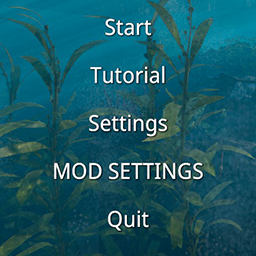
From ThunderstoreAdds a Mod Settings button below Settings in the main menu and to the in-game pause menu, providing a unified configuration interface for mods.
Note: This description is bilingual. The Chinese section is provided below the English section. 说明:本描述为中英双语版本,中文内容位于英文内容下方。
Mod Settings Menu (English)
Adds a Mod Settings button below Settings in the main menu and to the in-game pause menu, providing a unified configuration interface for mods.
Main Features
- Shows configurable mod names on the left and the selected mod's settings on the right.
- Lets mod authors optionally register a display name, description, author, version, Nexus Mods ID, and Thunderstore package.
For Players
This mod does not change gameplay by itself. It provides a common settings screen for compatible mods. Only loaded mods with at least one configuration entry appear in the list. The available settings depend on the mods you have installed.
Mod Author API
- Registration is optional. A loaded BepInEx plugin with normal
Config.Bindentries is detected automatically. - Use
ModSettingsRegistry.Registeronly when you want to provide custom metadata or Nexus Mods and Thunderstore links. - Use
ModSettingsTags.SectionandModSettingsTags.EntryinConfigDescriptionfor display metadata, ordering, and custom slider steps. Lower order values appear first; unspecified values use1000.
Complete example mods: Sunkenland example mods
Sorting example:
Config.Bind("General", "Enabled", true, new ConfigDescription(
    "Enable this mod.",
    null,
    ModSettingsTags.Section("General", order: 10),
    ModSettingsTags.Entry(order: 10)));

Config.Bind("General", "SpeedMultiplier", 1f, new ConfigDescription(
    "Adjust the speed multiplier.",
    new AcceptableValueRange<float>(0.5f, 3f),
    ModSettingsTags.Entry(order: 20, sliderStep: 0.25d)));
Put the section tag on any one entry in that section. Registered mods can alternatively use ConfigureSection and ConfigureEntry; registered values override tag values. Set ModSettingsEntryOptions.SliderStep to configure a registered range slider. Without a custom step, integer sliders use 1 and floating-point sliders use 0.1.
Optional hard dependency example:
using BepInEx;
using BepInEx.Configuration;
using ModSettingsMenu.Api;
using UnityEngine;

[BepInPlugin(PluginInfo.PLUGIN_GUID, PluginInfo.PLUGIN_NAME, PluginInfo.PLUGIN_VERSION)]
[BepInDependency(ModSettingsMenu.PluginInfo.PLUGIN_GUID)]
public sealed class MyPlugin : BaseUnityPlugin
{
    private void Awake()
    {
        Config.Bind("General", "Enabled", true, "Enable this mod.");
        Config.Bind("General", "SpeedMultiplier", 1f, new ConfigDescription("Adjust the speed multiplier.", new AcceptableValueRange<float>(0.1f, 5f)));
        Config.Bind("Controls", "QuickAction", KeyCode.F7, "Choose the quick action key.");

        ModSettingsRegistry.Register(
            PluginInfo.PLUGIN_GUID,
            new ModSettingsModOptions
            {
                Name = "My Mod",
                Description = "A short description shown above this mod's settings.",
                Author = "Author Name",
                Version = PluginInfo.PLUGIN_VERSION,
                NexusModsId = 6,
                ThunderstoreTeam = "MyTeam",
                ThunderstoreModName = "MyMod"
            });
    }
}
Localization API Example
For localized config entries and mod metadata, register the Sunkenland Localization API JSON file from the same directory as your plugin DLL. ModSettingsModOptions.Description is saved when the mod is registered, so register again after LocalizationApi.LanguageChanged to refresh the current-language description.
using System.IO;
using System.Reflection;
using BepInEx;
using BepInEx.Configuration;
using ModSettingsMenu.Api;
using SunkenlandLocalizationAPI.Api;
using UnityEngine;

[BepInPlugin(PluginInfo.PLUGIN_GUID, PluginInfo.PLUGIN_NAME, PluginInfo.PLUGIN_VERSION)]
[BepInDependency(ModSettingsMenu.PluginInfo.PLUGIN_GUID)]
[BepInDependency(SunkenlandLocalizationAPI.PluginInfo.PLUGIN_GUID)]
public sealed class MyPlugin : BaseUnityPlugin
{
    private ModLocalizer _localizer;

    private void Awake()
    {
        _localizer = LocalizationApi.For(PluginInfo.PLUGIN_GUID);
        string directory = Path.GetDirectoryName(Assembly.GetExecutingAssembly().Location);
        _localizer.RegisterJson(Path.Combine(directory, "MyPlugin.Localization.json"));
        LocalizationApi.LanguageChanged += OnLanguageChanged;

        Config.Bind("General", "Enabled", true, _localizer.Config("config.enabled", 10, "General", "config.section.general", 10));
        Config.Bind("General", "SpeedMultiplier", 1f, _localizer.Config("config.speed_multiplier", 20, "General", "config.section.general", 10, new AcceptableValueRange<float>(0.5f, 3f), sliderStep: 0.25d));
        Config.Bind("Controls", "QuickAction", KeyCode.F7, _localizer.Config("config.quick_action", 10, "Controls", "config.section.controls", 20));

        RegisterSettings();
    }

    private void RegisterSettings()
    {
        ModSettingsRegistry.Register(
            PluginInfo.PLUGIN_GUID,
            new ModSettingsModOptions
            {
                Name = "My Mod",
                LocalizedName = () => _localizer.GetLocalizedText("mod.name"),
                Description = _localizer.GetLocalizedText("mod.description"),
                Author = "Author Name",
                Version = PluginInfo.PLUGIN_VERSION
            });
    }

    private void OnLanguageChanged(string language)
    {
        RegisterSettings();
    }
}
MyPlugin.Localization.json must contain an en section. Add any other supported game locale such as zh-Hans; missing keys fall back to en.
Highlights
From source dataLoaders
Runs on BepInEx.
Footprint
Rated a light load on a server.
Dependencies
Needs 2 other projects installed alongside it.
ModSettingsMenu on Nxeon
From our catalogue- One-click install
- Not available. One-click install isn't available for this game's mods yet. Download it and upload it to your server in Files.
- Server type needed
- BepInEx
- Server load
- light
- Smallest plan we suggest
- Sunkenland — 4 GB (4 GB RAM). This follows our own load rating above, not a benchmark.
- Latest build
- 1.3.1, released 2026-09-16
Game versions by loader
| Loader | Game versions | Newest |
|---|---|---|
| BepInEx |
From 5 recorded builds of ModSettingsMenu.
Recent builds
| Build | Released | Game versions | Loaders |
|---|---|---|---|
| 1.3.1 | 2026-09-16 | n/a | BepInEx |
| 1.3.0 | 2026-08-16 | n/a | BepInEx |
| 1.2.0 | 2026-08-13 | n/a | BepInEx |
| 1.1.0 | 2026-08-10 | n/a | BepInEx |
| 1.0.0 | 2026-08-07 | n/a | BepInEx |
Dependencies
- Required: BepInExPack Sunkenland
- Required: SunkenlandLocalizationAPI
Declared by the newest build that lists any. Required ones are installed with it on one-click installs.
Run ModSettingsMenu on a Sunkenland server
Deploy a server above, then upload the file in Files.
What kind of mod it is
From the catalogAdmin & protection
Permissions, moderation, anti-cheat and land protection for the people running the server.
Compatibility
- Game
- Sunkenland
- Loaders
- BepInEx
- Requires
- One-click install needs a BepInEx server. 2 other projects installed alongside it.
Verified at the source
- ✓ThunderstoreOfficial listing, checked 2026-10-02Open ↗
- ✓AuthorIce_Box_Studio_Sunkenland, as published on Thunderstore
- ✓LicenseNot published by the sourceFree