






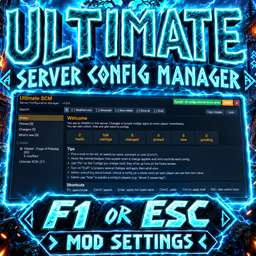
About Ultimate Realtime CFG Manager Server Configuration Panel
From Thunderstore✅ Real-time .cfg manager & server configuration panel: edit any mod's config in-game (F1), sync settings live to all players, no restart. Admin tools, dedicated server, mod settings menu, 15 languages. Includes Ultimate SCM.
Ultimate Real-time .cfg Manager (Server Configuration Panel) 1.0.0

Edit every mod's .cfg in-game, in real time. One panel. Synced live with the server.
💬 Join the Discord




> 💡 Suggestions, bugs and questions: https://discord.gg/aMkN89Cuas — when reporting a bug, attach your BepInEx LogOutput.log and say what you expected to happen.
> 📦 Ultimate Server Configuration Manager is included as a dependency (Igao-Ultimate_Server_Configuration_Manager-1.0.3). Install this package with your mod manager and it is installed automatically, together with BepInExPack_Valheim. You do not need to download it separately.
Looking for a real-time config manager? An in-game .cfg editor for Valheim mods, a server configuration panel for dedicated servers and hosts, a mod settings menu you open with F1 or from the ESC menu, live config sync to every player with no server restart (when the mod supports it), admin-only controls, and a panel translated into 15 languages. It works with any BepInEx mod, and with mods that use ServerSync or Jotunn.
A universal settings panel for Valheim. It shows the configs of all installed BepInEx mods, explains each one using the mod's own comment (with a button to translate it into your Valheim language), and syncs everything with the server.
> Install on the server and on all clients.
Screenshots
Home screen — every mod, what changed, what is pending:

Editing a mod as admin — edit any config live, choose per config or per mod what players see (Hidden · View only · Can edit), draft several changes and apply them at once:

What a player sees — by default everything is hidden until the admin releases it:

Installation
- Install through a mod manager (Thunderstore Mod Manager, r2modman, etc.). Ultimate Server Configuration Manager 1.0.3 is included as a dependency and comes along automatically; the panel itself is that mod.
- It must be installed on the server AND all clients.
- Requires BepInExPack_Valheim (also installed automatically).
How to open
- ESC → "Mod Settings" (a button added to the pause menu), or
- F1 (configurable in
Panel hotkey). ConfigurationManager also uses F1 by default: change the key of one of the two. - ESC closes the panel (if a search is typed, the first ESC press clears the search).
- The window remembers where you left off: position, size (drag the top to move it and the bottom-right corner to resize it), last opened mod, collapsed sections, and filters.
Center windowresets it to the default.
Shortcuts
| Key | Action | |---|---| | F1 | opens/closes | | Ctrl+F | jumps to search | | Enter | applies the typed value | | Ctrl+Z | undoes the last change (outside text fields) | | Ctrl+S | applies the draft | | ESC | closes the confirmation → cancels the note → clears the search → closes the panel |
Sync rules
| Situation | What happens | |---|---| | Player joins the server | Immediately receives the server's values for the configs of all mods the server has. | | Config Hidden (default) | The player doesn't see it. The server value is enforced and only admins change it. The player's .cfg is not overwritten. | | Config View only | The player sees it but cannot change it. The server value is enforced. | | Config Can edit | Each player uses and changes their own value. | | Admin changes something | The server validates it, saves it, and sends only what changed to everyone. | | Owner edits the .cfg on the server while it is running | The server reloads the file and syncs everyone (checked every 60 s; changes made in the panel are instant). | | Player leaves the server | All configs go back to their local value. | | Mod that only the player has | Stays local (the server doesn't know about it). | | Mod that only the server has | The admin can see and edit it in the panel even without having the mod. | | Mod that already uses ServerSync / Jotunn / ConditionalConfigSync | Ultimate SCM does not enforce values (the mod does that itself); admin changes are sent to the server. | | Server without Ultimate SCM | Everything works as a local panel. |
Who is an admin: anyone listed in the server's adminlist.txt (the same admins as devcommands). In single-player, you are an admin. Admin tools only turn on after you type devcommands in the console (F5): until then even an admin sees the panel as a normal player (hidden configs don't show, locked ones are read-only). Turn off Admin needs devcommands to drop this requirement. On a server, Ultimate SCM's own options follow the same rule: players only see/change them if the admin releases them (in the main menu everyone can always change their own hotkey and language).
Highlights
From source dataLoaders
Runs on BepInEx.
Footprint
Rated a light load on a server.
Last update
Its author last shipped an update 30d ago.
Ultimate Realtime CFG Manager Server Configuration Panel on Nxeon
From our catalogue- One-click install
- Supported on Nxeon Valheim servers, for BepInEx servers. We download it from Thunderstore, place it, and restart the server.
- Server type needed
- BepInEx
- Server load
- light
- Smallest plan we suggest
- Valheim — 4 GB (4 GB RAM). This follows our own load rating above, not a benchmark.
- Latest build
- 1.0.0, released 2026-10-05
Game versions by loader
| Loader | Game versions | Newest |
|---|---|---|
| BepInEx |
From 1 recorded build of Ultimate Realtime CFG Manager Server Configuration Panel.
Dependencies
- Required: BepInExPack Valheim
- Required: Ultimate Server Configuration Manager
Declared by the newest build that lists any. Required ones are installed with it on one-click installs.
Run Ultimate Realtime CFG Manager Server Configuration Panel on a Valheim server
Pick a server or deploy a new one above; it is installed in one click.
What kind of mod it is
From the catalogAdmin & protection
Permissions, moderation, anti-cheat and land protection for the people running the server.
Compatibility
- Game
- Valheim
- Loaders
- BepInEx
- Requires
- One-click install needs a BepInEx server.
Verified at the source
- ✓ThunderstoreOfficial listing, checked 2026-10-06Open ↗
- ✓AuthorIgao, as published on Thunderstore
- ✓LicenseNot published by the sourceFree











