
Group Log
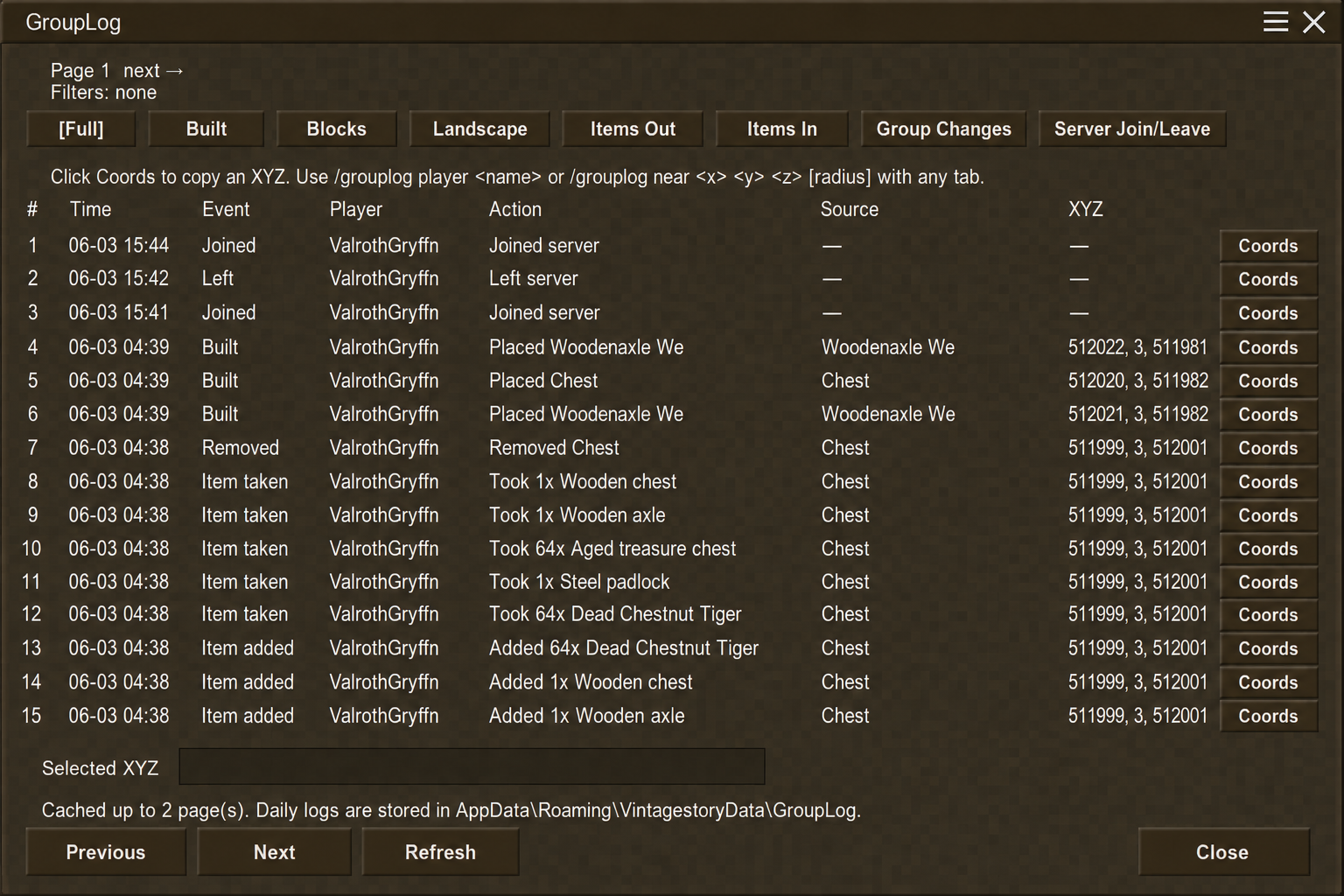
GL tracks group player joins, block, containers, and item interactions with searchable paged logs.
Description
GroupLog
Latest update: 1.0.6 — Vintage Story 1.22.7
- Search results are merged across log folders and sorted newest first.
- Improved nearby-coordinate searches and administrator searches across the full server log.
- More reliable group ownership tracking, including operator changes and leave/disband events.
- Optional administrator-only access for the Book of Grudges.
See the Files tab for the full 1.0.6 changelog.
Discord for support or feedback:https://discord.gg/rQFtQ2FkAg
GroupLog gives group owners and trusted admins a clean in-game activity log for Vintage Story. Review who did what, when it happened, and where it happened without digging through raw server logs.
Features
- In-game GroupLog viewer
- Book of Grudges item support
- Search by player name
- Search near coordinates
- Copy exact XYZ locations
- Teleport to logged events as server owner/admin
- Group and solo-player log folders
- Daily log files instead of one giant log
- Automatic 28-day cleanup
- Optional administrator-only Book of Grudges access
Tracked activity
<table style="width: 100%; border-collapse: collapse;"> <tbody> <tr> <td style="padding: 6px; border: 1px solid #5c4a2f;">Joins and leaves</td> <td style="padding: 6px; border: 1px solid #5c4a2f;">Block placements</td> </tr> <tr> <td style="padding: 6px; border: 1px solid #5c4a2f;">Block breaks and removals</td> <td style="padding: 6px; border: 1px solid #5c4a2f;">Landscape activity</td> </tr> <tr> <td style="padding: 6px; border: 1px solid #5c4a2f;">Items taken from containers</td> <td style="padding: 6px; border: 1px solid #5c4a2f;">Items added to containers</td> </tr> <tr> <td style="padding: 6px; border: 1px solid #5c4a2f;">Group command activity</td> <td style="padding: 6px; border: 1px solid #5c4a2f;">XYZ coordinates</td> </tr> </tbody> </table>Book of Grudges
The Book of Grudges is crafted with 9 Cattail Tops, 1 in each crafting slot. Right-clicking it opens the correct GroupLog view based on permission level.
- Server owner/admin: opens the full server log browser.
- Group owner/operator: opens that group’s logs.
- Unauthorized players: cannot use it.
Commands and hotkeys
<pre style="background: #0e0c09; border: 1px solid #5c4a2f; padding: 12px; color: #f5e4bc; overflow-x: auto;">/grouplog /grouplog player <name> /grouplog near <x> <y> <z> [radius]</pre>- Ctrl + Shift + L: Open personal/group log viewer
- Ctrl + Shift + A: Open server admin browser
Log storage
Logs are stored as daily files under:
<pre style="background: #0e0c09; border: 1px solid #5c4a2f; padding: 12px; color: #f5e4bc; overflow-x: auto;">VintagestoryData/Logs/GroupLog/</pre>Logs are organized into group and solo-player folders. Retention is configurable and defaults to 28 days.
Access control
GroupLog is designed for group owners, group operators, trusted admins, and server owners. Regular players cannot browse server-wide logs.
Note: GroupLog is a visibility and audit tool. It does not replace claims, permissions, backups, or normal server protection.
Ratings & reviews
Sign in to leave a rating or comment.



