
Back to NxLabs
ModUpdateChecker
LBy Lady_Regna
Server-side mod that checks the Vintage Story Mod Database for updates to tracked mods and notifies
Description
Mod Update Checker
A server-side Vintage Story mod that automatically detects installed mods, compares their versions with the official Mod Database, and notifies admins when updates are available via logs and in-game chat.
Features
- Automatic Installed Mod Detection: Scans all installed mods on your server
- Smart Version Comparison: Compares installed versions with the latest versions from VS Mod DB API
- Flexible Tracking: Check all installed mods or only specific ones
- Changelog Display: Shows what changed in the new version
- In-Game Notifications: Alerts admins with
controlserver privilege when updates are found- Server Log Output: Detailed update information in server logs
- Persistent State: Remembers last checked versions across server restarts
- In-Game Commands: Add/remove mods and force checks without editing config files
Configuration
The config file is created at
ModConfig/modupdatechecker.json:
{ "TrackedMods": [ "charactercards", "NicknameMod" ], "CheckIntervalMinutes": 60, "CheckOnStartup": true, "AnnounceInChat": true, "CheckAllInstalledMods": true, "ComparisonMethod":"version"}Config Options
<table style="border-collapse: collapse; width: 87.1471%;" border="1"> <tbody> <tr> <td style="width: 10.6777%; text-align: center;">Option </td> <td style="width: 20.1543%; text-align: center;">Default </td> <td style="width: 31.315%; text-align: center;">Description </td> </tr> <tr> <td style="width: 10.6777%;">TrackedMods</td> <td style="width: 20.1543%;">[]</td> <td style="width: 31.315%;">List of mod IDs to track (only used whenCheckAllInstalledMods is false)</td> </tr> <tr> <td style="width: 10.6777%;">CheckIntervalMinutes</td> <td style="width: 20.1543%;">60</td> <td style="width: 31.315%;">How often to check for updates (in minutes)</td> </tr> <tr> <td style="width: 10.6777%;">CheckOnStartup</td> <td style="width: 20.1543%;">true</td> <td style="width: 31.315%;">Check for updates when server starts</td> </tr> <tr> <td style="width: 10.6777%;">AnnounceInChat</td> <td style="width: 20.1543%;">true</td> <td style="width: 31.315%;">Send in-game chat messages to admins</td> </tr> <tr> <td style="width: 10.6777%;">CheckAllInstalledMods</td> <td style="width: 20.1543%;">true</td> <td style="width: 31.315%;">If true, checks all installed mods. If false, only checks mods in TrackedMods list</td> </tr> <tr> <td>ComparisonMethod</td> <td>date</td> <td> - "date" - Compares release dates/IDs to detect updates (more reliable)
- "version" - Compares version strings with installed version
Finding Mod IDs
Mod IDs can be found:
1. In the mod's URL on mods.vintagestory.at (e.g.,
mods.vintagestory.at/charactercards → charactercards)2. In the mod's
modinfo.json file3. Using the numeric asset ID from the API
Commands
<table style="border-collapse: collapse; width: 79.049%; height: 120px;" border="1"> <tbody> <tr style="height: 20px;"> <td style="width: 33.3333%; height: 20px; text-align: left;">Command </td> <td style="width: 33.3333%; height: 20px; text-align: left;">Permission</td> <td style="width: 33.3333%; height: 20px; text-align: left;">Description </td> </tr> <tr style="height: 20px;"> <td style="width: 33.3333%; height: 20px;">/modupdates</td> <td style="width: 33.3333%; height: 20px;">controlserver</td> <td style="width: 33.3333%; height: 20px;">Show status and help</td> </tr> <tr style="height: 20px;"> <td style="width: 33.3333%; height: 20px;">/modupdates check</td> <td style="width: 33.3333%; height: 20px;">controlserver</td> <td style="width: 33.3333%; height: 20px;">Force an immediate update chec</td> </tr> <tr style="height: 20px;"> <td style="width: 33.3333%; height: 20px;">/modupdates list</td> <td style="width: 33.3333%; height: 20px;">controlserver</td> <td style="width: 33.3333%; height: 20px;">List all tracked mods and their versions</td> </tr> <tr style="height: 20px;"> <td style="width: 33.3333%; height: 20px;">/modupdates add <modid></td> <td style="width: 33.3333%; height: 20px;">controlserver</td> <td style="width: 33.3333%; height: 20px;">Add a mod to tracking</td> </tr> <tr style="height: 20px;"> <td style="width: 33.3333%; height: 20px;">/modupdates remove <modid></td> <td style="width: 33.3333%; height: 20px;">controlserver</td> <td style="width: 33.3333%; height: 20px;">Remove a mod from tracking</td> </tr> </tbody> </table>
How It Works
1. On startup and at regular intervals, the mod scans your server for installed mods
2. For each mod (all mods or just tracked ones, depending on config):
- Queries the VS Mod DB API for the latest version
- Compares the installed version with the API version
- Notifies admins if an update is available
3. Notifications are sent via server logs and in-game chat to admins
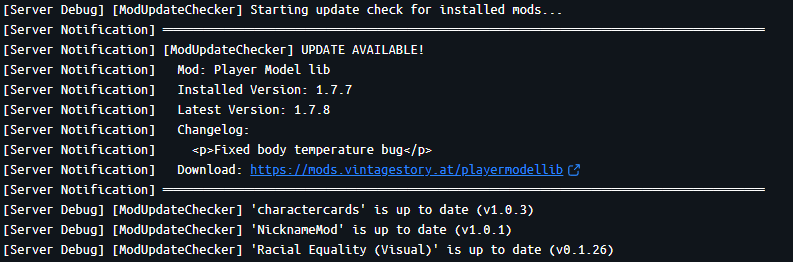
Example Log Output
When an update is found:
═══════════════════════════════════════════════════════════Download
No download link is available for this entry right now.
Ratings & reviews
No ratings yet
Sign in to leave a rating or comment.



