
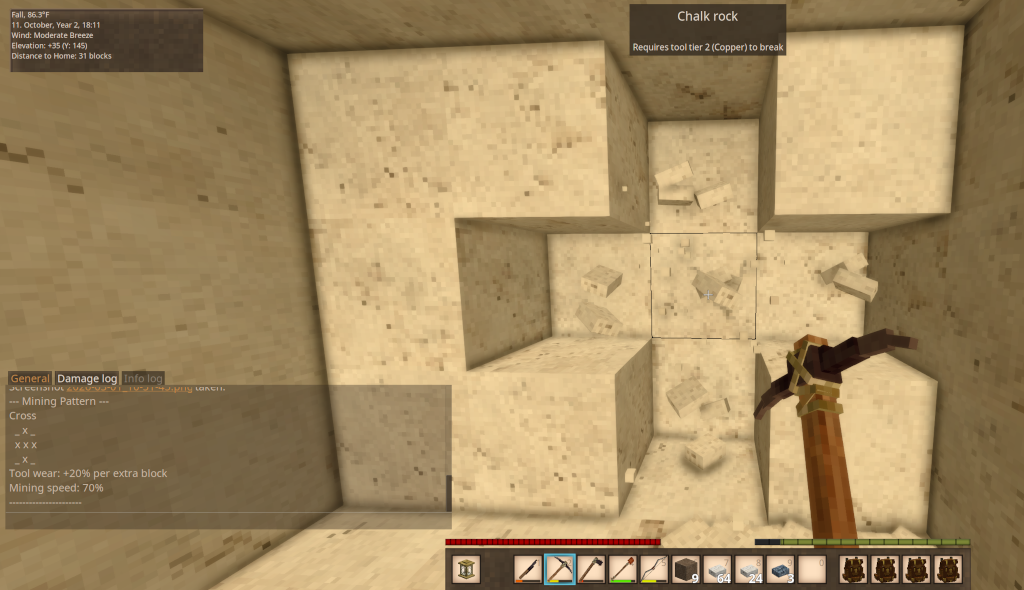
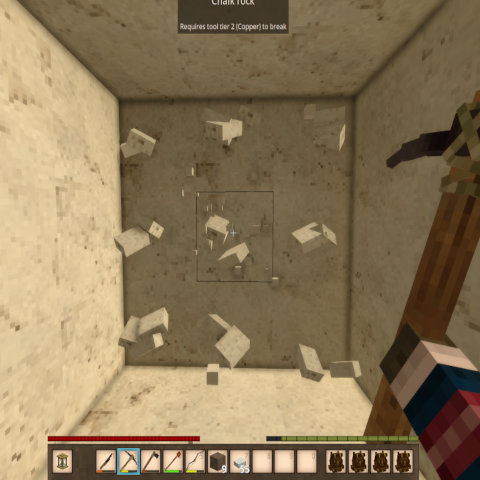
Pattern Mining
Mine in 5 distinct patterns using your pickaxe. Now includes shovels!!
Description
Pattern Mining (formerly Vertical Mining)
...:::What's New:::...
Shovels now work with Pattern Mining!
- Hold a shovel (or a pickaxe, as before) and press Ctrl+P to cycle patterns.
- Shovels dig soil, gravel, sand and snow. Stone, ore and wood in your pattern
are left standing — switch to a pickaxe for those.
- Bug fix: a full pattern could destroy a nearly-spent tool despite the
"tools won't break from pattern mining" rule. Fixed. -
Adds a Single 1x1 pattern that breaks only the block you hit — no extra tool
wear, no mining speed penalty. It's now the pattern you start on, so you can
leave Pattern Mining enabled all the time and it won't change how you mine
until you cycle to something bigger.Single 1x1 is first in the cycle. Your existing pattern carries across on your
next login — if you were mining with Cross, you'll still be on Cross.The on-screen dot grid is now larger and tighter, so the active pattern reads
as one shape at a glance. Both are adjustable in patternmining.json:
HudScale for dot size (default 1.6) and HudDotSpacing for the gap between
them (default 0.72, lower is tighter).
The pattern-cycle key is rebindable — change it in Settings > Controls or in
patternmining.json.
Side: Client and Server
Hotkeys: Ctrl+P (cycle patterns) Commands: /pm (toggle on/off)
New: on-screen pattern indicator. A small 3×3 dot grid shows the shape of your active mining pattern while Pattern Mining is enabled, tucked just left of the off-hand slot. It hides when you
toggle off with /pm, and follows pattern cycling live. Turn it off with "ShowHud": false in patternmining.json.
Description
Pattern Mining expands on the original Vertical Mining concept by giving you five
distinct mining patterns to choose from, all accessible through a simple hotkey.
Whether you're shaft mining, clearing tunnels, or carving out rooms, there's a
pattern to match your task. Larger patterns come with trade-offs — increased tool
wear and slower mining speed — keeping things balanced and grounded in realistic
gameplay. As of 3.0.0, those trade-offs are fully configurable.
Mining Patterns
<table style="width: 764px;"> <thead> <tr> <th style="width: 133.433px;">Pattern</th> <th style="width: 280.2px;">Shape</th> <th style="width: 86.3333px;">Extra Blocks</th> <th style="width: 107.417px;">Tool Wear</th> <th style="width: 155.617px;">Mining Speed</th> </tr> </thead> <tbody> <tr> <td style="width: 133.433px;">Center 1x1</td> <td style="width: 280.2px;">Center</td> <td style="width: 86.3333px;">1</td> <td style="width: 107.417px;">Normal</td> <td style="width: 155.617px;">100%</td> </tr> <tr> <td style="width: 133.433px;">Vertical 1x2</td> <td style="width: 280.2px;">Center + below</td> <td style="width: 86.3333px;">1</td> <td style="width: 107.417px;">Normal</td> <td style="width: 155.617px;">100%</td> </tr> <tr> <td style="width: 133.433px;">Column 1x3</td> <td style="width: 280.2px;">Center + above + below</td> <td style="width: 86.3333px;">2</td> <td style="width: 107.417px;">+10%</td> <td style="width: 155.617px;">85%</td> </tr> <tr> <td style="width: 133.433px;">Horizontal 3x1</td> <td style="width: 280.2px;">Center + left + right</td> <td style="width: 86.3333px;">2</td> <td style="width: 107.417px;">+15%</td> <td style="width: 155.617px;">85%</td> </tr> <tr> <td style="width: 133.433px;">Cross</td> <td style="width: 280.2px;">Center + above + below + left + right</td> <td style="width: 86.3333px;">4</td> <td style="width: 107.417px;">+20%</td> <td style="width: 155.617px;">70%</td> </tr> <tr> <td style="width: 133.433px;">Tunnel 3x3</td> <td style="width: 280.2px;">Full 3x3 face</td> <td style="width: 86.3333px;">8</td> <td style="width: 107.417px;">+25%</td> <td style="width: 155.617px;">50%</td> </tr> </tbody> </table>Pattern Diagrams
<pre>Center 1x1 Vertical 1x2 Column 1x3 Horizontal 3x1 Cross Tunnel 3x3 _ _ _ _ _ _ _ x _ _ _ _ _ x _ x x x _ x _ _ x _ _ x _ x x x x x x x x x _ _ _ _ x _ _ x _ _ _ _ _ x _ x x x</pre>
How to Use
1. Type /pm in chat to toggle Pattern Mining on.
2. Hold a pickaxe or shovel and press Ctrl+P to cycle through the five mining patterns.
The selected pattern and its stats are displayed in the chat window.
3. Mine any block — the extra blocks in your selected pattern will break automatically, based on which face of the block you hit.
4. Hold Sneak while mining to temporarily override the pattern and mine only a single block.
5. Type /pm again to toggle Pattern Mining off. Mining speed returns to normal.
Changing the "Cycle Mining Pattern" key
The default is Ctrl+P. To change it, pick whichever is easier:
In-game (easiest): Settings → Controls → search "Cycle Mining Pattern" → click it and press your new key. This overrides the config file.
Config file: edit patternmining.json in your Vintage Story ModConfig folder, then restart the game:
- Windows: %APPDATA%\VintagestoryData\ModConfig\patternmining.json
- Linux: ~/.config/VintagestoryData/ModConfig/patternmining.json
- macOS: ~/Library/Application Support/VintagestoryData/ModConfig/patternmining.json
"CycleHotkey": "P",
"CycleHotkeyCtrl": true,
"CycleHotkeyShift": false,
"CycleHotkeyAlt": false
Download
No download link is available for this entry right now.
Ratings & reviews
Sign in to leave a rating or comment.



