
Back to NxLabs
Pico Stackables
PBy Picolli
Multiply item & block stack sizes, with per-item overrides and a live in-game config editor.
Description
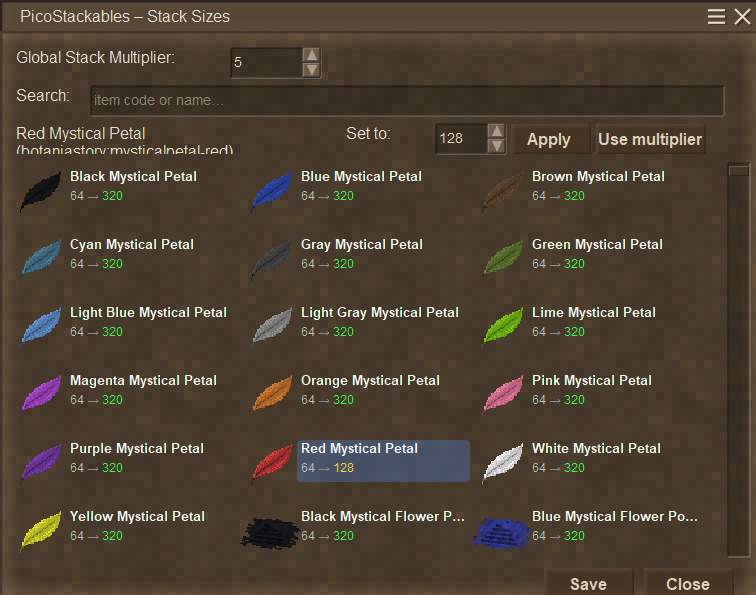
Pico Stackables lets you change how much every item and block stacks to, with full control through a friendly in-game editor — no file editing required.
Features
- Global multiplier — scale every stack size at once (e.g. ×2 turns a stack of 16 into 32, 64 into 128).
- Flat size mode — prefer a single number? Flip one switch to set every item and block to a fixed stack size, like 500 or 1000.
- Prevent item loss — a safety toggle (on by default) that never lets a stack size drop below its vanilla value, so changing your settings can't truncate and delete items from existing oversized stacks.
- Per-item / per-block overrides — click any entry, type an exact stack size, and Apply. It keeps that custom value and ignores the global setting (shown in yellow). Right-click to quick-toggle.
- In-game config dialog — type
.picostackablesto open a searchable, multi-column grid of every item and block in the game, including modded content, with hover tooltips and a live “which mode is active” indicator. - Live preview — each entry shows
original → newwith the new value in green, updating instantly as you adjust the multiplier or flat size. - Never lose your edits — the dialog shows when you have unsaved changes and asks before closing if you do. Settings are saved to disk and reload automatically every session.
- Clean list — tools and other durability items, creatures/NPCs, and internal placeholders are automatically left alone and hidden, so you only see things you'd actually stack.
- Works with other mods — applies to all registered blocks/items automatically, no configuration needed.
How to use
- Install the mod and load a world.
- Press Enter and type
.picostackablesto open the editor. - Pick a multiplier or flat size, fine-tune individual items if you like, and hit Save.
Notes
- Stack-size changes are applied on both the server and connected clients; on multiplayer, only server operators can save changes.
- A few mods that compute stack sizes dynamically in code may override the setting for their specific items.
Open source under the MIT license.
Changelogs
<pre style="--diffs-min-number-column-width-default: 1ch;" tabindex="0" data-file="" data-disable-line-numbers="" data-overflow="wrap"> </pre>
v1.3.1
- Saved settings now apply as soon as the world loads — no need to re-open the dialog and re-save each session.
<pre style="--diffs-min-number-column-width-default: 1ch;" tabindex="0" data-file="" data-disable-line-numbers="" data-overflow="wrap"> </pre> - Temporal gears (game:gear-temporal) can now be managed and rescaled, even though they don't stack in vanilla.
v1.3.0
Dialog usability
<pre style="--diffs-min-number-column-width-default: 2ch;" tabindex="0" data-file="" data-disable-line-numbers="" data-overflow="wrap"> </pre> - Reorganized the config screen into two clean rows and widened it so nothing feels cramped.
<pre style="--diffs-min-number-column-width-default: 2ch;" tabindex="0" data-file="" data-disable-line-numbers="" data-overflow="wrap"> </pre> - Added a live "mode active" indicator showing whether the multiplier or the flat size is in effect.
<pre style="--diffs-min-number-column-width-default: 2ch;" tabindex="0" data-file="" data-disable-line-numbers="" data-overflow="wrap"> </pre> - Added hover tooltips to the multiplier, flat size, mode switch and the "Prevent item loss" toggle.
<pre style="--diffs-min-number-column-width-default: 2ch;" tabindex="0" data-file="" data-disable-line-numbers="" data-overflow="wrap"> </pre> - Added an on-screen hint: left-click an item to edit it, right-click to quick-toggle an override.
<pre style="--diffs-min-number-column-width-default: 2ch;" tabindex="0" data-file="" data-disable-line-numbers="" data-overflow="wrap"> </pre> - Closing with unsaved changes now asks for confirmation instead of silently discarding edits.
<pre style="--diffs-min-number-column-width-default: 2ch;" tabindex="0" data-file="" data-disable-line-numbers="" data-overflow="wrap"> </pre> <pre style="--diffs-min-number-column-width-default: 2ch;" tabindex="0" data-file="" data-disable-line-numbers="" data-overflow="wrap"> </pre> <pre style="--diffs-min-number-column-width-default: 2ch;" tabindex="0" data-file="" data-disable-line-numbers="" data-overflow="wrap"> </pre> <pre style="--diffs-min-number-column-width-default: 2ch;" tabindex="0" data-file="" data-disable-line-numbers="" data-overflow="wrap"> </pre>Download
No download link is available for this entry right now.
Ratings & reviews
No ratings yet
Sign in to leave a rating or comment.



