
Place it Anywhere
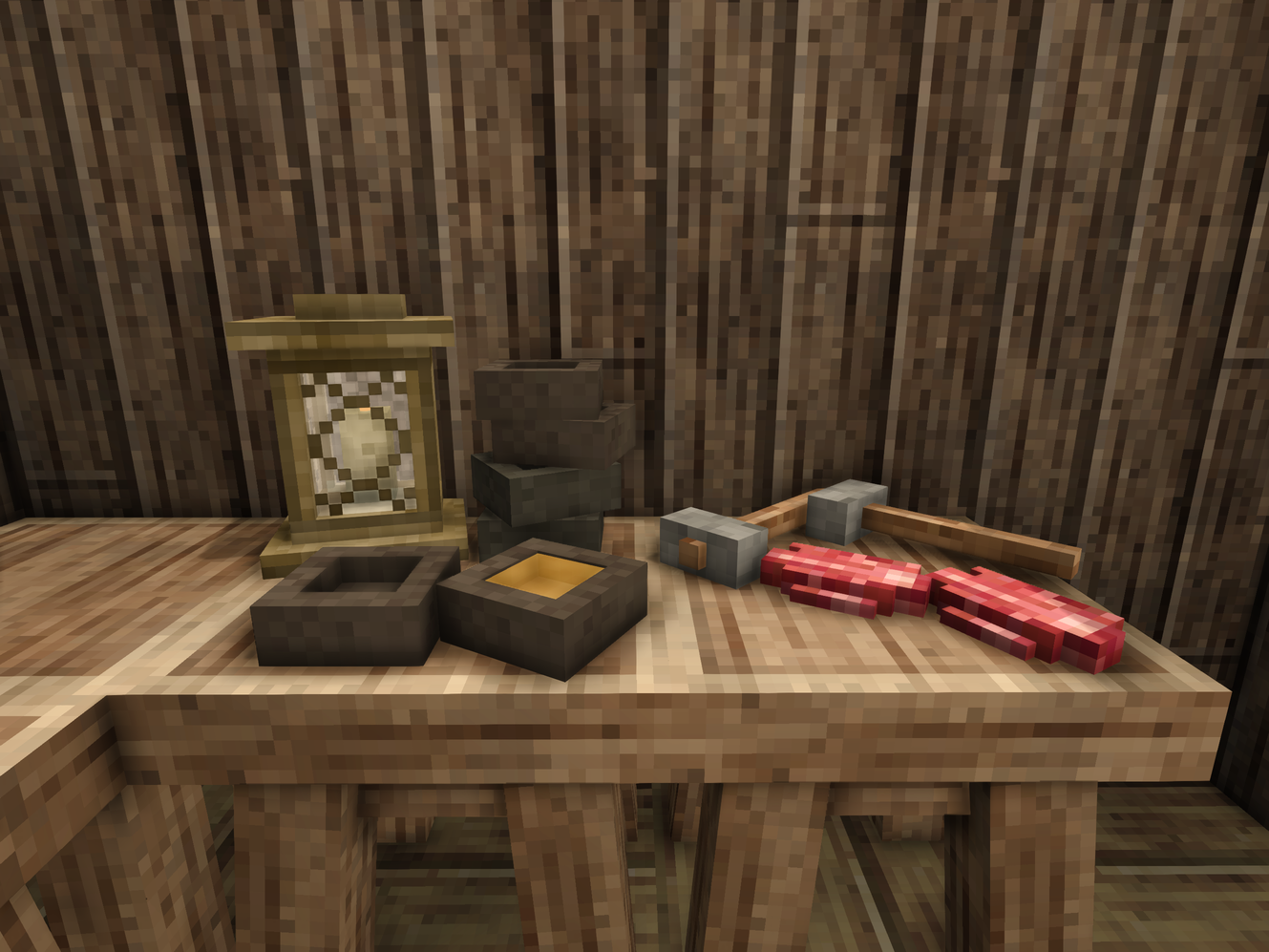
Place any item as decoration on floors, walls and ceilings. Up to 64 items per cell.
Description
Place It Anywhere
Put any item or block exactly where you want it — on the floor, on a wall, or under the ceiling.
Tired of decorations that only snap to a few fixed spots? Place It Anywhere lets you set down any item or block as a free-form decoration, anywhere on a surface, on a fine 1/16 grid. Line up bottles on a shelf, hang tools on the wall, scatter clutter across a table — and nudge each piece until it sits just right.
How it works
Hold a hammer in your offhand, grab whatever you want to place in your main hand, then Sneak + Right-click a surface. The item snaps to the grid and automatically matches the face you clicked — floor, wall, or ceiling. That's it.
Want to fine-tune? Press F (hammer still in offhand) to open the controls and adjust height, rotation, and how far the item sits from you. Everything you place is fully recoverable — just Left-click a placed item to pick it back up.
<span style="background-color: #fbeeb8;">Choose what triggers the mod: [PiA] hammer, any hammer, or Sneak alone. Turn off mod with num 0 (default)</span>
Crafting
Place hammer in a crafting grid, place again and it comes back to normal hammer
Controls
<table style="border-collapse: collapse; border-color: #000000; border-style: solid; height: 95px;" data-dc-tpl="23" data-om-id="34b56835:28"> <thead data-dc-tpl="24" data-om-id="34b56835:29"> <tr style="height: 19px;" data-dc-tpl="25" data-om-id="34b56835:30"> <th style="height: 19px; width: 109.162px;" data-dc-tpl="26" data-om-id="34b56835:31">Action</th> <th style="height: 19px; width: 484.02px;" data-dc-tpl="27" data-om-id="34b56835:32">How</th> </tr> </thead> <tbody data-dc-tpl="28" data-om-id="34b56835:33"> <tr style="height: 19px;" data-dc-tpl="29" data-om-id="34b56835:34"> <td style="height: 19px; width: 109.162px;" data-dc-tpl="30" data-om-id="34b56835:35">Place item</td> <td style="height: 19px; width: 484.02px;" data-dc-tpl="32" data-om-id="34b56835:37">Hammer in offhand + item in hand → Sneak + Right-click a surface</td> </tr> <tr style="height: 19px;" data-dc-tpl="34" data-om-id="34b56835:39"> <td style="height: 19px; width: 109.162px;" data-dc-tpl="35" data-om-id="34b56835:40">Pick up item</td> <td style="height: 19px; width: 484.02px;" data-dc-tpl="37" data-om-id="34b56835:42">Hammer in offhand → Left-click a placed item</td> </tr> <tr style="height: 19px;" data-dc-tpl="39" data-om-id="34b56835:44"> <td style="height: 19px; width: 109.162px;" data-dc-tpl="40" data-om-id="34b56835:45">Open controls</td> <td style="height: 19px; width: 484.02px;" data-dc-tpl="42" data-om-id="34b56835:47">Hammer in offhand → press F</td> </tr> <tr style="height: 19px;" data-dc-tpl="44" data-om-id="34b56835:49"> <td style="height: 19px; width: 109.162px;" data-dc-tpl="45" data-om-id="34b56835:50">Fine yaw</td> <td style="height: 19px; width: 484.02px;" data-dc-tpl="47" data-om-id="34b56835:52">Hammer in offhand → Sneak + scroll wheel</td> </tr> </tbody> </table>
Numpad shortcuts:
<table style="border-collapse: collapse; height: 119.2px; border-color: #000000; border-style: solid; width: 15.9981%;" data-dc-tpl="50" data-om-id="34b56835:55"> <thead data-dc-tpl="51" data-om-id="34b56835:56"> <tr style="height: 20px;" data-dc-tpl="52" data-om-id="34b56835:57"> <th style="width: 23.5753%; height: 20px;" data-dc-tpl="53" data-om-id="34b56835:58">Key</th> <th style="width: 76.111%; height: 20px;" data-dc-tpl="54" data-om-id="34b56835:59">Does</th> </tr> </thead> <tbody data-dc-tpl="55" data-om-id="34b56835:60"> <tr style="height: 20px;" data-dc-tpl="56" data-om-id="34b56835:61"> <td style="width: 23.5753%; height: 20px; text-align: center;" data-dc-tpl="57" data-om-id="34b56835:62">8 / 2</td> <td style="width: 76.111%; height: 20px;" data-dc-tpl="58" data-om-id="34b56835:63">Pitch up / down</td> </tr> <tr style="height: 20px;" data-dc-tpl="59" data-om-id="34b56835:64"> <td style="width: 23.5753%; height: 20px; text-align: center;" data-dc-tpl="60" data-om-id="34b56835:65">4 / 6</td> <td style="width: 76.111%; height: 20px;" data-dc-tpl="61" data-om-id="34b56835:66">Roll left / right</td> </tr> <tr style="height: 39.2px;" data-dc-tpl="62" data-om-id="34b56835:67"> <td style="width: 23.5753%; height: 39.2px; text-align: center;" data-dc-tpl="63" data-om-id="34b56835:68">7 / 9</td> <td style="width: 76.111%; height: 39.2px;" data-dc-tpl="64" data-om-id="34b56835:69">Depth — pull toward / push away from you</td> </tr>Download
No download link is available for this entry right now.
Ratings & reviews
Sign in to leave a rating or comment.



