
Real Meat
Size-based animal drops and temperature-aware meat spoilage. All settings configurable in-game.
Description
Real Meat Mod - Overview
Real Meat brings realistic hunting mechanics to Vintage Story by scaling animal drops based on size and implementing temperature-aware meat spoilage.
Core Features
Size-Based Animal Drops
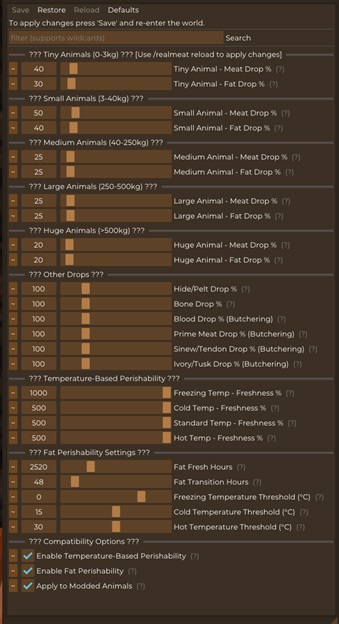
Animals are classified into five weight categories, each with configurable drop multipliers:
- Tiny (0-3kg): chickens, rabbits, baby animals
- Small (3-40kg): foxes, raccoons, wolves
- Medium (40-250kg): sheep, pigs, deer
- Large (250-500kg): bears, bison
- Huge (>500kg): elk, moose, elephants, mammoths
By default, larger animals yield proportionally less meat per kilogram (reducing the "whale effect"), while smaller animals can be configured to drop more realistic amounts. All meat, fat, hide, and bone drops are independently configurable from 0-500%.
Temperature-Based Perishability
Meat and fat now respond realistically to environmental temperature:
- Freezing (<0°C): Meat lasts 5x longer (default)
- Cold (0-15°C): Meat lasts 2x longer (default)
- Standard (15-30°C): Normal vanilla spoilage rate
- Hot (>30°C): Meat spoils 2x faster (default)
All temperature thresholds and multipliers are fully configurable.
Mod Compatibility
Butchering Mod
Real Meat automatically detects and integrates with the Butchering mod:
- Compounding Multipliers: Real Meat multipliers apply on top of Butchering's equipment efficiency and skill bonuses
- Formula: Final Drops = Base × Equipment Efficiency × Skill × Real Meat Multiplier
- Butchering-Specific Drops: Configurable multipliers for blood, prime meat, sinew, and ivory (0-500%)
- Automatic Detection: No configuration needed - works seamlessly when both mods are installed
- Works with all Butchering equipment: hooks, ceiling hooks, and tables
Food Shelves Mod
Real Meat respects Food Shelves preservation mechanics:
- Container Preservation: Meat stored in Food Shelves freezers, cooling cabinets, and other preservation containers uses the container's preservation rate instead of environmental temperature
- Automatic Detection: No configuration needed - detected at startup
- Vanilla Compatible: Also respects vanilla container preservation (storage vessels, crocks, cellars)
Configuration
In-Game Setup
Configure everything through the Configure Everything mod interface with organized sections for each animal size category, temperature settings, and Butchering compatibility options. After making changes:
- Click "Save" in Configure Everything
- Type
/realmeat reload in chat to apply changes immediately - Use
/realmeat status to view current settings
Commands
/realmeat reload - Reload configuration without restarting/realmeat status - Display current multiplier values
Compatibility
- Works with vanilla and modded animals (configurable)
- Butchering mod: Full compatibility with compounding multipliers
- Food Shelves mod: Full compatibility with preservation containers
- Requires Configure Everything (configlib) for in-game configuration
- Uses Harmony patching for maximum compatibility
Technical Details
- Author: Huanpo (Inspired by R.Meat by LordOri)
- Version: 1.5.0
- Dependencies: Configure Everything (for config UI)
- Optional: Butchering mod (for enhanced butchering features), Food Shelves mod (for preservation containers)
Fully configurable, lightweight, and designed to enhance the hunting and food preservation experience!
Download
No download link is available for this entry right now.
Ratings & reviews
Sign in to leave a rating or comment.



