
Description
Overview
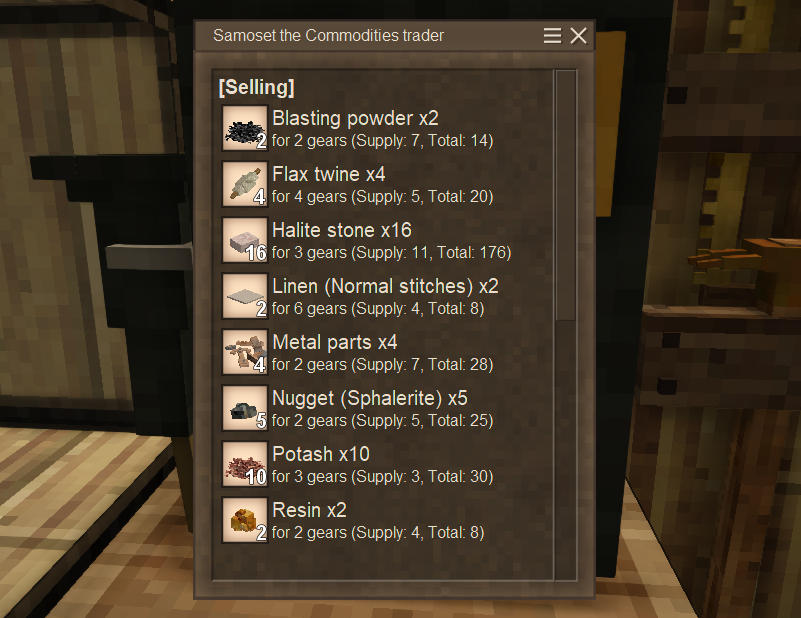
This mod adds a Trader Phone, which allows you to remotely check trader's stock.
It displays the assigned trader's supply/demand list, gears, and the number of days until the next refresh in the GUI.
This mod is marked as beta because some implementation tasks remain, especially for optimization, and its stability needs to be tested.
Currently, the Trader Phone allows players to spam chunk loading, so it might not be ideal for a multiplayer server with a large, unspecified number of players.
That said, this mod already has all its core functions implemented and should work fine in single player or on a server with only known friends.
There seems to be some vanilla bugs related to trader in 1.22 at this point (rc7)
https://github.com/anegostudios/VintageStory-Issues/issues?q=is%3Aissue%20trader
Please ensure it's not a vanilla bug when you report me an issue.
I can't fix it.
That said, since 1.22 changed trader entity codes, some display issues may occur on this mod.
I've addressed it and tested it thoroughly (including saves from 1.21), but if you find remaining issues, feel free to report it.
See Help/Contact section to see how to report.
As a known tiny issue, memos from 1.21 lack the climate suffix (like "(cold)") in the trader type, unlike those created in 1.22.
(Only a display issue, not functionally affects)

I may add an auto-update feature for memos in the future, but since this currently has almost no impact, it's a low priority.
(There's no stock difference between trader climate types)
Crafting
There are multiple Trader Phones with different appearances.
Except for small differences such as the selection box, they are functionally identical.

Box style
Box (a.k.a "the original") style can be crafted from:
- Bronze or higher lamellae x4
- Or bronze or higher plate x2
- Temporal gear x2
- Lead plate x2
- Any solder bar x1
- Soldering iron (used as a tool)


Wall Box style
The Box style can be converted to/from its wall-mounted version.

Antique style
Antique style can be crafted from:
- Brass plate x2
- Temporal gear x2
- Any board x4
- Lead plate x1
- Copper nails and strips x2
- Parchment x1

The model was provided by Corvus.
Big thanks!!
Usage
To check a trader's stock, you need to get a phone number memo for that trader and register it to a Trader Phone.
First, place a Trader Phone and right-click it with a parchment to create a phone number memo (Blank).
Then, obtain a written memo either by using the blank memo on the trader or by searching for their location in the Trader Phone (you can right-click it with a blank memo to open the GUI).
Use the written memo on the Trader Phone to register, and after that, you can check the trader’s stock anytime by right-clicking the Trader Phone.
<span style="font-size: 14pt;">1. Create a blank memo</span>
First, place a Trader Phone and right-click it with a parchment to obtain a phone number memo (Blank).


You have two ways to get a trader's phone number memo.
<span style="font-size: 14pt;">2-A. Directly use a blank memo on a trader</span>
Go to the trader and right-click them with a blank memo.

You will obtain a written phone number memo immediately.

<span style="font-size: 14pt;">2-B. Phone number search</span>
If you already know where the trader is, you can use the phone number search function in the Trader Phone.
- Right-click any Trader Phone with a blank memo to open the phone number search GUI
- Follow the instructions on the GUI; enter the trader's coordinates and click the 'Search' button
- If the phone successfully finds the trader, their details will be shown on the GUI
- Click the 'Write Down' button to obtain a written phone number memo


If 'Trader not found' was displayed in step 3, check the following and try again:
- Auto-detecting Y may fail, so you might need to enter it manually.
- If you took the coordinates from the map, zoom in and record them as accurately as possible.
Ratings & reviews
Sign in to leave a rating or comment.



