
Back to NxLabs

NxLabs / Vintage Story

Road network - connected curved roads and bridges

HBy HP4You

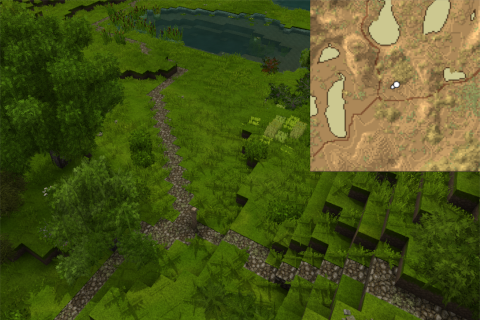
Road Network allows you to spawn roads automatically, which snuggle to the terrain.

Road network - connected curved roads and bridges

Description

In my last playthrough, I always wanted to create a road network between our village and my mine, but never came around to become a road builder. So I created this mod for easy road creation (no cost in creative mod).


First, create a "Base of Builder Team" (check manual for recipe) and place stone path blocks inside. (Pole needs to be right clicked after server start again). (Can be skipped in creative mod.)

Afterwards, place two road signs and right click one selecting "Create Road" to confirm you want to create this road. This automatically generates a road curving through the landscape from point A to point B.

Alernatively you can select "Toggle Preview" to see a preview.

100%
100%


Existing roads will be followed with priority and larger water surfaces will get a small bridge if there is no faster way around. The cost of traversing water ways ("WaterTranstionConst") can be changed in the config file "%appdata/VintageStoryData/ModConfig/roadnetwork_PathSearchParameter.json" (after starting a game with the mod once) and the config can be reloaded with /roadnetwork reload-config.


In case something weired happens you can use the commands (.roadnetwork <subcommand>) to toggle:

  • a simple plane of the search area (toggle-planar)
  • display the found surface area (toggle-surface) one above the actual found surface for better visiblity. My guess is this is the most helpfull to find blocks, which are falsely detected as ground blocks).
  • the road preview (toggle-road) again one block above the actual road for better visibility

All three options disable direct road placement on sneak right clicking sign. Only one visualization can be active at a time.


<span style="font-size: 10pt;">Commands - mainly for visually debugging</span>
<table style="border-collapse: collapse; width: 95.8204%; height: 375.334px;" border="1"> <tbody> <tr style="height: 23.8167px;"> <td style="width: 43.9559%; height: 23.8167px; text-align: center;"><span style="font-size: 14pt;">Command</span></td> <td style="width: 55.9973%; height: 23.8167px; text-align: center;"><span style="font-size: 14pt;">Description</span></td> </tr> <tr style="height: 23.8167px;"> <td style="width: 43.9559%; height: 23.8167px; text-align: center;"><span style="font-size: 14pt;">.help roadnetwork</span></td> <td style="width: 55.9973%; height: 23.8167px; text-align: left; padding-left: 40px;"><span style="font-size: 14pt;">get help/description in game</span></td> </tr> <tr style="height: 46.2px;"> <td style="width: 43.9559%; height: 46.2px; text-align: center;"><span style="font-size: 14pt;">.roadnetwork toggle-planar</span></td> <td style="width: 55.9973%; height: 46.2px; text-align: left; padding-left: 40px;"><span style="font-size: 14pt;">toggle plane in xz to get an overview about the space being searched</span></td> </tr> <tr style="height: 46.2px;"> <td style="width: 43.9559%; height: 46.2px; text-align: center;"><span style="font-size: 14pt;">.roadnetwork toggle-surface</span></td> <td style="width: 55.9973%; height: 46.2px; text-align: left; padding-left: 40px;"><span style="font-size: 14pt;">toggle detected surface (one above detected blocks for better visibility)</span></td> </tr> <tr style="height: 46.2px;"> <td style="width: 43.9559%; text-align: center; height: 46.2px;"><span style="font-size: 14pt;">.roadnetwork toggle-path</span></td> <td style="width: 55.9973%; text-align: left; height: 46.2px; padding-left: 40px;"><span style="font-size: 14pt;">toggle path preview (one above detected blocks for better visibility)</span></td> </tr> <tr style="height: 23.8167px;"> <td style="width: 43.9559%; text-align: center; height: 23.8167px;"><span style="font-size: 14pt;">.roadnetwork undo</span></td> <td style="width: 55.9973%; text-align: left; padding-left: 40px; height: 23.8167px;"><span style="font-size: 14pt;">undo last (default: 5) road creations (of this session)</span></td> </tr> <tr style="height: 23.8167px;"> <td style="width: 43.9559%; text-align: center; height: 23.8167px;"><span style="font-size: 14pt;">/roadnetwork reload-config</span></td> <td style="width: 55.9973%; text-align: left; padding-left: 40px; height: 23.8167px;"><span style="font-size: 14pt;">reloads all config files</span></td> </tr> <tr style="height: 46.2px;"> <td style="width: 43.9559%; text-align: center; height: 46.2px;"><span style="font-size: 14pt;">/roadnetwork print-searchPar[-raw]</span></td> <td style="width: 55.9973%; text-align: left; padding-left: 40px; height: 46.2px;">

<span style="font-size: 14pt;">prints the search parameter (excluding the comments with -raw)</span>

</td> </tr> <tr style="height: 23.8167px;"> <td style="width: 43.9559%; text-align: center; height: 23.8167px;"><span style="font-size: 14pt;">/roadnetwork data print [full]</span></td> <td style="width: 55.9973%; text-align: left; padding-left: 40px; height: 23.8167px;">

<span style="font-size: 14pt;">print number of registered way points and roads, with extra full parameter get extended summary</span>

</td> </tr> <tr style="height: 23.8167px;"> <td style="width: 43.9559%; text-align: center; height: 23.8167px;"><span style="font-size: 14pt;">/roadnetwork data backup</span></td> <td style="width: 55.9973%; text-align: left; padding-left: 40px; height: 23.8167px;">

<span style="font-size: 14pt;">back up data (way points &amp; roads) into ModConfig/roadnetwork_bckp/</span>

</td> </tr> <tr style="height: 23.8167px;">

Download

No download link is available for this entry right now.

Ratings & reviews

No ratings yet

Sign in to leave a rating or comment.



