
SlowTox visualizer
Visualization of buffs and debuffs applied to the player when drinking alcohol
Description
SlowTox Visualized
Clear intoxication and effect statuses for SlowTox.
Public release stack: SlowTox Visualized 1.1.7 + Player Status HUD 1.2.0+
- Shows intoxication as a readable status icon (hidden at zero value).
- Publishes active SlowTox effects as hoverable status icons with tooltips.
- Uses Player Status HUD rendering so all status mods share one strip.
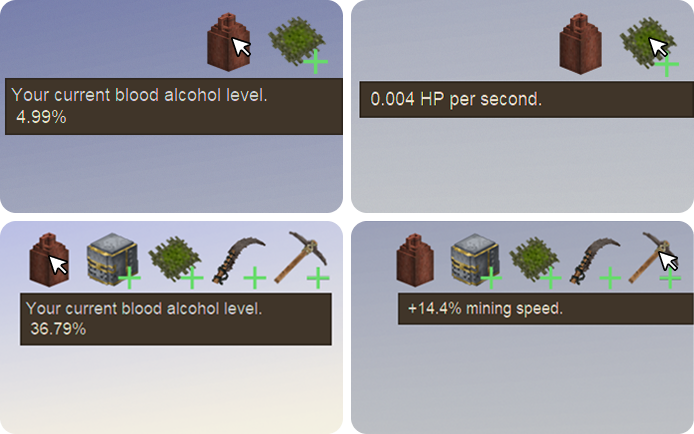

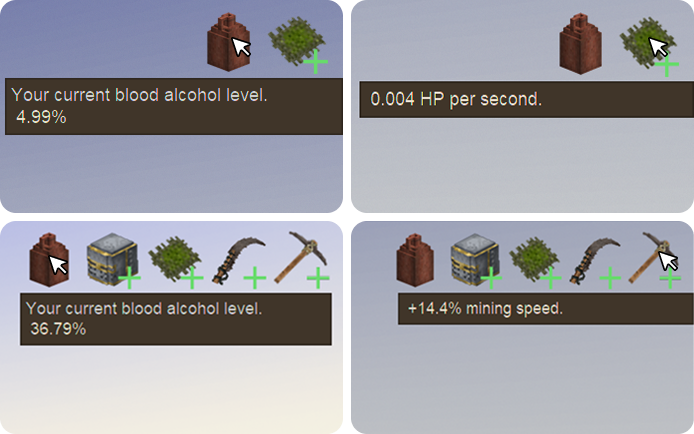
In-game example screenshot.
Why is nothing visible after install?
Most often one required dependency is missing. Install/enable both SlowTox and Player Status HUD.
Why does intoxication icon disappear?
It is shown only when intoxication is above zero. At zero it is hidden by design.
Can I customize layout?
Yes, edit <span style="background: rgba(248,251,222,.12); padding: 2px 6px; border-radius: 4px; color: #f8fbde;">VintagestoryData/ModConfig/slowtoxvisualized-hudlayout.json</span>. Use the HUD wizard via Ctrl+F8 for visual positioning.
Does this replace Player Status HUD?
No. SlowTox Visualized provides status data; Player Status HUD renders the strip.
- No icons: check 3 enabled mods (SlowTox + Player Status HUD + SlowTox Visualized).
- Wrong position: open wizard with Ctrl+F8 and save layout.
- Weird/old assets: re-copy latest mod files.
- After lang/assets updates: do a full client restart.
Official server
Teotale Vintage Story Server
SlowTox Visualized was built for the Teotale server ecosystem, where these status mechanics are part of core gameplay.
Join the community, read server rules, and start your next long-term world at www.teotale.com.
Ratings & reviews
Sign in to leave a rating or comment.



