







About 哆啦A梦的口袋
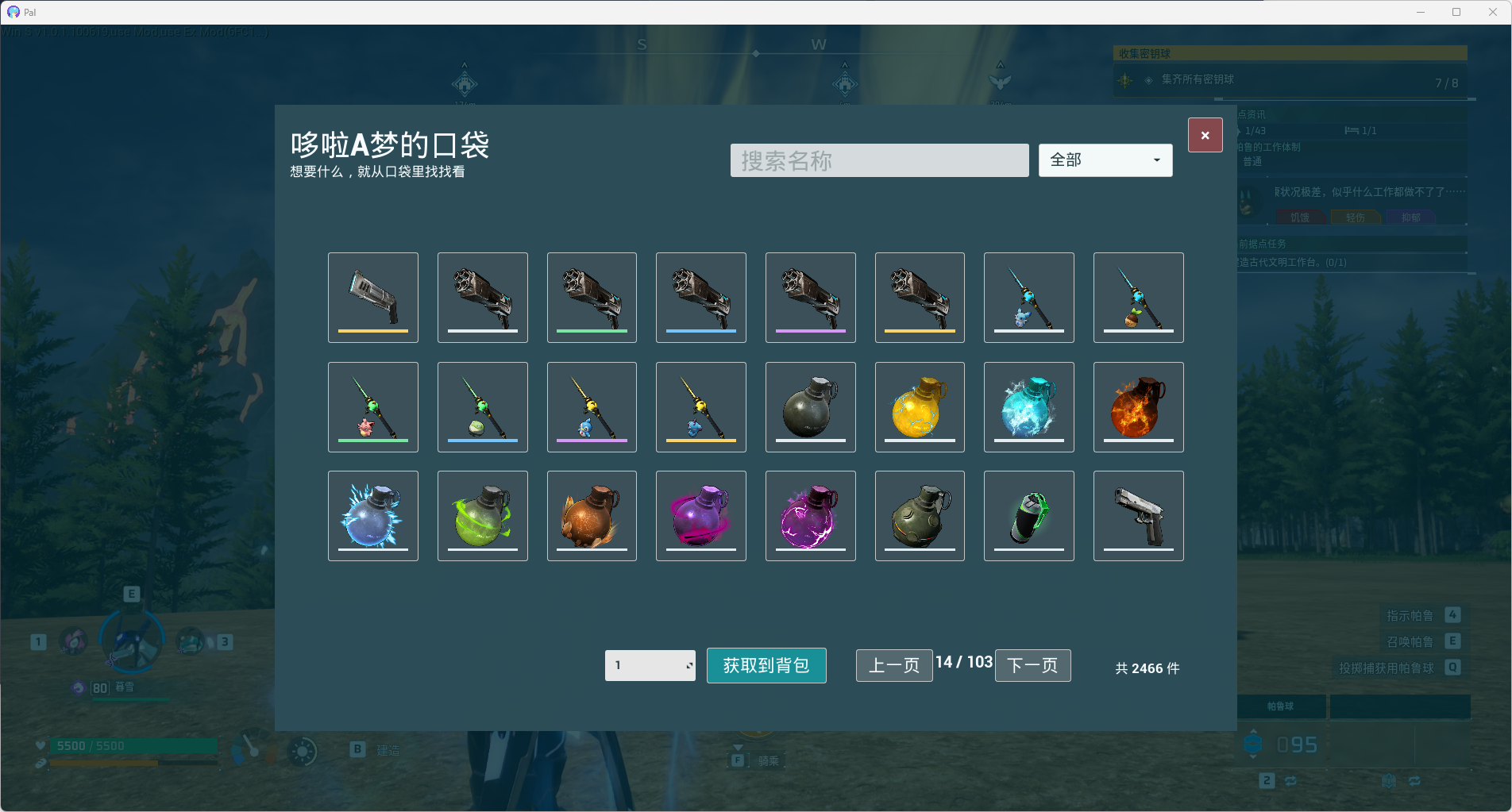
From Steam Workshop哆啦A梦的口袋 / Doraemon's Pocket 随时打开一个包含当前版本有效物品的便捷面板,搜索并选择所需物品,然后直接获取到玩家背包。 Open a convenient item browser containing valid items from the current game version. Search for an item, choose the quantity,…
哆啦A梦的口袋 / Doraemon's Pocket
随时打开一个包含当前版本有效物品的便捷面板,搜索并选择所需物品,然后直接获取到玩家背包。
Open a convenient item browser containing valid items from the current game version. Search for an item, choose the quantity, and add it directly to your inventory.
主要功能 / Features
- 按 Insert 打开或关闭物品面板
- 自动匹配游戏语言,支持简体中文和英文界面
- 支持使用中文名称或英文名称搜索物品
- 按武器、防具、素材、消耗品等类型筛选
- 每页显示 24 件物品,支持快速翻页
- 显示游戏原有物品图标和品质颜色
- 鼠标悬浮时显示名称、类型、品质、最大堆叠数量和物品介绍
- 可选择 1 至 9999 的获取数量
- 选中物品后可直接获取到当前玩家背包
- 关闭面板后自动恢复游戏输入
- Press Insert to open or close the item panel
- Automatically switches between Simplified Chinese and English based on the game language
- Search items by either Chinese or English name
- Filter items by weapon, armor, material, consumable, and other categories
- Displays 24 items per page with pagination
- Uses the original in-game item icons and quality colors
- Hover over an item to view its name, category, quality, maximum stack size, and description
- Choose an amount from 1 to 9999
- Add the selected item directly to the local player's inventory
- Game input is restored automatically when the panel closes
使用方法 / How to Use
[list=1] [*]进入一个单人世界。 [*]按 F8/Insert 打开“哆啦A梦的口袋”。 [*]通过搜索框、分类筛选或翻页找到物品。 [*]单击物品图标进行选择。 [*]输入需要获取的整数数量。 [*]点击“获取到背包”。 [*]按 Insert、Esc 或右上角关闭按钮退出面板。 [/list]
[list=1] [*]Enter a single-player world. [*]Press F8/Insert to open Doraemon's Pocket. [*]Find an item using the search box, category filter, or page buttons. [*]Click an item icon to select it. [*]Enter the desired whole-number quantity. [*]Click “Add to Inventory”. [*]Press Insert, Esc, or the close button to exit the panel. [/list]
依赖 / Dependency
需要订阅并启用 UE4SS Experimental (Palworld)。
Requires UE4SS Experimental (Palworld) to be subscribed and enabled.
支持范围 / Supported Scope
当前版本仅支持 Windows Steam 单人游戏。
多人客户端、联机主机和专用服务器暂不支持。Mod 只显示能够正常进入玩家库存的有效静态物品。已经获取的物品会由游戏正常保存;禁用或卸载 Mod 不会删除这些物品。
The current version supports Windows Steam single-player only.
Multiplayer clients, co-op hosts, and dedicated servers are not supported. The mod only displays valid static items that can be stored in the player's inventory. Acquired items are saved normally by the game and will not be removed when the mod is disabled or uninstalled.
兼容版本 / Compatibility
版本:1.0.0 Mod 内部版本:0.1.0 最低游戏修订号:427 已验证 Steam Build:24181527
Version: 1.0.0 Internal mod version: 0.1.0 Minimum game revision: 427 Verified Steam Build: 24181527
Highlights
From source dataFootprint
Rated a light load on a server.
Last update
Its author last shipped an update 4 mo ago.
哆啦A梦的口袋 on Nxeon
From our catalogue- One-click install
- Not available. One-click install isn't available for this game's mods yet. Download it and upload it to your server in Files.
- Server load
- light
- Smallest plan we suggest
- Palworld — 8 GB (8 GB RAM). This follows our own load rating above, not a benchmark.
- Latest build
- 2026-07-19, released 2026-07-19
Game versions by loader
| Loader | Game versions | Newest |
|---|---|---|
| Workshop |
From 1 recorded build of 哆啦A梦的口袋.
Dependencies
- Required: UE4SS Experimental (Palworld)
Declared by the newest build that lists any. Required ones are installed with it on one-click installs.
Run 哆啦A梦的口袋 on a Palworld server
Deploy a server above, then upload the file in Files.
What kind of mod it is
From the catalogWeapons, items & crafting
New weapons, gear, items and the recipes to make them.
Compatibility
- Game
- Palworld
Verified at the source
- ✓Steam WorkshopOfficial listing, checked 2026-11-01Open ↗
- ✓Author爱吃小蓓饼干, as published on Steam Workshop
- ✓LicenseNot published by the sourceFree











