







About AutoPal
From Steam WorkshopAutoPal · Automated Production for Palworld ⚠ All code in this mod (Lua scripts and the native C++ extension) was generated by AI. The author wrote the requirements, tested everything in the game and…
AutoPal · Automated Production for Palworld
⚠ All code in this mod (Lua scripts and the native C++ extension) was generated by AI. The author wrote the requirements, tested everything in the game and on a test server, and made the design calls, but wrote no code by hand. Please use it with that in mind.
Tell AutoPal what you want and how many; it breaks recipes down, uses the chests of all your guild's bases, places orders on workbenches by priority, and sends pals to gather and craft. Its features come in 7 modules, all off by default; turn on the ones you want. The interface supports Chinese and English, following your game language (English for other languages). Each multiplayer client renders server messages in its own language. Chinese labels are included below for reference.
Installation
Client (single player / joining a server) [olist] [*]Subscribe to this mod and to UE4SS (Palworld experimental; it is listed as a required item). [*]Start the game; on the title screen open Options → Mod Management and turn Enable Mod on. [*]Check AutoPal and UE4SS, click the blue Save button; the game restarts. [/olist] Dedicated server (Windows): copy the folders of both Workshop items into the server's Mods\Workshop\, set bGlobalEnableMod=true in Mods\PalModSettings.ini and add the lines ActiveModList=UE4SSExperimentalPW and ActiveModList=AutoPal, then restart the server. In multiplayer the server and every client need the same version.
Getting started
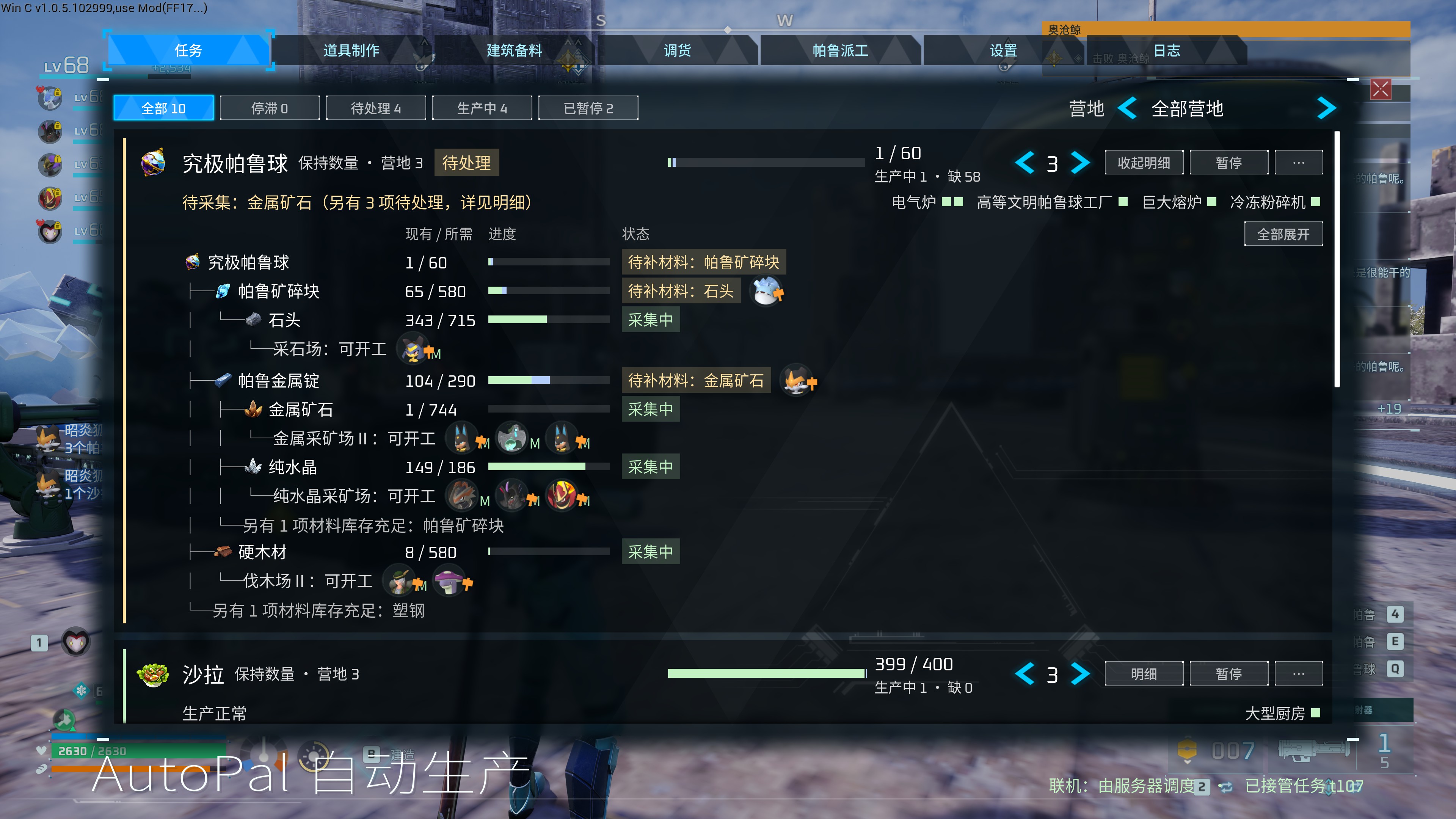
[olist] [*]Open the window: in a world, press F6 (or swipe sideways on a PS5 controller's touchpad). Press it again or Esc to close. [*]Turn modules on: Settings (设置) → Modules (功能模块), switch on what you need. Each module's options sit in the category of the same name, each with a description underneath. Server-wide modules apply to every player and any player may change them. [*]Create a production task (needs Production): on the Crafting page (道具制作) pick an item, a task type (Keep / Once / Ongoing), the amount, base and priority, then click Create task (创建任务). To gather all materials for a building, use the Building page (建筑备料). [*]Follow progress: each card on the Tasks page (任务) shows progress and the most pressing issue (e.g. no working pal, a missing material). Details (明细) break it down level by level: stock / need, production state and the pals at each facility for every material; "⋯" holds edit, log and delete. [*]See who works where: the Pal Jobs page (帕鲁派工) lists every pal of a base with its current job, state and all 13 work suitability levels. [*]Move items (needs Transfer): the Transfer page (调货) moves items between your inventory and any of your guild's bases, or deposits your inventory in one click. [*]Troubleshoot: the Logs page (日志) records orders, pal assignments, hauling and errors by category; its Performance category (性能) shows AutoPal's timings. [/olist]
Modules
- Production (生产调度, server-wide): three task types (keep a stock such as at least 100 Jam Bread, make N once, produce continuously) plus building materials that gather everything one building needs. Recipes are broken down, intermediates made first, and pals sent to gathering facilities and ranches for raw materials. One priority queue for all tasks; production only goes through the game's own order requests, so the game itself consumes the materials. Pals are assigned to workbenches, gathering facilities and generators by work suitability; pals you fixed yourself are left alone. Optional hauling of finished products; orders without progress for too long are reported (night time does not count).
- Shared storage across bases (全营地共用箱子, server-wide): the chests of all your guild's bases act as one, so building and workbench menus use materials from other bases; production, supply and transfers count all bases too.
- Base supply (营地补给, server-wide): feed boxes are topped up with dishes when they run low; food in ordinary chests is moved into fridges.
- Transfer and deposit (调货与入库, server-wide): move items between your inventory and any of your guild's bases, deposit your inventory in one click (by item category), tidy base chests.
- Character modifiers (人物修改器, server-wide switch, personal effects): infinite stamina, no hunger, infinite reserve ammo, no equipment durability loss (no automatic repairs), attack / defense / speed multipliers. Each player picks their own; they only affect that player.
- Game tweaks (游戏功能修改器, server-wide): Palbox base range (size, circle or square), breeding speed, Pals needed per Essence Condenser star; each player may widen the fishing catch bar for themselves.
- Pal quality and nearby rarities (帕鲁品质与附近稀有, this PC only): an overlay with the direction and distance of nearby lucky / alpha pals, eggs, chests, statues and more; combat, work and utility grades above pals' heads and on their detail pages; optional automatic Palbox sorting by quality. Only affects your own screen.
Notes
- Requires UE4SS (Palworld experimental).
- Multiplayer: the automation runs on the server (or single player / host); the server and every client need the same version of AutoPal.
- The native extension checks the game version. After a game update, modifiers, base range, shared storage and automatic ordering turn themselves off until the mod is updated; everything else keeps working.
- Hosting a co-op game: the host is not affected; a player who joins and stands more than about 200 m from another base may not see that base's chest materials in build and workbench menus (automated production and transfers are not affected). For a group playing long term, a dedicated server is recommended.
Highlights
From source dataFootprint
Rated a light load on a server.
Last update
Its author last shipped an update 1d ago.
AutoPal on Nxeon
From our catalogue- One-click install
- Not available. One-click install isn't available for this game's mods yet. Download it and upload it to your server in Files.
- Server load
- light
- Smallest plan we suggest
- Palworld — 8 GB (8 GB RAM). This follows our own load rating above, not a benchmark.
- Latest build
- 2026-11-02, released 2026-11-02
Game versions by loader
| Loader | Game versions | Newest |
|---|---|---|
| Workshop |
From 4 recorded builds of AutoPal.
Recent builds
| Build | Released | Game versions | Loaders |
|---|---|---|---|
| 2026-11-02 | 2026-11-02 | n/a | Workshop |
| 2026-10-31 | 2026-10-31 | n/a | Workshop |
| 2026-10-30 | 2026-10-30 | n/a | Workshop |
| 2026-10-29 | 2026-10-29 | n/a | Workshop |
Dependencies
- Required: UE4SS Experimental (Palworld)
Declared by the newest build that lists any. Required ones are installed with it on one-click installs.
Run AutoPal on a Palworld server
Deploy a server above, then upload the file in Files.
What kind of mod it is
From the catalogTechnology & automation
Machines, power, logistics and automation.
Compatibility
- Game
- Palworld
Verified at the source
- ✓Steam WorkshopOfficial listing, checked 2026-11-03Open ↗
- ✓AuthorMafty Navue Erin, as published on Steam Workshop
- ✓LicenseNot published by the sourceFree











