







About Immersive Palworld: First Person
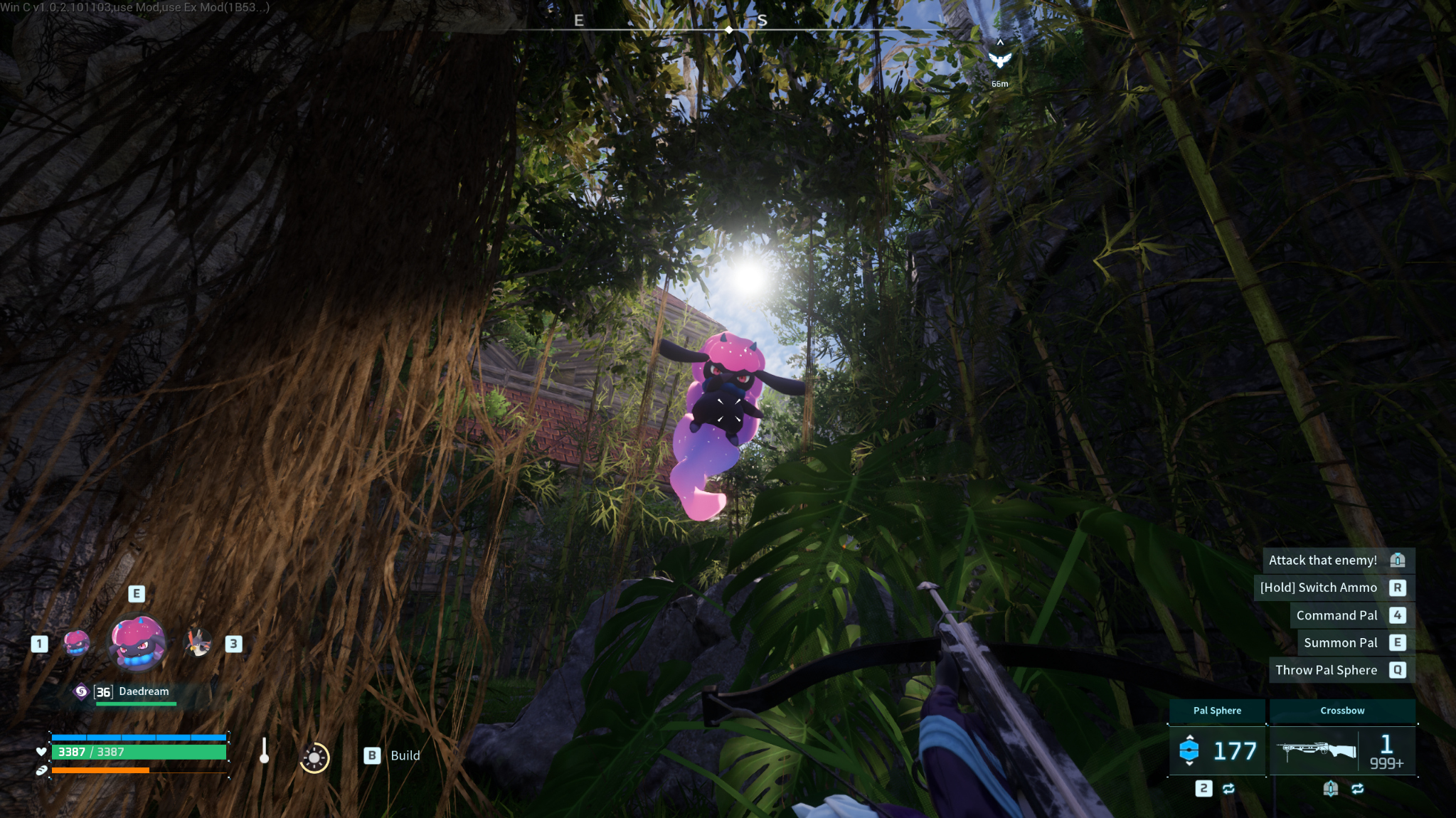
From Steam WorkshopExperience Palworld in first person while exploring, fighting, building, swimming, climbing, and riding Pals. Immersive Palworld adds full-body visibility, contextual arms and weapons, smooth camera…
Experience Palworld in first person while exploring, fighting, building, swimming, climbing, and riding Pals. Immersive Palworld adds full-body visibility, contextual arms and weapons, smooth camera transitions, customizable viewmodel positioning, independent FOV profiles, and native settings integration. Client-side: no server installation required.
What's New in v1.0.4
Recommended: Use Restore to Default on the Graphics and Game Settings pages to try the v1.0.4 defaults.
- Full-body first person: Connected body presentation for swimming, climbing, riding, and settled gliding. Riding and Full Body Mesh now default to On; saved preferences are preserved.
- Viewmodel customization: Adjust arm and weapon Distance, Horizontal, and Vertical positioning without changing world FOV. Live previews fade the settings menu while adjusting camera sliders.
- Turning limits: Separate controls for climbing, mounted resting, mounted aiming, and vertical look.
- Water and impact effects: Water-surface camera clearance, View Water Particles, and Melee Hit Effect Size controls.
- Performance improvements: Fewer repeated scans, maintenance spread across frames, bounded deferred work, stale-cache cleanup, and reused settings-preview discovery.
- Weapons and animation: Improved crouched alignment, sword aiming, bow-arrow recovery, glider deployment, dismounts, dodge-roll arms, and unarmed blocking.
- Shadows and Pal Spheres: Improved body/weapon shadows and summon/recall sphere and hand-effect alignment, including HUD-hidden behavior.
- Camera stability: Improved startup, travel, dialogue, and bed-camera handoffs. A native watchdog attempts third-person recovery if camera updates stop or repeatedly fail.
- Better Building: Improved structure placement view when in building mode.
Main Features
- Adjustable camera bobbing, player/mount transparency, Pal fading, and foliage fading.
- Custom crosshairs with shapes, colors, outlines, transparency, scale, and idle visibility.
- Separate HUD, entity-label, structure-label, damage-counter, and base-radius controls.
- Native Photo Mode, dialogue, and fishing-camera handoffs; controllable bed-camera orbit.
Controls
Under Options > Controls > Keyboard or Controller Pad > Player Action:
- Toggle First/Third Person: Keyboard defaults to F5, below Push-to-Talk. Controller defaults to unbound, below Build Menu.
- Toggle HUD: Immediately below the perspective binding. Keyboard defaults to F1; controller defaults to unbound.
- Alt + Mouse Wheel: Adjust active FOV in one-degree increments.
Perspective and HUD bindings support remapping and Restore to Default.
In-Game Settings
Changes apply immediately. Mod preferences save in ImmersivePalworldSettings.ini; bindings use Palworld's control configuration. These are new-install defaults; updates preserve saved preferences.
Options > Graphics
- First Person / First Person Riding / First Person Full Body Mesh: Default On.
- Climbing Turning Radius: 0-360 degrees; default 80 to either side.
- Mounted Resting / Mounted Aiming Turning Radius: 0-360 degrees; defaults 90 / 140 to either side.
- Mounted/Climbing Vertical Turning Radius: 0-90 degrees; default 45 up/down.
- Viewmodel Distance: 0-60 cm; default 30.
- Viewmodel Horizontal / Vertical: -25 to 25 cm / -25 to 40 cm; both default 0.
- First / Third Person FOV: 60-140 degrees; defaults 110 / 90.
- Third Person Camera Distance: 0.5x-2.0x; default 1.0x. Applies on foot and mounted.
- Camera Bobbing: 0-100%; default 50. 0 disables it; 100 doubles original strength.
- Player Mesh / Riding Pal Mesh / Riding Pal Effects Transparency: 0-100%; defaults 0 / 0 / 80.
- Owned Pal Fade Radius: 0-80 m; default 0. Zero disables modded and native camera-proximity fading for owned/party Pals.
- Foliage Fade Radius: 0-2 m; default 0.5.
- Melee Hit Effect Size: 0-100%; default 50. Zero hides supported flashes; 100 keeps original size.
- View Water Particles: Default Off. Controls your player's wet droplets and swimming effects in both perspectives.
- View Player HUD / Structure Labels / Entity Labels / Damage Counters / Base Radius Circle: Default On.
Set horizontal turning limits to 360 for unrestricted turning; vertical to 90 for normal pitch range. Viewmodel sliders adjust on-foot arms/weapons; traversal and mounted poses retain contextual placement.
Hiding the HUD also hides first-person player/equipment presentation and blocks weapon switching. Pause and settings menus remain usable.
Options > Game Settings
- Show Mod Alerts and Launch Info: Above Language; default On. Off suppresses the Mods Detected dialog and top-left build/mod information.
- View Idle Crosshair (not aiming): Under Aim; default Off.
- Crosshair Color: 24 colors; default White.
- Custom Crosshair Type: Off plus 17 glyphs; default +.
- Crosshair Outline Opacity: Default 0.
- Crosshair Transparency: 0-100%; default 0.
- Crosshair Scale: 0.5x-2.0x; default 1.0x.
Crosshair styling applies to vanilla and custom types. Specialized aiming guides and native bow prompts remain available.
Compatibility
- Designed for Windows Steam Palworld, with ultrawide & steam deck support.
- Client-side multiplayer: each player wanting first person installs it locally.
- Controller bindings and previews are supported. Steam Deck/SteamOS support depends on UE4SS, see UE4SS Notice below.
- Other camera, FOV, player-visibility, HUD, settings, foliage, or binding mods may conflict. Game and loader updates may require compatibility patches.
Highlights
From source dataFootprint
Rated a light load on a server.
Last update
Its author last shipped an update 16d ago.
Immersive Palworld: First Person on Nxeon
From our catalogue- One-click install
- Not available. One-click install isn't available for this game's mods yet. Download it and upload it to your server in Files.
- Server load
- light
- Smallest plan we suggest
- Palworld — 8 GB (8 GB RAM). This follows our own load rating above, not a benchmark.
- Latest build
- 2026-10-19, released 2026-10-19
Game versions by loader
| Loader | Game versions | Newest |
|---|---|---|
| Workshop |
From 3 recorded builds of Immersive Palworld: First Person.
Recent builds
| Build | Released | Game versions | Loaders |
|---|---|---|---|
| 2026-10-19 | 2026-10-19 | n/a | Workshop |
| 2026-10-17 | 2026-10-17 | n/a | Workshop |
| 2026-08-15 | 2026-08-15 | n/a | Workshop |
Dependencies
- Required: UE4SS Experimental (Palworld)
Declared by the newest build that lists any. Required ones are installed with it on one-click installs.
Run Immersive Palworld: First Person on a Palworld server
Deploy a server above, then upload the file in Files.
What kind of mod it is
From the catalogWeapons, items & crafting
New weapons, gear, items and the recipes to make them.
Compatibility
- Game
- Palworld
Verified at the source
- ✓Steam WorkshopOfficial listing, checked 2026-11-04Open ↗
- ✓AuthorDrDryEyes, as published on Steam Workshop
- ✓LicenseNot published by the sourceFree











