About Inventory Storage Search 1.0.1
From Steam WorkshopInventory and Storage Search Got a packed inventory and tired of scrolling through hundreds of slots just to find one item? This mod adds search bars to your player inventory, regular storage, and…
Inventory and Storage Search
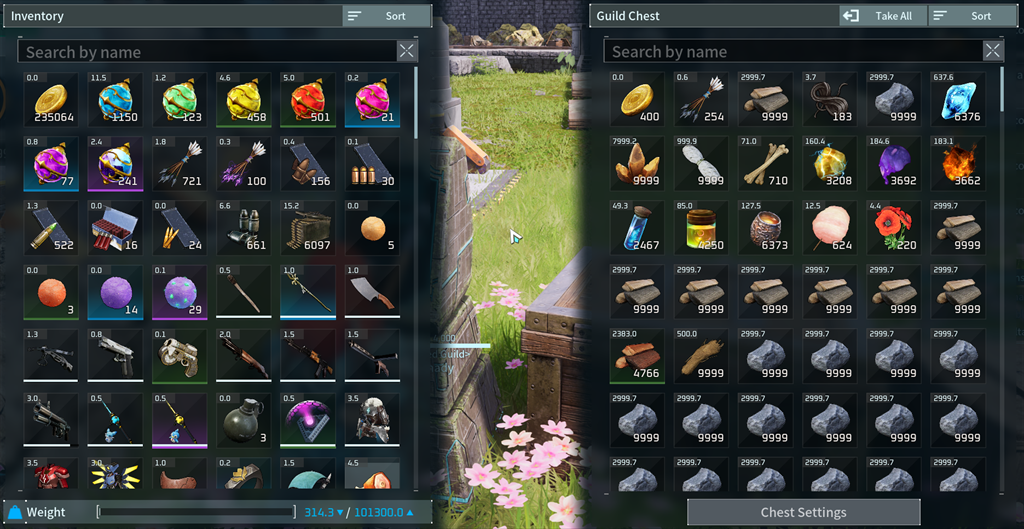
Got a packed inventory and tired of scrolling through hundreds of slots just to find one item? This mod adds search bars to your player inventory, regular storage, and Guild Storage that look like they belong in the game.
Click a search bar and start typing. You can search using any part of an item's name or description, and the player and storage sides can be searched separately.
Features
- Search your main player inventory, regular storage, and Guild Storage.
- Use separate search bars for your inventory and the storage you have open.
- Find items using a full or partial item name or description. Capitalization does not matter.
- Clear the search to bring every item back exactly where it was.
- Use slots, tooltips, drag and drop, quick move, and normal item transfers like usual.
- While the storage search is active, Take All and its shortcut only move the matching items.
- Clear the storage search and Take All goes back to its normal behavior.
- Typing in the search bar will not accidentally trigger your other game or mod shortcuts.
- Item description popups will not kick you out of the search bar while you are typing.
- Empty storage slots are skipped when possible, which helps with large containers that only have a few items in them.
- The mod does nothing in the background while your inventory and storage menus are closed.
- No custom items, item changes, or save edits.
Requirements
This mod requires UE4SS Experimental. Subscribe to it, then enable both UE4SS Experimental and Inventory and Storage Search in Palworld's Mod Management menu.
Single Player Installation
[olist] [*]Subscribe to UE4SS Experimental and Inventory and Storage Search. [*]Launch Palworld. [*]Go to Options, then Mod Management. [*]Turn on mod support, UE4SS Experimental, and Inventory and Storage Search. [*]Save your changes and restart the game if it asks you to. [/olist]
How To Use
Open your inventory or a storage container and use the new search bar below the usual header. Type any part of an item's name or description. Press the clear button, or clear what you typed, to show everything again.
Storage screens have two search bars: one for your inventory and one for the container. They work independently. If there is text in the storage-side search bar, Take All and its normal shortcut will only move the items that match your search.
No inventory or storage lag Note
This mod has been tested alongside No inventory or storage lag. One small thing to keep in mind: if a very large inventory or Guild Storage is still loading its slots, let it finish before you start searching. Typing too early can make the results look incomplete or out of order until the rest of the slots finish loading.
Co-op and Dedicated Servers
I made and tested this as a local, single-player mod. I have not verified co-op or dedicated-server support yet.
Uninstallation
Close Palworld, disable Inventory and Storage Search in Mod Management, and unsubscribe from it. That is all you need to do. The mod does not add custom items or change your save, so removing it simply brings back the normal inventory and storage interface.
Compatibility
Tested with Inventory Expansion and No inventory or storage lag enabled. Other mods that replace the same inventory or storage menus, search controls, keyboard handling, or Take All behavior may conflict.
If something goes wrong, please include your Palworld version, the version of this mod, which inventory or storage screen you were using, the steps that caused the problem, your full mod list, and your latest UE4SS.log.
Highlights
From source dataFootprint
Rated a light load on a server.
Last update
Its author last shipped an update 2 mo ago.
Inventory Storage Search 1.0.1 on Nxeon
From our catalogue- One-click install
- Not available. One-click install isn't available for this game's mods yet. Download it and upload it to your server in Files.
- Server load
- light
- Smallest plan we suggest
- Palworld — 8 GB (8 GB RAM). This follows our own load rating above, not a benchmark.
- Latest build
- 2026-08-15, released 2026-08-15
Game versions by loader
| Loader | Game versions | Newest |
|---|---|---|
| Workshop |
From 1 recorded build of Inventory Storage Search 1.0.1.
Dependencies
- Required: UE4SS Experimental (Palworld)
Declared by the newest build that lists any. Required ones are installed with it on one-click installs.
Run Inventory Storage Search 1.0.1 on a Palworld server
Deploy a server above, then upload the file in Files.
What kind of mod it is
From the catalogQuality of life & UI
Small conveniences, tweaks and interface improvements players notice straight away.
Compatibility
- Game
- Palworld
Verified at the source
- ✓Steam WorkshopOfficial listing, checked 2026-10-10Open ↗
- ✓AuthorShady, as published on Steam Workshop
- ✓LicenseNot published by the sourceFree