About Paldar
From Steam Workshop⚠️ Launch Palworld and enable the mod from Options → Mod Management Created by T3R3NC3B, this mod adds an on-screen minimap, allowing players to track the world conveniently without opening the full…
⚠️ Launch Palworld and enable the mod from Options → Mod Management
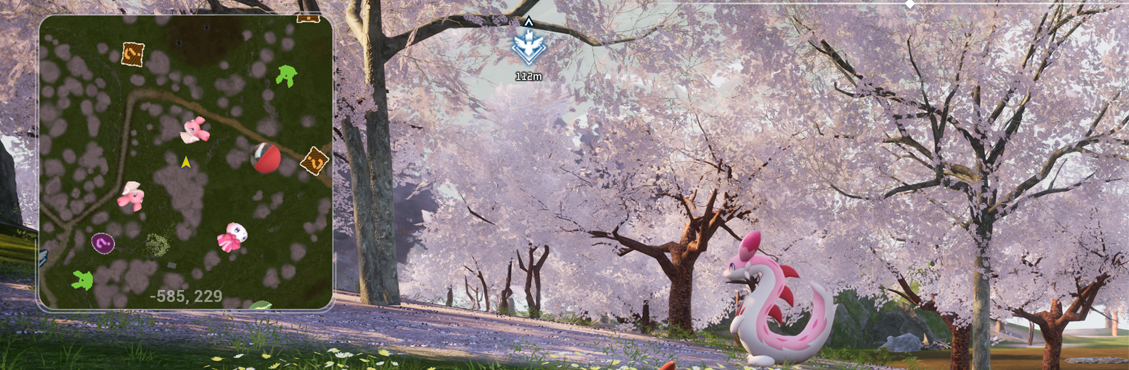
Created by T3R3NC3B, this mod adds an on-screen minimap, allowing players to track the world conveniently without opening the full map.
Features:
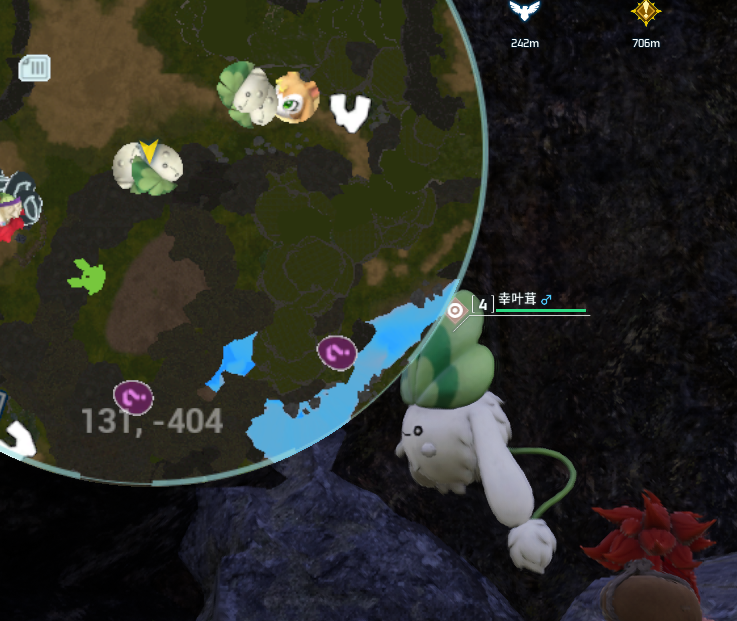
Shows player world location. Shows all Pals around you on the minimap. Shows fast travel points on minimap. Shows other players on the minimap. Shows dungeons on minimap. Shows chests on minimap. Shows notes on minimap. Shows human NPC's on minimap. Shows player camps on minimap. Shows death locations on minimap. Shows skillfruit trees on minimap. Shows rare/shiny pals on minimap (indicated with sparkles on the pal icon). Shows bosses on map.
Auto-hide map in boss battles, inventories, menus. Compatible with single player and dedicated servers (only if installed on clients) Slightly auto-zooms based on your speed. Mega zoomed-out mode for easier navigating without opening full map! Minimap size & position adjustable in-game with ease. Adjust minimap zoom level.
Usage: KEY BINDS:
[ Z ] KEY to toggle mega zoom out mode for easier travelling without opening the map often (pal icons are hidden in this mode). HOLD [ Z ] KEY and scroll the mouse wheel up and down to zoom in and out (doesn't work in mega zoomed out mode). [ L ] KEY to cycle minimap default screen positions. [ H ] KEY to show/hide the minimap. [ K ] KEY to enter/exit minimap adjust mode - use arrow keys to move and the mouse scroll wheel to adjust the size. NOTE: Sometimes the INSERT KEY (UE4SS command) needs to be pressed to initialize the mod when playing on a server.
Known Issues:
Minimap can overlap some UI still. Player & camp icons acting weird when in co-op (code invite method). Missing some Pal icons. Underground bosses aren't seen on minimap yet. Enabling Lifmunk Effigy will cause the game to crash. The mod may occasionally cause stuttering or FPS drops on some AMD graphics cards.
📝 **Quick notice for everyone:** 📝
* If the mouse wheel resize doesn't work, or just cycles through weapons. Just create a **Single Player** world once, adjust the minimap size with the mouse wheel, and save. The selected size will be saved and used when you play Multiplayer as well, you don't need to resize it there.
* For changing the minimap keybinds (or any other hotkeys) or Minimap Rotation or Switch to Circular Mode, please read the: **Pinned Paldar.modconfig Keybind Discussion** and **How to Lock Minimap Rotation or Switch to Circular Mode in Paldar** It contains a complete step-by-step guide explaining where the config files are located and how to change the keybinds.
Highlights
From source dataFootprint
Rated a light load on a server.
Last update
Its author last shipped an update 11 mo ago.
Paldar on Nxeon
From our catalogue- One-click install
- Not available. One-click install isn't available for this game's mods yet. Download it and upload it to your server in Files.
- Server load
- light
- Smallest plan we suggest
- Palworld — 8 GB (8 GB RAM). This follows our own load rating above, not a benchmark.
- Latest build
- 2025-12-20, released 2025-12-20
Game versions by loader
| Loader | Game versions | Newest |
|---|---|---|
| Workshop |
From 1 recorded build of Paldar.
Dependencies
- Required: UE4SS Experimental (Palworld)
Declared by the newest build that lists any. Required ones are installed with it on one-click installs.
Run Paldar on a Palworld server
Deploy a server above, then upload the file in Files.
What kind of mod it is
From the catalogQuality of life & UI
Small conveniences, tweaks and interface improvements players notice straight away.
Compatibility
- Game
- Palworld
Verified at the source
- ✓Steam WorkshopOfficial listing, checked 2026-11-01Open ↗
- ✓AuthorzConnor.i22, as published on Steam Workshop
- ✓LicenseNot published by the sourceFree