






About Production Controller Planner
From Steam WorkshopProduction Controller Planner — Public Beta 0.6.0-beta.4 Keep your guild supplied with automatic crafting and resource priorities. Set your desired stock levels, choose what matters most, and let the…
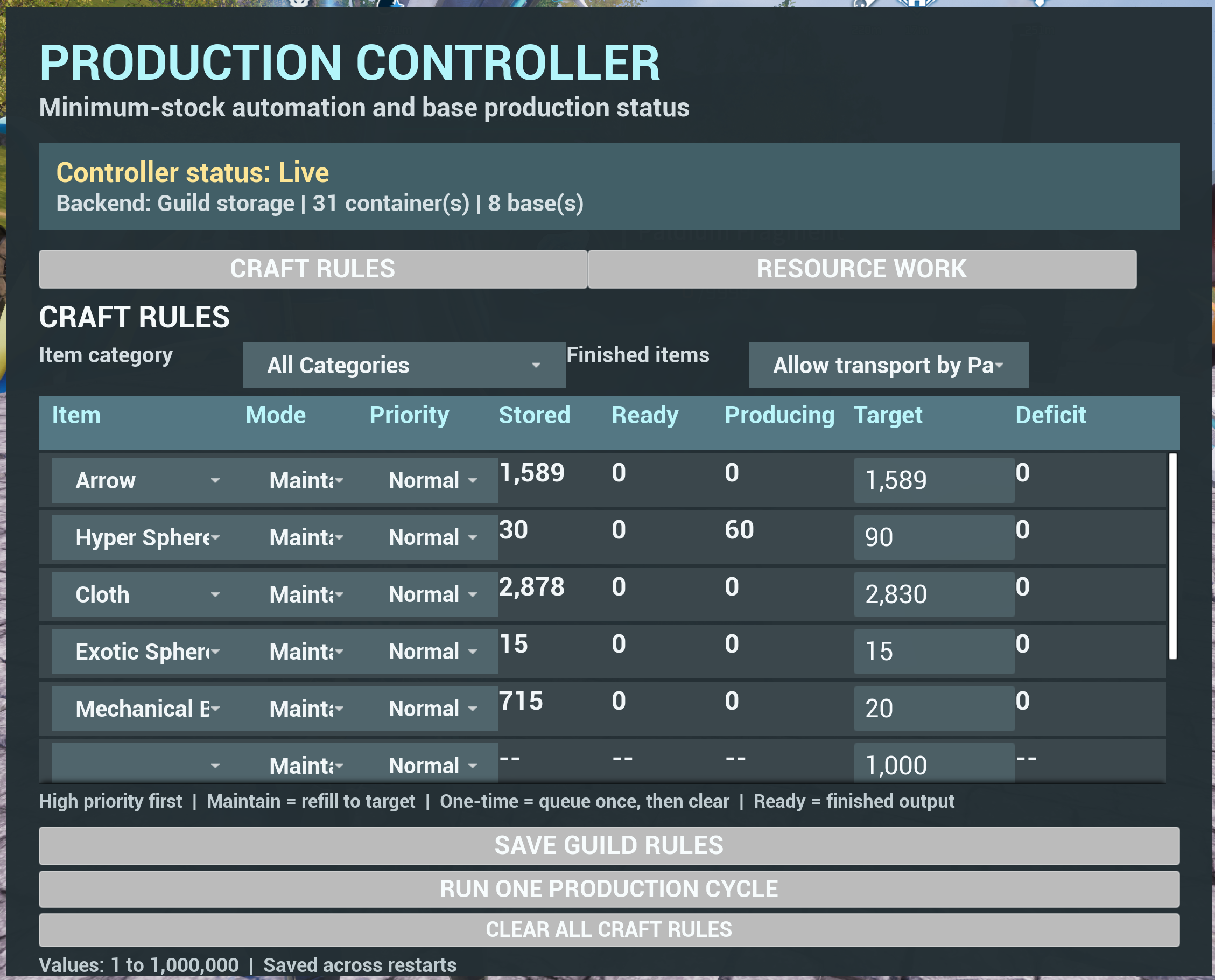
Production Controller Planner — Public Beta 0.6.0-beta.4 Keep your guild supplied with automatic crafting and resource priorities. Set your desired stock levels, choose what matters most, and let the controller manage supported production across your guild’s bases. - Configure up to 10 crafting rules and 10 resource rules. - Choose Low, Normal, or High priority for each rule. - Use Maintain crafting to replenish supplies or One-time crafting for a specific order. - Automatically allocate Ancient Material Synthesizers between configured resources. - Use Auto-balance to manage resource selections or Dedicated to preserve existing selections. - View stored supplies, finished output, work in progress, and remaining shortages. - Share saved rules and current production information with guild members. - Pause automatic Synthesizer switching with a shared checkbox. - Enable optional Pal transport for crafted output. - Keep internal synchronization messages out of normal game chat. Enter a base and press 5 to open the controller. Select your items, set targets and priorities, then press the page’s Apply button. Press Esc, Tab, or Close to exit. Requires the Windows Steam version of Palworld and UE4SSExperimentalPW, installed and enabled. For multiplayer, install matching mod versions and the dependency on the dedicated server and participating clients. Dedicated automation requires at least one connected guild member. This is a public beta. Targets are minimum stock levels rather than exact caps, so production can exceed them. Collect finished Synthesizer output before automatic switching can proceed; stopping or changing work may reset an unfinished production cycle. Ancient Farm crop selection and individual Pal assignments remain manual. If you encounter an issue, include your mod version, whether you were playing solo or on a dedicated server, and what happened before the problem.
For Nexus Mods: 1. Close Palworld. 2. Install the required UE4SSExperimentalPW dependency using its installation instructions. 3. Download and extract the Production Controller ZIP. 4. Copy the included Pal and Mods folders into your Palworld installation folder, merging folders and replacing older mod files when prompted:...\Steam\steamapps\common\Palworld\ You can find this folder through Steam → right-click Palworld → Manage → Browse local files. 5. Launch Palworld and enable the required mods in Mod Management, then restart if prompted. 6. Enter a base and press 5 to open Production Controller. For Steam Workshop: 1. Subscribe to Production Controller Planner and its required UE4SSExperimentalPW dependency. 2. Enable both in Palworld’s Mod Management screen. 3. Restart Palworld, enter a base, and press 5. For dedicated servers: - Stop the server before installing or updating. - Install matching versions of Production Controller and its dependency on the server and participating clients. - For a manual installation, extract the ZIP into the server installation folder, typically ...\steamapps\common\PalServer\, merging the included Pal and Mods folders. - Restart the server and clients afterward. - Automatic production requires at least one connected guild member. When updating, replace the mod files while the game and server are closed. Keep your existing settings and save files.
Highlights
From source dataFootprint
Rated a light load on a server.
Last update
Its author last shipped an update 52d ago.
Production Controller Planner on Nxeon
From our catalogue- One-click install
- Not available. One-click install isn't available for this game's mods yet. Download it and upload it to your server in Files.
- Server load
- light
- Smallest plan we suggest
- Palworld — 8 GB (8 GB RAM). This follows our own load rating above, not a benchmark.
- Latest build
- 2026-09-13, released 2026-09-13
Game versions by loader
| Loader | Game versions | Newest |
|---|---|---|
| Workshop |
From 1 recorded build of Production Controller Planner.
Run Production Controller Planner on a Palworld server
Deploy a server above, then upload the file in Files.
What kind of mod it is
From the catalogWeapons, items & crafting
New weapons, gear, items and the recipes to make them.
Compatibility
- Game
- Palworld
Verified at the source
- ✓Steam WorkshopOfficial listing, checked 2026-11-04Open ↗
- ✓AuthorParadoxJoy, as published on Steam Workshop
- ✓LicenseNot published by the sourceFree











