






About [B42] ZombieBuddy Extensions
From Steam WorkshopZombieBuddy Extensions Mod ID: None (manual download) Workshop ID: 3807686870 Current version: 1.13 Supported builds: Project Zomboid 42.21 only; no backward compatibility is assured. Linux/macOS…
[B42] ZombieBuddy Extensions
Mod ID: None (manual download) Workshop ID: 3807686870 Current version: 1.13 Supported builds: Project Zomboid 42.21 only; no backward compatibility is assured. Linux/macOS support is not confirmed. Required mod: Original ZombieBuddy by Zed
Unofficial extensions for ZombieBuddy 2.3.4.
Features
- Author trust: Trust author leaves individual Allow/Deny choices unchanged and stores no derived hash approvals. Console: Trust Author first, then Save to Disk; declining falls back to individual approval. Saved trust survives restarts; unsaved trust lasts for this session and its local Coop hosts.
- Preload policy: Saving the default mod selection removes inactive preload registrations. Restart warnings name new/changed JARs or JARs not run early. policy=allow-all registers declared non-banned preloads without author trust; Steam bans also block early startup. Saved Deny still applies. Apply changes by fully restarting; the process keeps running.
- Multiplayer: Compatible with regular 2.3.4; optional on each installation. Features apply locally; Java mods retain their own installation requirements.
- Author cache: Checks official keys, cached keys, then Steam. Saves verified Steam keys and the first verified name in .zombie_buddy or config_dir. Matching keys work offline; no polling or automatic mod approval. policy=allow-all skips signature checks/cache.
- Approval choices: Grey X: undecided; red X: denied. Repeat Allow/Deny to reset; opposite switches. Save decisions to disk saves explicit choices/removes resets, even alone. New untouched mods: denied now, asked next launch. Untrust alone preserves hash choices. Save off preserves approvals/trust/preloads. Cancel discards edits, restores saved approvals/verified author trust and denies only unresolved mods; preloads stay unchanged. Signature/Steam-ban checks apply.
- Local Coop: Host forwards policy, allow_unsigned_mods, frontend, config_dir, verbosity; no client experimental settings. Each host reads saved client settings/choices plus current temporary Allow/Deny and author trust/revocation; no dialogs or decision/settings writes. Invalid handoff blocks Java/preloads; creation failure stops hosting. Unsafe Windows encoding/length keeps original command with warning; server Java mods may not load. Dedicated servers need separate setup and retain write access.
- Network failures: Network-client setup errors stay within the affected lookup instead of aborting startup. Cached matching keys remain usable; invalid signatures stay blocked.
- Windows DLLs: Uses the active JVM's libraries; ignores unloaded leftovers. Refuses loaded conflicts, multiple JVMs or failed identity checks. Valid runtime aliases remain supported. Keep ZB_GUARD_* errors; do not delete DLLs based on them alone. Agent options: 4096 bytes including JAR prefix/NUL.
- Experimental mode: Skips unavailable SIGINFO so startup can continue; display/keyboard diagnostics remain available.
Installation folders
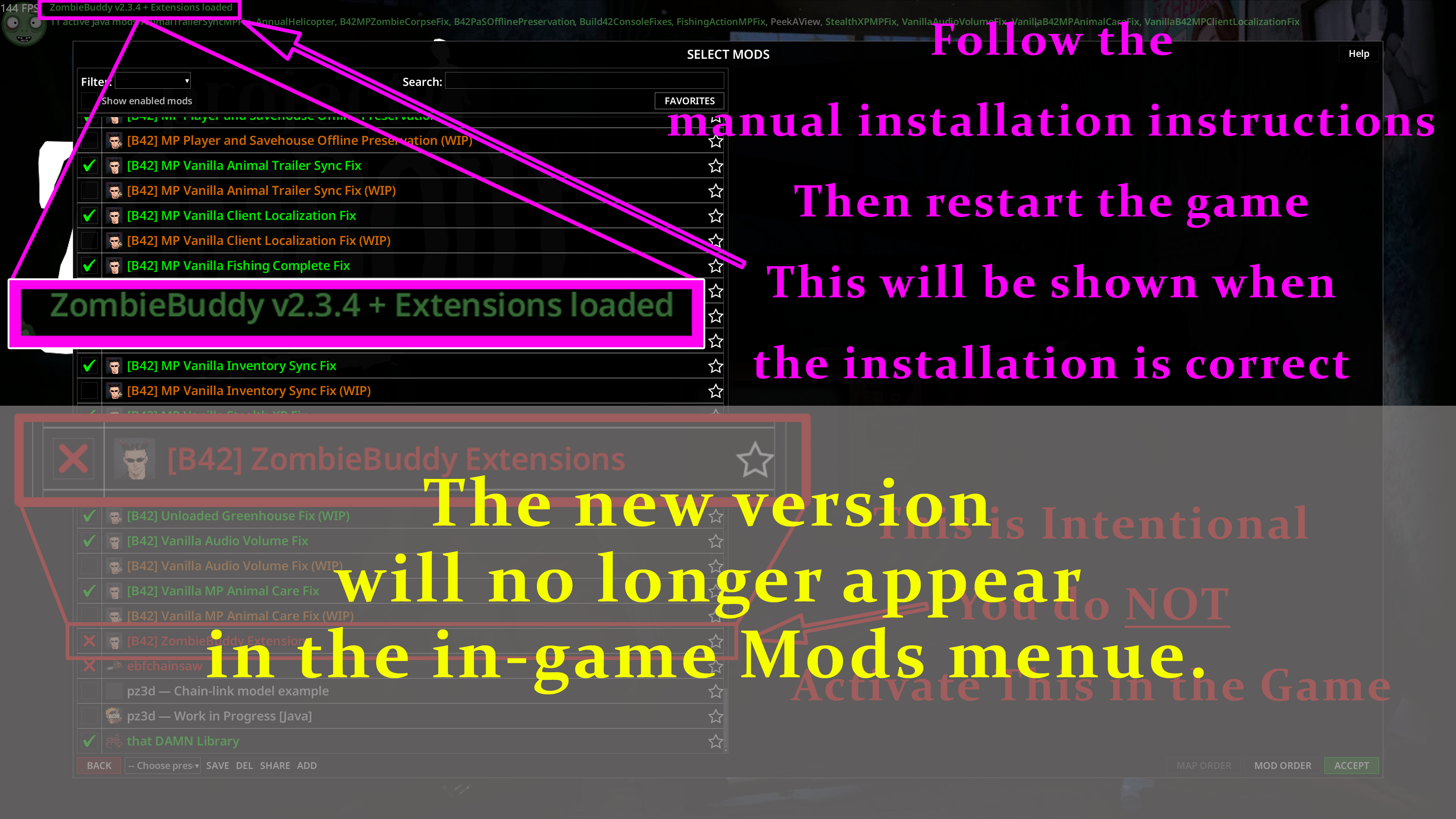
Install and configure original ZombieBuddy first. Keep the original ZombieBuddy subscribed and enabled. This package supplies a replacement ZombieBuddy.jar and, for Windows, a protected zbNative.dll; subscribing downloads them, but does not install them. This manual download does not appear in the in-game mod list. For these Windows paths, replace .. with the parent of your Steam library folder. If the game and Workshop downloads are in different libraries, use the appropriate library for each path. Project Zomboid game folder:
..\Steam\steamapps\common\ProjectZomboid[/code]
[b]Extensions folder (replacement JAR and Windows DLL):[/b]
[code]..\Steam\steamapps\workshop\content\108600\3807686870\mods\ZombieBuddy_Extensions\42
Manual installation
- 1. Close Project Zomboid and all Coop or dedicated-server processes.
- 2. Back up the existing ZombieBuddy.jar in the game or server installation you actually launch, then replace it with the JAR from the Extensions folder. On Windows, use the game folder shown above.
- 3. On Windows, also back up the existing zbNative.dll and replace it with the DLL from the same Extensions folder. Copy both supplied files into each game or dedicated-server installation that should use Extensions; keep the JAR from step 2.
- 4. Start with original ZombieBuddy enabled and use its usual Java-mod approval process.
Other standard JAR destinations are Linux:
projectzomboid/ZombieBuddy.jar[/code]
[b]macOS:[/b]
[code][noparse]Project Zomboid.app/Contents/Java/ZombieBuddy.jar[/noparse]
Windows launch options
Use -agentlib:zbNative --, or -agentlib:zbNative=experimental -- for experimental mode. Use the zbNative.dll from this Extensions package for the Windows DLL protection; an outdated DLL can also prevent startup when options are supplied.
Official updates
A newer officially signed version can replace this extension through the regular updater. The same official version 2.3.4 does not replace it. On Windows, replacement may take effect on the next launch. Features not yet included upstream may be lost; this add-on does not block updates or reapply itself.
Credits
- Unofficial extensions by Antikristianos.
- Extensions programmed with GPT assistance (ChatGPT / Codex).
- Translation assistance: ChatGPT and Google Translate.[/list]
- Original MIT license and dependency notices are included.
Highlights
From source dataFootprint
Rated a light load on a server.
Last update
Its author last shipped an update 10d ago.
[B42] ZombieBuddy Extensions on Nxeon
From our catalogue- One-click install
- Supported on Nxeon Project Zomboid servers. We download it from Steam Workshop, place it, and restart the server.
- Server load
- light
- Smallest plan we suggest
- Project Zomboid — 6 GB (6 GB RAM). This follows our own load rating above, not a benchmark.
- Latest build
- 2026-10-25, released 2026-10-25
Game versions by loader
| Loader | Game versions | Newest |
|---|---|---|
| Workshop |
From 9 recorded builds of [B42] ZombieBuddy Extensions.
Recent builds
| Build | Released | Game versions | Loaders |
|---|---|---|---|
| 2026-10-25 | 2026-10-25 | n/a | Workshop |
| 2026-10-22 | 2026-10-22 | n/a | Workshop |
| 2026-10-22 | 2026-10-22 | n/a | Workshop |
| 2026-10-21 | 2026-10-21 | n/a | Workshop |
| 2026-10-18 | 2026-10-18 | n/a | Workshop |
| 2026-10-15 | 2026-10-15 | n/a | Workshop |
Dependencies
- Required: ZombieBuddy
Declared by the newest build that lists any. Required ones are installed with it on one-click installs.
Run [B42] ZombieBuddy Extensions on a Project Zomboid server
Pick a server or deploy a new one above; it is installed in one click.
What kind of mod it is
From the catalogQuality of life & UI
Small conveniences, tweaks and interface improvements players notice straight away.
Compatibility
- Game
- Project Zomboid
Verified at the source
- ✓Steam WorkshopOfficial listing, checked 2026-11-01Open ↗
- ✓AuthorAntikristianos, as published on Steam Workshop
- ✓LicenseNot published by the sourceFree















