About KNOX TV
From Steam Workshop⚠️ READ THIS FIRST - OR THE MOD WILL NOT WORK ⚠️ Enable ZombieBuddy AND KNOX TV in the MAIN MENU (Mods button on the main menu), not only inside your save. Then approve KNOX TV when ZombieBuddy asks…
⚠️ READ THIS FIRST - OR THE MOD WILL NOT WORK ⚠️
Enable ZombieBuddy AND KNOX TV in the MAIN MENU (Mods button on the main menu), not only inside your save. Then approve KNOX TV when ZombieBuddy asks (restart the game if it doesn't ask). Without this, nothing shows on the TVs and there is no "KNOX TV: Watch" option. Full steps: see How to install below.
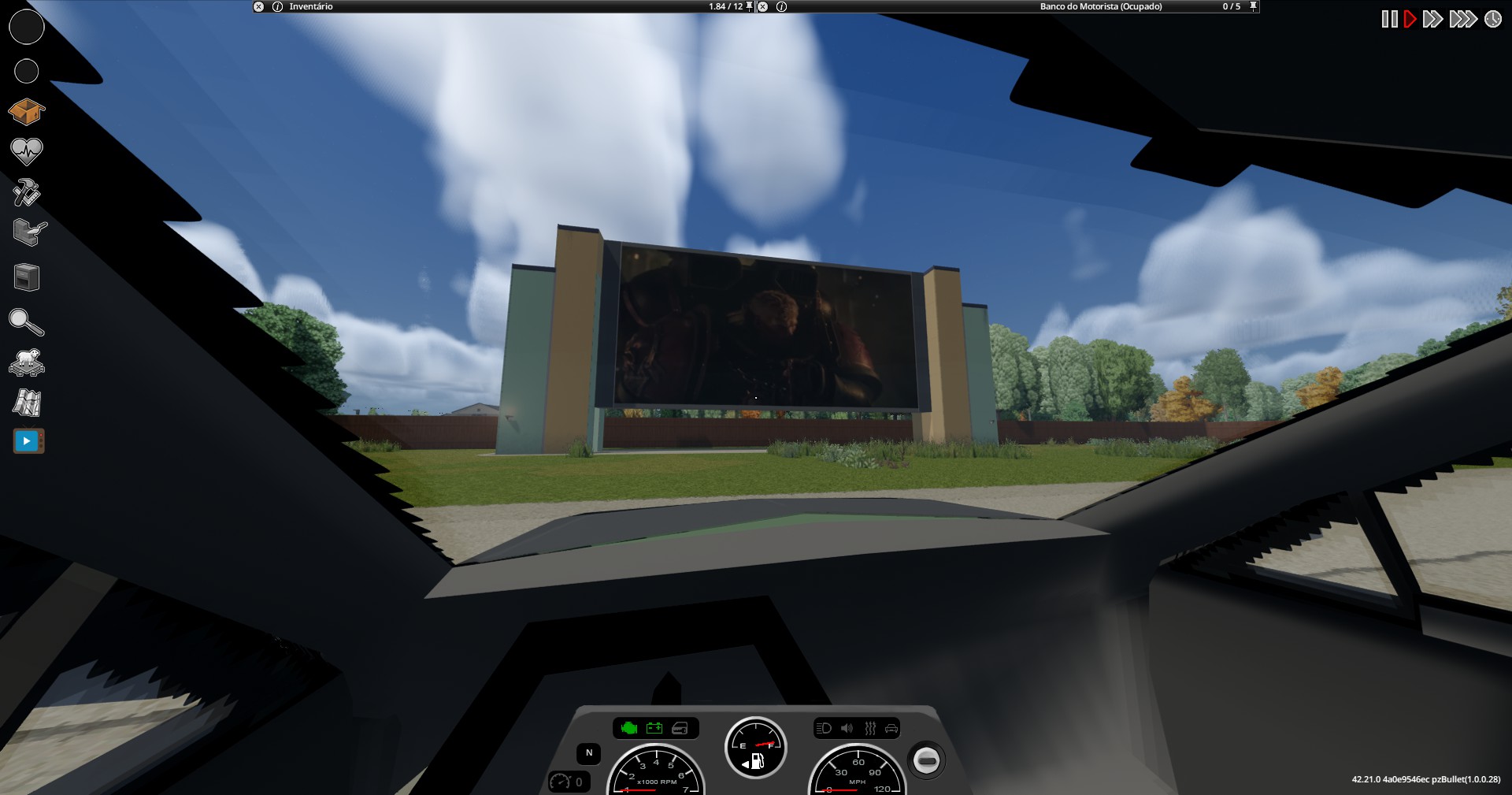
A real web browser on Project Zomboid's TVs! Watch YouTube, Twitch and other sites on in-game TVs and on cinema and drive-in screens, synchronized for every player in multiplayer. Works in first person with Viewpoint.
Features
- TV with a browser: turn a TV on, right-click it and choose "KNOX TV: Watch". Browse with mouse and keyboard (search, fullscreen, YouTube shortcuts).
- Video on the TV screen: the picture shows up on the TV itself in the world, including in first person with Viewpoint.
- Watch together: in multiplayer, everyone near the TV sees and hears the same video at the same point. Play, pause, seeking and changing videos are all synchronized.
- Realistic sound: volume drops with distance and is muffled by walls.
- Your own volume: - and + buttons in the browser window, keys (Page Up / Page Down by default) and a slider in Options > Mods > KNOX TV. Works on any site and only affects you.
- Browser resolution: 480p, 720p or 1080p in Options > Mods > KNOX TV (lower is lighter on the PC). With some mods the new resolution may not show up on the TV screen - for example Viewpoint in first person.
- Big screens: the Rosewood drive-in, the March Ridge cinema (2 rooms), the Valley Station cinema (3 rooms), the Louisville cinemas (3 rooms of the multiplex and a small one) and the outdoor screen of a bar in Muldraugh, with the video kept at the right aspect ratio.
- Remote control: the icon on the left sidebar (or the Insert key, configurable) opens the browser for the screen you're watching, without walking up to it.
- Compatible with Voxel Studio (Viewpoint 3D models): TVs keep the default look so the video can be shown.
- Server permission: a sandbox option chooses who can control TVs: everyone, admins only, or admins only on the big screens. Everyone can always watch.
- Compatible with TV & Radio ReInvented: when KNOX TV is playing on a TV, that mod's floating TV shows the KNOX TV video too, and clicking its screen opens the KNOX TV browser.
Requirements
- Project Zomboid Build 42.21
- ZombieBuddy: subscribe and run its installer. The first time, and after every update, ZombieBuddy asks you to approve KNOX TV.
- Windows 64-bit. The mod is about 280 MB because of the built-in browser.
- Linux (experimental): also subscribe to KNOX TV - Linux Engine (the Linux browser engine, you do not need to enable it) and install ZombieBuddy the Linux way (see its page). Not tested on a real Linux PC yet - feedback welcome!
How to install (read this if nothing shows up)
[olist] [*]Subscribe to ZombieBuddy and KNOX TV, and run ZombieBuddy's installer (see its page). [*]Start the game and enable both mods in the MAIN MENU (Mods button on the main menu, not only inside a save). Click accept: the game reloads to activate them. [*]ZombieBuddy asks you to approve KNOX TV (Java mod). Approve it. If the question doesn't show up, close and open the game again. [*]Existing save: when loading it, check that ZombieBuddy and KNOX TV are also enabled in that save's mod list. [*]In game, turn a TV on and right-click it: the KNOX TV: Watch option must be there. If it isn't, KNOX TV's Java part didn't load - go back to steps 2 and 3. [/olist]
Sound and volume
The sound does NOT go through the game: the built-in browser (KNOXTVEngine.exe) plays it straight to Windows, like a browser open next to the game. So the game's volume options don't change it. What controls it:
- the page itself (e.g. YouTube's volume bar);
- distance to the screen and walls (automatic);
- your own KNOX TV volume: - and + in the browser window, the volume keys (Page Up / Page Down) or Options > Mods > KNOX TV;
- Windows: KNOXTVEngine shows up as a separate app in the Windows Volume Mixer, if you want to set it there.
Supported sites
YouTube, Twitch, Vimeo and Dailymotion. DRM-protected services (Crunchyroll, Netflix, Prime Video) won't play.
Privacy
Logins are stored only on your PC. Login and account pages are never shared with other players: only the video link and its current time are synced.
Notice: this mod includes a program
The browser is a separate program (KNOXTVEngine.exe, based on Electron/Chromium), included in mods/KNOXTV/42/engine. The mod starts it without a window and receives the picture through shared memory. If the browser crashes, the game keeps running.
Servers
The server side is Lua only, so it works even on rented servers. Add this item's ID and ZombieBuddy's to WorkshopItems and "KNOXTV" to Mods (every player also needs ZombieBuddy installed and approved, see How to install). The sandbox option "Who can control TVs" sets who can change what is playing. Sites allowed on TVs are listed in Zomboid/Lua/KNOXTV/allowed_domains.txt, created the first time someone uses a TV.
Languages
English and Portuguese (the game picks it from your language setting; other languages show English).
Workshop ID: 3813477039 Mod ID: KNOXTV
[hr][/hr]
❤️ Support & Community
Want to support the development or join the community?
Highlights
From source dataFootprint
Rated a light load on a server.
Last update
Its author last shipped an update 13d ago.
KNOX TV on Nxeon
From our catalogue- One-click install
- Supported on Nxeon Project Zomboid servers. We download it from Steam Workshop, place it, and restart the server.
- Server load
- light
- Smallest plan we suggest
- Project Zomboid — 6 GB (6 GB RAM). This follows our own load rating above, not a benchmark.
- Latest build
- 2026-10-22, released 2026-10-22
Game versions by loader
| Loader | Game versions | Newest |
|---|---|---|
| Workshop |
From 2 recorded builds of KNOX TV.
Recent builds
| Build | Released | Game versions | Loaders |
|---|---|---|---|
| 2026-10-22 | 2026-10-22 | n/a | Workshop |
| 2026-10-11 | 2026-10-11 | n/a | Workshop |
Dependencies
- Required: ZombieBuddy
Declared by the newest build that lists any. Required ones are installed with it on one-click installs.
Run KNOX TV on a Project Zomboid server
Pick a server or deploy a new one above; it is installed in one click.
What kind of mod it is
From the catalogQuality of life & UI
Small conveniences, tweaks and interface improvements players notice straight away.
Compatibility
- Game
- Project Zomboid
Verified at the source
- ✓Steam WorkshopOfficial listing, checked 2026-10-23Open ↗
- ✓AuthorDTechno, as published on Steam Workshop
- ✓LicenseNot published by the sourceFree