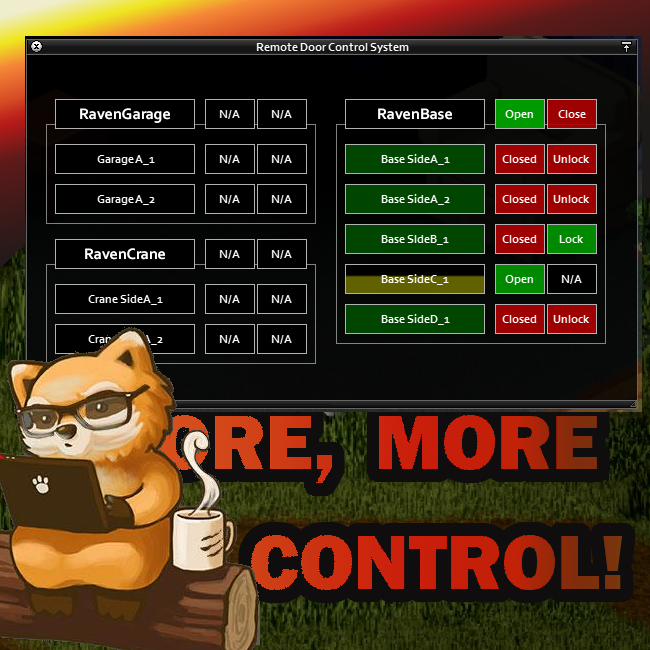
About Remote Door Control System UI
From Steam WorkshopRemote Door Control System UI Bored of none working remotes? One red button pressing to toggle all around? Beware! Here comes precise High Mobile Remote Door Control System. Requires a core mod:…
Remote Door Control System UI
Bored of none working remotes? One red button pressing to toggle all around? Beware! Here comes precise High Mobile Remote Door Control System.
Requires a core mod: Z Remote Door Control
Features
- User Interface similar to inventory window to maintain all your linked doors
- Dynamic UI elements repositioning
- Open/Close doors from a range of your linked remotes
- Lock/Unlock doors from a range of your linked remotes
- Observe doors condition within range of your linked remotes
- Name each of your linked door as you wish to take its advantage later in UI
- Unite several controlled doors under same group to control them simultaneously
- Alternatively toggle all linked doors within your remote range using a hotkey but maintain its real state using RDC UI
- A small fun part introduced mainly for MP: Hijacking - allows other players to hack/control your doors by just connecting them the same way from another side or part of a same door (shown on video) and is a part of core Z Remote Control Doors
- Added HotKey to toggle UI visibility, Default: G
- Added possibility to hide RDC toggle button from screen via SandBox options (Remote Control tab)
Custom doors support
Added full support for the Log Wall Gate mod. "Lock" feature is not applicable for this "door" type.
FAQ
Multiplayer/Singleplayer?
- Supports both.
Existing save?
- Works instantly, not corrupting anything
Garage/Double doors?
- Sure! Main focus area was to make them work correctly.
Can I Hide RDC Button from screen?
- Yes, now you can hide it from SandBox (Remote Control tab).
Highly recommended to use alongside with Long Range Remote to uncover its truly potential: Long Range Remote
❤️ Made with love and we hope that you will enjoy it same, as we do ;)
⛔ Redistribution of this mod without explicit permission from the original creator is prohibited under any circumstances. This includes, but not limited to, uploading this mod to the Steam Workshop or any other site, distribution as part of another mod or modpack, distribution of modified versions. You are free to do whatever you want with the mod provided you do not upload any part of it anywhere.
© 2023 The Z

Workshop ID: 2866223444 Mod ID: ZRemoteDoorControlSystemUIVol1
Highlights
From source dataFootprint
Rated a light load on a server.
Last update
Its author last shipped an update 3 yr ago.
Remote Door Control System UI on Nxeon
From our catalogue- One-click install
- Supported on Nxeon Project Zomboid servers. We download it from Steam Workshop, place it, and restart the server.
- Server load
- light
- Smallest plan we suggest
- Project Zomboid — 6 GB (6 GB RAM). This follows our own load rating above, not a benchmark.
- Latest build
- 2023-05-31, released 2023-05-31
Game versions by loader
| Loader | Game versions | Newest |
|---|---|---|
| Workshop |
From 1 recorded build of Remote Door Control System UI.
Dependencies
- Required: Z Remote Door Control
Declared by the newest build that lists any. Required ones are installed with it on one-click installs.
Run Remote Door Control System UI on a Project Zomboid server
Pick a server or deploy a new one above; it is installed in one click.
What kind of mod it is
From the catalogBuilding & decoration
Blocks, furniture, decorations and building tools.
Compatibility
- Game
- Project Zomboid
Verified at the source
- ✓Steam WorkshopOfficial listing, checked 2026-11-01Open ↗
- ✓AuthorThe Z, as published on Steam Workshop
- ✓LicenseNot published by the sourceFree