






About Tomb's Player Body Overhaul
From Steam WorkshopTomb's Player Body Overhaul B41 + B42.20+ Stable A complete overhaul of the Zomboid character models, designed to add more detail but keep the feel as "Vanilla+" as possible. Available for both B41…
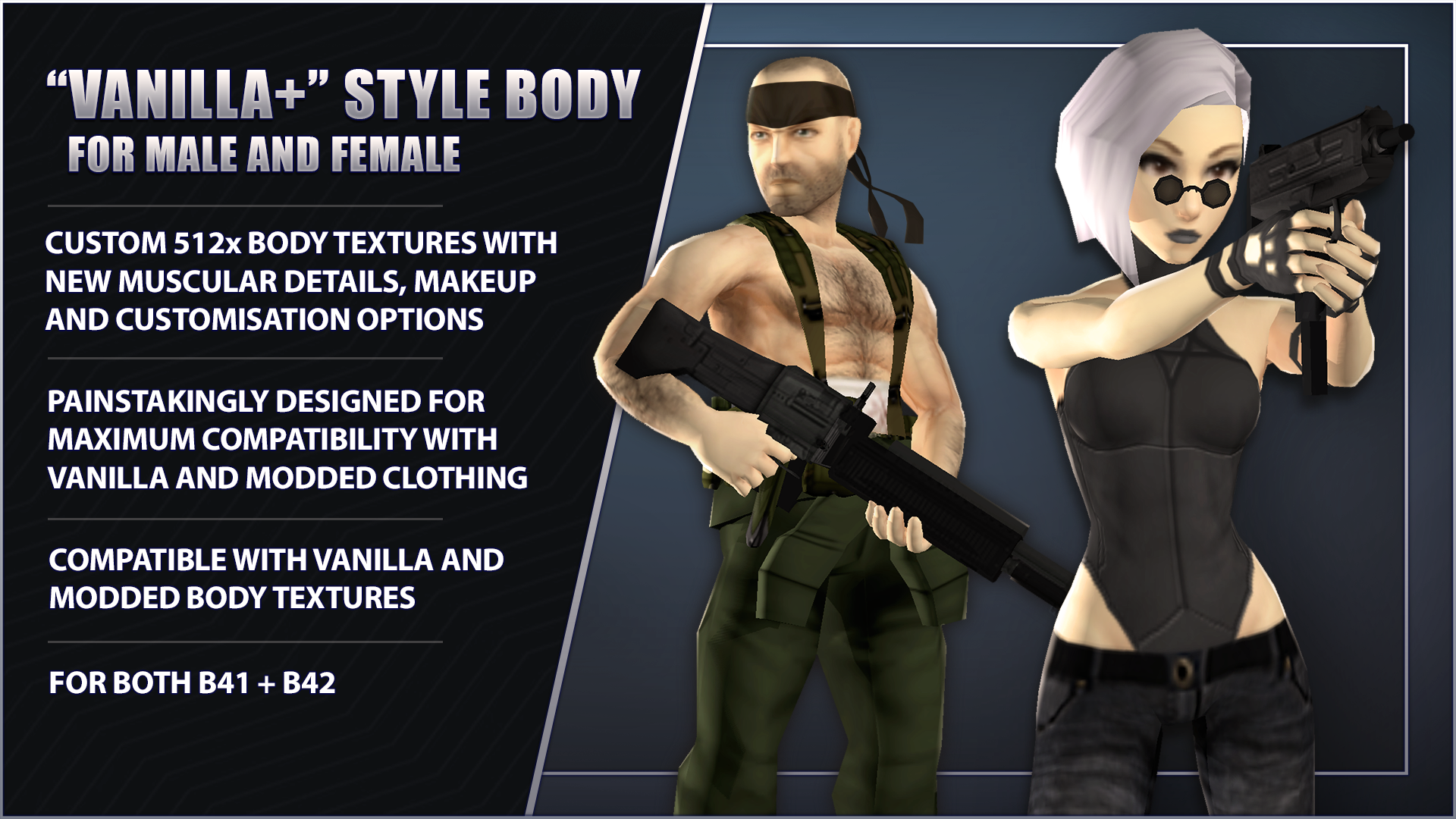
[h1]Tomb's Player Body Overhaul B41 + B42.20+ Stable[/h1] A complete overhaul of the Zomboid character models, designed to add more detail but keep the feel as "Vanilla+" as possible. Available for both B41 and B42 and fully integrated with Spongie's Character Customisation, allowing for a wide range of customisation options.
December 2025 content update: Companion mod Tomb's Wardrobe: Alternative - Out now!

[h1]Important: Body mods can only load as the game is booting up, they must be enabled in the main menu mod list and the game MUST be restarted for them to work.[/h1] The mod comes with 5 files: [h3]Body - [/h3] The main mod containing the models. No textures are pre-packaged if you prefer to use vanilla / your own preference of texture. Like with all body mods they have no associated XML files, so the game must be restarted for the model change to take effect. 3 options for textures. Select only one: [h3]Textures - [/h3] The default underwear ON texture. [h3]Textures [DOLL] - [/h3] Naked, doll-like textures with no details for using ingame underwear. [h3]Textures [NUDE] - [/h3] Includes female nipples + pubic hair for each sex but no explicit nudity. and lastly: [h3]Customisation - [/h3] Adds 9 alternate heads for both Male and Female to Spongie's Character Customisation menu, for a total of 10 unique looks to choose from. Note: I highly recommend setting the max texture size in the settings to at least 512 for the highest quality experience. [list] [*]Ensure that all the mods are loaded after Spongie's Customisation, including textures and customisation. [*]RESTART Project Zomboid to complete the installation. The mod will not take effect correctly until the next time you restart the game .[/list] If everything is set up right your load order should look like this:
[h1]If your character model ends up deformed after activating it's due to PZ_Optimization, not this mod. Note the fix in the FAQ.[/h1] The mod is safe to use with existing saves (but you should always make backups!) If you are adding this to an existing save, the mod files must be enabled on both the main menu mods screen and also in the save file.
An optional (but HIGHLY recommended) compatibility patch to fix minor clipping issues is available at the link below where I'll be putting updates to address these as I find them, as well as creating custom compatibility patches for popular mods.

[h2]Notes on Multiplayer:[/h2] Due to how they can only be loaded during the game's startup sequence, ALL Body Mods are effectively 'client side'. In order to use them in MP each player must have the body mod + texture active on their own game prior to joining a server. Once the body is loaded it will persist into any session until disabled. Running the mods on a server will do nothing. Note: If you run mods that require the body mod as a dependency (Alt Wardrobe, Spongie's Customiser, etc) then the body mods must still be loaded on the server so that dependent mods can activate.
Fancy getting your goth on? A huge selection of Alternative clothes? Then check out the Goth Skin and Alternative Fashion Pack addons below for all your (definitely not goth mommy) needs.

If you want to stay up to date with future development and other upcoming mods, join the Discord where I post updates regularly.I took every care to eliminate errors, but please report any problems in the comments, pinned report thread or preferably, the discord. [h3]If you like the mod please consider giving a like and a favourite to help others find it![/h3]
[h3]If you want to support my efforts[/h3]
Huge thanks to EvilInside for being my sounding board during this project, helping to fine tune the bodies and test the mod, you're a beast bro. Also thanks to Nik, Spongie, Ash, Throttlekitty and Rainmaker, for their resources/help/time/permissions while putting this all together! [h3]List of mods used in the thumbnail/screenshots[/h3] Spongie's Hair
Highlights
From source dataFootprint
Rated a light load on a server.
Last update
Its author last shipped an update 10 mo ago.
Tomb's Player Body Overhaul on Nxeon
From our catalogue- One-click install
- Supported on Nxeon Project Zomboid servers. We download it from Steam Workshop, place it, and restart the server.
- Server load
- light
- Smallest plan we suggest
- Project Zomboid — 6 GB (6 GB RAM). This follows our own load rating above, not a benchmark.
- Latest build
- 2025-12-25, released 2025-12-25
Game versions by loader
| Loader | Game versions | Newest |
|---|---|---|
| Workshop |
From 1 recorded build of Tomb's Player Body Overhaul.
Dependencies
Declared by the newest build that lists any. Required ones are installed with it on one-click installs.
Run Tomb's Player Body Overhaul on a Project Zomboid server
Pick a server or deploy a new one above; it is installed in one click.
What kind of mod it is
From the catalogListed on Steam Workshop as “QoL”
Quality of life & UI
Small conveniences, tweaks and interface improvements players notice straight away.
Compatibility
- Game
- Project Zomboid
Verified at the source
- ✓Steam WorkshopOfficial listing, checked 2026-11-01Open ↗
- ✓AuthorTomb, as published on Steam Workshop
- ✓LicenseNot published by the sourceFree















