
About SimpleAmmoHPBar
From mod.io弹药血量显示 SimpleAmmoHPBar
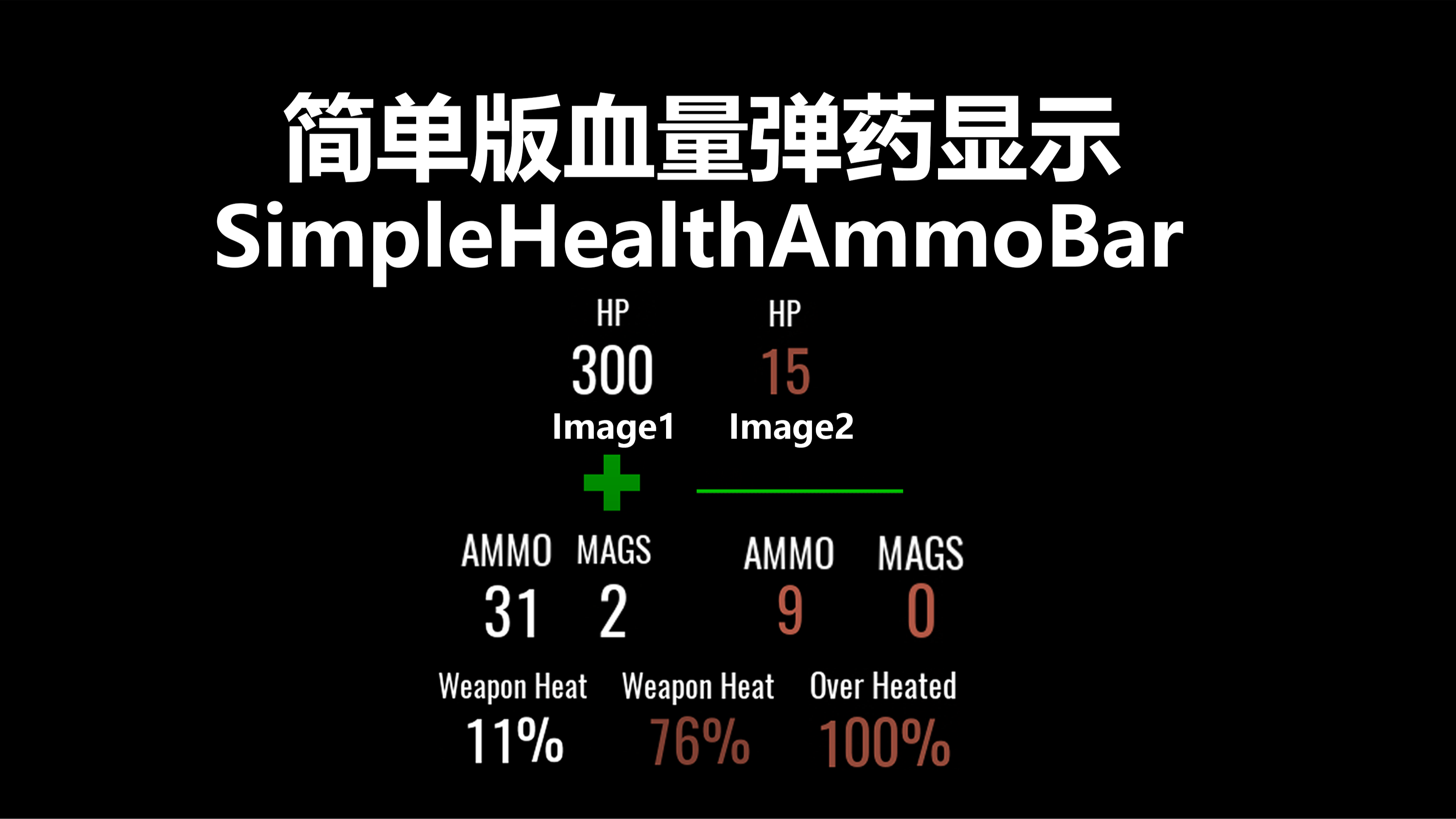
这是一个显示生命值以及武器子弹和武器过热值的UI
它将会显示在指南针两边的位置
长条血量图标会显示在整个屏幕下方
突变代码
SimpleHealthAmmoBar
突变参数
[/SimpleHealthAmmoBar/Mutators/SimpleHealthAmmoBar.SimpleHealthAmmoBar_C]
ShowOfficialAmmoCount=True
HPBarS=True
AmmoBarS=True
MagazineBarS=True
NextAmmoS=True
WeaponHeatBarS=True
HPBarCrossImageS=True
HPBarStripImageS=True
WeaponHeatPromptS=True
ReloadPromptHudS=True
GetFiremodeHudS=True
HPImageStatsColor=(R=1.0,G=0.0,B=0.0,A=0.8) ;Red,Green,Blue,Alpha
HPImageLowColor=(R=1.0,G=0.0,B=0.0,A=0.8) ;Red,Green,Blue,Alpha
ALLBarNameColor=(R=1.0,G=0.0,B=0.0,A=1.0) ;Red,Green,Blue,Alpha
HPBarCrossImageSE=1.0
HPBarStripImageSE=1.0
AmmoHPBarT=(X=0.0,Y=0.0)
AmmoBarT=(X=0.0,Y=0.0)
MagazineBarT=(X=0.0,Y=0.0)
HPBarT=(X=0.0,Y=0.0)
WeaponHeatBarT=(X=0.0,Y=0.0)
HPBarCrossImageT=(X=0.0,Y=0.0)
ShowOfficialAmmoCount:显示/隐藏 原版右下角弹药UI
HPBarS:显示/隐藏 生命值显示
AmmoBarS:显示/隐藏 弹药显示
MagazineBarS:显示/隐藏 备弹显示
NextAmmoS:显示/隐藏 下一个弹匣显示(显示在屏幕中间)
WeaponHeatBarS:显示/隐藏 武器过热值显示
HPBarCrossImageS:显示/隐藏 十字血条图标
HPBarStripImageS:显示/隐藏 屏幕下方长条血条图标
WeaponHeatPromptS:显示/隐藏 即将过热提示(显示在屏幕中间)
ReloadPromptHudS:显示/隐藏 提示换弹以及提示弹药耗尽(显示在屏幕中间)
GetFiremodeHudS:显示/隐藏 提示开火模式,检查弹药和切换开火模式都会出现(显示在屏幕中间)
HPImageStatsColor:更改血量图标初始颜色(默认值为绿色 如不需要调整请不要输入该参数)
ALLBarNameColor:更改下方显示名称以及换弹提示颜色(默认值为白色 如不需要调整请不要输入该参数)
HPBarCrossImageSE:更改十字血量图标的大小
AmmoHPBarT、AmmoBarT、MagazineBarT、HPBarT、WeaponHeatBarT、HPBarCrossImageT
均为坐标调节
This UI displays health, weapon bullets, and weapon overheating values
It will be displayed on both sides of the compass
Mutation code
SimpleHealthAmmoBar
Mutation parameters
[/SimpleHealthAmmoBar/Mutators/SimpleHealthAmmoBar.SimpleHealthAmmoBar_C]
ShowOfficialAmmoCount=True
HPBarS=True
AmmoBarS=True
MagazineBarS=True
NextAmmoS=True
WeaponHeatBarS=True
HPBarCrossImageS=False
HPBarStripImageS=True
WeaponHeatPromptS=True
ReloadPromptHudS=True
GetFiremodeHudS=True
HPImageStatsColor=(R=1.0,G=0.0,B=0.0,A=0.8) ;Red,Green,Blue,Alpha
HPImageLowColor=(R=1.0,G=0.0,B=0.0,A=0.8) ;Red,Green,Blue,Alpha
ALLBarNameColor=(R=1.0,G=0.0,B=0.0,A=1.0) ;Red,Green,Blue,Alpha
HPBarCrossImageSE=1.0
HPBarStripImageSE=1.0
AmmoHPBarT=(X=0.0,Y=0.0)
AmmoBarT=(X=0.0,Y=0.0)
MagazineBarT=(X=0.0,Y=0.0)
HPBarT=(X=0.0,Y=0.0)
WeaponHeatBarT=(X=0.0,Y=0.0)
HPBarCrossImageT=(X=0.0,Y=0.0)
ShowOfficialAmmoCount: Enable/Disable Official bottom right ammunition UI
HPBarS: Enable/Disable Health Display
AmmoBarS: Enable/Disable Ammunition Display
MagazinesBarS: Enable/Disable Ammunition Display
NextAmmoS: Enable/Disable next magazine display (displayed in the middle of the screen)
WeaponHeatBarS: Enable/Disable Weapon Overheating Value Display
HPBarCrossImageS: Enable/Disable Cross Blood Bar Icon
HPBarStripImageS: Enable/Disable the long blood bar icon at the bottom of the screen
WeaponHeatPromptS: Enable/Disable Approaching Overheat prompt (displayed in the center of the screen)
ReloadPromptHudS: Enable/Disable reload prompts and ammo depletion warnings (displayed in the center of the screen)
GetFiremodeHudS: Enable/Disable fire mode prompts, which appear when checking ammo or switching fire modes (displayed in the center of the screen)
HPImageStatsColor: Change the initial color of the health icon (The default value is green. If no adjustment is needed, please do not enter this parameter)
ALLBarNameColor: Change the color of the displayed name below and reload prompt (default is white; if no adjustment is needed, do not enter this parameter)
HPBarCrossImageSE: Change the size of the cross health icon
AmmoHPBarT、AmmoBarT、MagazineBarT、HPBarT、WeaponHeatBarT、HPBarCrossImageT
All are coordinate adjustments
Highlights
From source dataFootprint
Rated a light load on a server.
Last update
Its author last shipped an update 2d ago.
SimpleAmmoHPBar on Nxeon
From our catalogue- One-click install
- Not available. One-click install isn't available for this game's mods yet. Download it and upload it to your server in Files.
- Server load
- light
- Smallest plan we suggest
- Insurgency: Sandstorm — 3 GB (3 GB RAM). This follows our own load rating above, not a benchmark.
- Latest build
- 1.2.1, released 2026-11-02
Recent builds
| Build | Released | Game versions | Loaders |
|---|---|---|---|
| 1.2.1 | 2026-11-02 | n/a | n/a |
| 1.2.0 | 2026-09-07 | n/a | n/a |
Run SimpleAmmoHPBar on a Insurgency: Sandstorm server
Deploy a server above, then upload the file in Files.
What kind of mod it is
From the catalogGame modes & minigames
Game modes, minigames and competitive formats for your server.
Compatibility
- Game
- Insurgency: Sandstorm
Verified at the source
- ✓mod.ioOfficial listing, checked 2026-11-04Open ↗
- ✓AuthorWh_Muato, as published on mod.io
- ✓LicenseNot published by the sourceFree