






About Auto-Docking Optional Home Script
From Steam WorkshopGives the [url=http://steamcommunity.com/sharedfiles/filedetails/?id=1330904900]Spug's Easy Auto-Docking script script live home connector position updates. This is the optional module to accompany…
Gives the Spug's Easy Auto-Docking script script live home connector position updates.
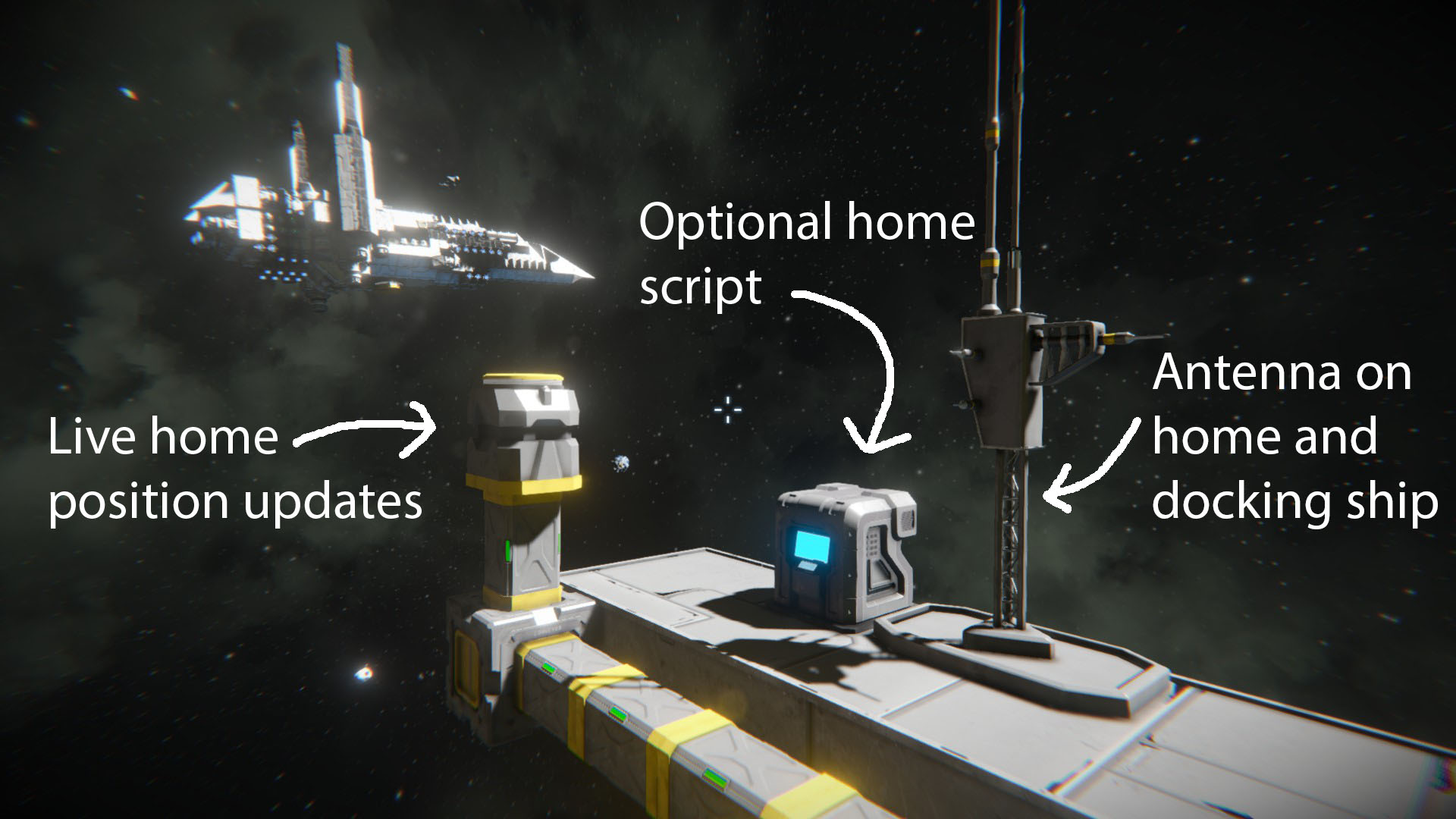
This is the optional module to accompany my Easy Auto-Docking Script. This is placed in a programming block on the home ship to allow live updates on it's position.
Please note, this won't work if the home ship is moving about and it's trying to dock. It'll have a go at it but the final approach isn't possible until home is held still for 2 or 3 seconds. (Shown in the video)
Features:
- Allows the home ship to be moved and the docking ship will still dock to the right place.
- Easy to install
- No changes need to be made to the "Spug's Easy Auto-Docking" script. (ensure it is on the latest version however)
- Only one of these scripts is needed on the home ship to manage many docking ships.
- The tags mentioned in the installation section below can be changed at the top of both scripts.
- Enables drone remote recall.
Installation:
- Both the docking ship and home ship must have an antenna on.
- The antenna on the home ship needs to contain [Home] in the name and the "Assigned programming block" drop down menu must have the programming block with this script in selected.
- The antenna on the docking ship needs to contain [Dock] in the name and the "Assigned programming block" drop down menu must have the programming block with the "Spug's Easy Auto-Docking" script in.
- Ensure all connectors have unique names.
- Recompile both scripts. - The main script should say "found antenna"
(See guide video if you're unsure about any of this)
German tutorials by FreakyMuffin: - Tolles Tutorial von FreakyMuffin für wenn Sie lieber Deutsch. - Teil 2 seines Tutorials
Drone recall:
Run the argument on the optional script: recall ARGUMENT where ARGUMENT is the argument your ship uses to return to the connector you're recalling to. For instance, if your ship is set to a connector with the argument "home1", you would recall it to home1 by running the argument: recall home1
If you're using no argument, just the word recall is needed.
Connectors are saved using their names so make sure ones you intend to dock onto with this are uniquely named. As a good side effect of this though, you can swap the names of your connectors round to remotely change the home connector for your ship: if manually docked onto a connector called "Connector 5", when docking (with this optional script enabled on the home grid) it'll dock to whichever connector happens to be named "Connector 5". This even works across different ships, as long as both have this optional script on board.
Main script:
http://steamcommunity.com/sharedfiles/filedetails/?id=1330904900
Please Rate and Enjoy!
Highlights
From source dataFootprint
Rated a light load on a server.
Last update
Its author last shipped an update 9 yr ago.
Auto-Docking Optional Home Script on Nxeon
From our catalogue- One-click install
- Not available. One-click install isn't available for this game's mods yet. Download it and upload it to your server in Files.
- Server load
- light
- Smallest plan we suggest
- Space Engineers — 8 GB (8 GB RAM). This follows our own load rating above, not a benchmark.
- Latest build
- 2018-04-21, released 2018-04-21
Game versions by loader
| Loader | Game versions | Newest |
|---|---|---|
| Workshop |
From 1 recorded build of Auto-Docking Optional Home Script.
Dependencies
Declared by the newest build that lists any. Required ones are installed with it on one-click installs.
Run Auto-Docking Optional Home Script on a Space Engineers server
Deploy a server above, then upload the file in Files.
What kind of mod it is
From the catalogTechnology & automation
Machines, power, logistics and automation.
Compatibility
- Game
- Space Engineers
Verified at the source
- ✓Steam WorkshopOfficial listing, checked 2026-11-01Open ↗
- ✓AuthorSpug, as published on Steam Workshop
- ✓LicenseNot published by the sourceFree












