







About BluePrint To Assembler
From Steam WorkshopEver wanted to know how much components you really need for your blueprint? Look no further! :p No seriously this script has it all. Just follow the instructions in the script editor on your…
Ever wanted to know how much components you really need for your blueprint?
Look no further! :p
No seriously this script has it all. Just follow the instructions in the script editor on your programmable block and hit OK!
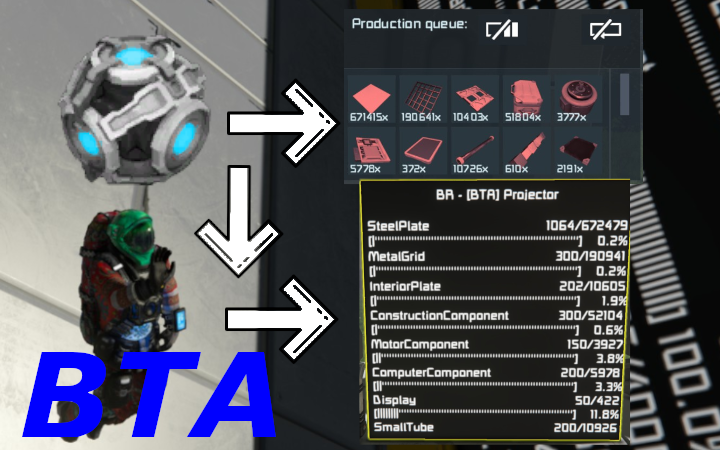
This script will send all the needed components to all associated assemblers so you don't need to calculate yourself and hope you have enough.
Basically it will check if the components of your projection have been send to assembler or not. If not it will calculate how many components you need in addition to your inventory (or not :p this is configurable :p), and will divide these components over all associated assemblers.
All blocks (including latest wasteland blocks) are in here so you have optimal calculations. If I missed a block (check your programmable block side text) please let me know i will try to fix this if possible asap. Custom blocks can be added in script. If necessary, custom components can also be added. (This might require a bit of script knowledge to add them!)
A big issue with these kind of scripts is the difference between armor blocks. I sort of fixed this as you will see in the instructions.
As a bonus you can also see how many components u need on a associated lcd. See components for a specific projector or see components needed for all associated projectors. IT IS ALL CONFIGURABLE :p
Run this program with arguments. Handy for button setup! - {projector name};{keyvalue heavy/toassembler};{Optional True/False} Description: With this argument you can change projector custom data values. Example arguments: [BTA] Projector;heavy;true (will set type armor for projector to heavy) [BTA] Projector 2;toassembler (will toggle if projector components must be sent to assemblers) - reset Description: Will reset all customdata values from projectors and lcds.
PS: optimal performance is maybe not achieved but I'm kinda noob in this so if any tips or notice some bugs feel free to let me know :) Also if errors occur info should be placed in CustomData of the ProgrammableBlock. If necessary, add me and send the info so I can take a better look at it.
Hope you enjoy this script!
Highlights
From source dataFootprint
Rated a light load on a server.
Last update
Its author last shipped an update 5 yr ago.
BluePrint To Assembler on Nxeon
From our catalogue- One-click install
- Not available. One-click install isn't available for this game's mods yet. Download it and upload it to your server in Files.
- Server load
- light
- Smallest plan we suggest
- Space Engineers — 8 GB (8 GB RAM). This follows our own load rating above, not a benchmark.
- Latest build
- 2022-02-20, released 2022-02-20
Game versions by loader
| Loader | Game versions | Newest |
|---|---|---|
| Workshop |
From 1 recorded build of BluePrint To Assembler.
Run BluePrint To Assembler on a Space Engineers server
Deploy a server above, then upload the file in Files.
What kind of mod it is
From the catalogTechnology & automation
Machines, power, logistics and automation.
Compatibility
- Game
- Space Engineers
Verified at the source
- ✓Steam WorkshopOfficial listing, checked 2026-11-01Open ↗
- ✓AuthorBusDroake, as published on Steam Workshop
- ✓LicenseNot published by the sourceFree












