






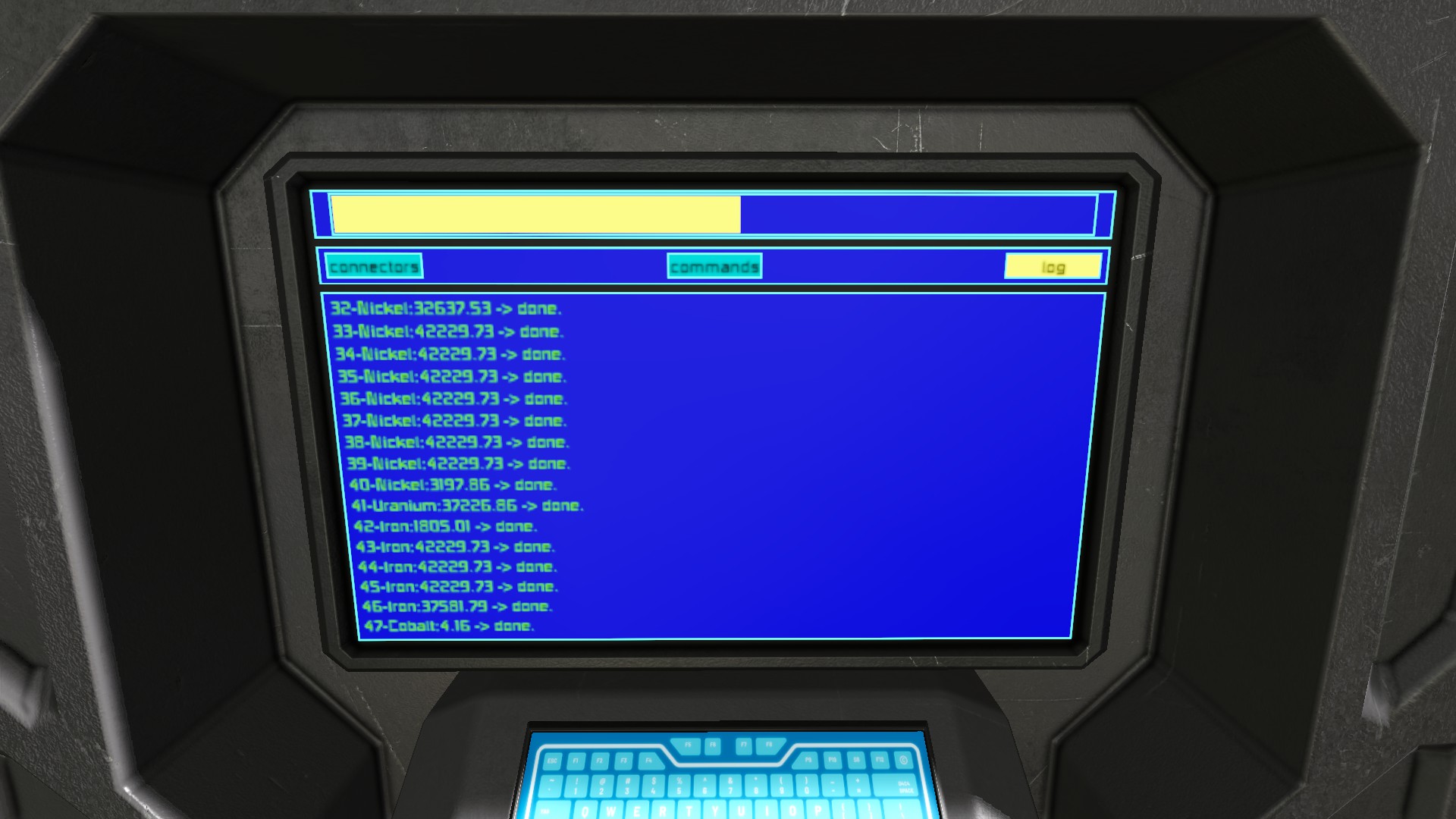

About Cargo Transfer System (In Game Script)
From Steam Workshop14.11.20 - Uppdate Orders & inter grid communications. Now operator or nother script can add order in list via GUI, run argument or inter grid communication. You can interrupt current order by…
14.11.20 - Uppdate
Orders & inter grid communications. Now operator or nother script can add order in list via GUI, run argument or inter grid communication. You can interrupt current order by pressing "C" key on log page.
Description
This script will do all the ship unloading work for you. No need to waste all your time dragging, dropping, and searching for the container. All you need to do is to connect your ships, choose which items you want to transfer, press the button and watch how the transference flow is going. You can also turn on and off connectors, and control their connection state via GUI. The program has GUI colors you can customize.
Deployment preparation
All you need is a programmable block, control block, and surface provider block (LCD, control seat, cockpit), of course enabled in game scripts, and at least one connector. In terms of safety, if you have a small ship it will be better to put a remote-control block and set it to control nothing.
Settings
The first time you run this script on your craft, it will write pattern data in its programmable block custom data.
Controller name: Cockpit
Surface provider name: Cockpit
Surface number: 1
GIU Scale: 1.0
Borders Color: 110: 114: 120: 255
Background Color: 37: 46: 53: 255
Text Color: 203: 226: 233: 255
Highlighted Color: 146: 205: 218: 255
Button Color: 66: 75: 82: 255
Button Text Color: 203: 226: 233: 255
Inactive Color: 33: 40: 45: 255
Success Color: 75: 185: 25: 255
Issue Color: 255: 255: 25: 255
Error Color: 245: 65: 25: 255
Controller name: Name of controller block. It can be cockpit, control seat or remote control block; Surface provider name: Name of block that have text surfaces, it can be same as controller block's name; Surface number: Well, if this block have more than one surface you can choose it here; GIU Scale: Things on screen is too small to see? Make this magical number just a half bigger to make things visible. But dont make it too large or you will get exception. Colors! If you have translucent LCD as surface provider, you need to change last number of needed color to make it translucent.
Control
Indicated control keys are assigned by default. There is few pages: connectors, commands and log. To switch between them use roll control, "Q/E". On connectors page you can choose from which connector you want to get info. Use side movement action "A/D". To switch connection state use move down action "C". To turn it on or off use move up action "SP". On commands page you have items filter, items that you want to transfer, and transference direction. To choose direction use move down action "C". There is six filters right now: all, ore, ingots, components, ammo and tools. To choose apropriate filter use move forward/backward "W/S" movement. To start transfer items with chosen filter use move up action. Log page is to show to you process of current transfer. You can scroll it with move forward/backward "W/S" action. You can interrupt current transfer by pressing "C" key. You can assign those actions to toolbar. Drug and drop programmable block on toolbar and choose "Run". Write key that indicates action in argument, you can find them right above.
Examples of terminal commands:
unload 1 "steel plates, potato, radiator"
gather 2 "glass, large tubes, grav comp"
unload 1 "lump bulb - 155, pok ball, bolts - 1500"
gather 1 ore
unload 9 "flour - 30
unload 4 components
Where number is a number of connector. If it's not specified it would be last number selected via GUI. If you need to transfer items by type you need to pick one of those.
All Ore Ingots Components Tools Ammo[/code]
If type or names is not specified it will move everything.
If you want to transfer items with specific names you need to write them in quotes as in example.

[h1]        Inter Grid Communications[/h1]
    Right now to communicate with system via script you can run it with agrument or send message via IGC. But when script sends it a message via IGC, calling script would be notified when CTS ended it's order. Messages to CTS is have same format as terminal input. It can be found on a grid since it have static name "PB CarTraSys". Script should send a  unicast message with CTS programmable blocks ID. When transfer is over CTS would send unicast message: "OVER " + (long) Connector ID. Directly to script that ordered this transfer.

[h1]        Log[/h1]
    Messages:
[list]
[*]Something. To large. - Item is to large to get it out from container and move it to ship's connector. You will see it when you drive small ship with small conveyor system, having components in it's cargo.
[*]Line is damaged, blocked or doesn't exist. - It is damaged, destroyed, there is sorter in between connector and container, or there is no connection between them at all.
[*]Cannot transfer this item to opponent's ship. - Undescripable [strike]♥♥♥♥[/strike] horror is happend. Don't even aks me about this message. It is last case error message, i don't know what can cause it to show up.
[/list]Highlights
From source dataFootprint
Rated a light load on a server.
Last update
Its author last shipped an update 6 yr ago.
Cargo Transfer System (In Game Script) on Nxeon
From our catalogue- One-click install
- Not available. One-click install isn't available for this game's mods yet. Download it and upload it to your server in Files.
- Server load
- light
- Smallest plan we suggest
- Space Engineers — 8 GB (8 GB RAM). This follows our own load rating above, not a benchmark.
- Latest build
- 2021-02-25, released 2021-02-25
Game versions by loader
| Loader | Game versions | Newest |
|---|---|---|
| Workshop |
From 1 recorded build of Cargo Transfer System (In Game Script).
Run Cargo Transfer System (In Game Script) on a Space Engineers server
Deploy a server above, then upload the file in Files.
What kind of mod it is
From the catalogTechnology & automation
Machines, power, logistics and automation.
Compatibility
- Game
- Space Engineers
Verified at the source
- ✓Steam WorkshopOfficial listing, checked 2026-11-01Open ↗
- ✓AuthorPrellentor, as published on Steam Workshop
- ✓LicenseNot published by the sourceFree












