







About Color Replacer Blocks - V2
From Steam WorkshopMeridius_IX has retired from modding. Click Here for more details. Introduction This is a total rewrite of the Color Replacer Blocks mod. Instead of using 2 or more color replacer blocks to initiate…
Meridius_IX has retired from modding. Click Here for more details.
Introduction
This is a total rewrite of the Color Replacer Blocks mod. Instead of using 2 or more color replacer blocks to initiate a change, this rewrite allows for much more flexible control - all from a single terminal control screen!
Included Features
- RGB Replacement - You can specify a block color that will be used in the replacement with RGB sliders.
- Existing Colors - You can also select colors that already exist on the grid for use in replacement.
- Direct Value - If you know the ColorMaskHSV value that you want to use for replacement, you can provided it directly as well in {X:0 Y:0 Z:0} format.
- Re-Skin Blocks - You can also apply Armor Skins to selected blocks as well.
- Randomized Paint - Select a color and skin and randomize the paint on your grid.
- Sub-Grid Recoloring - You can optionally recolor sub-grids as well!
How To Use The Controls
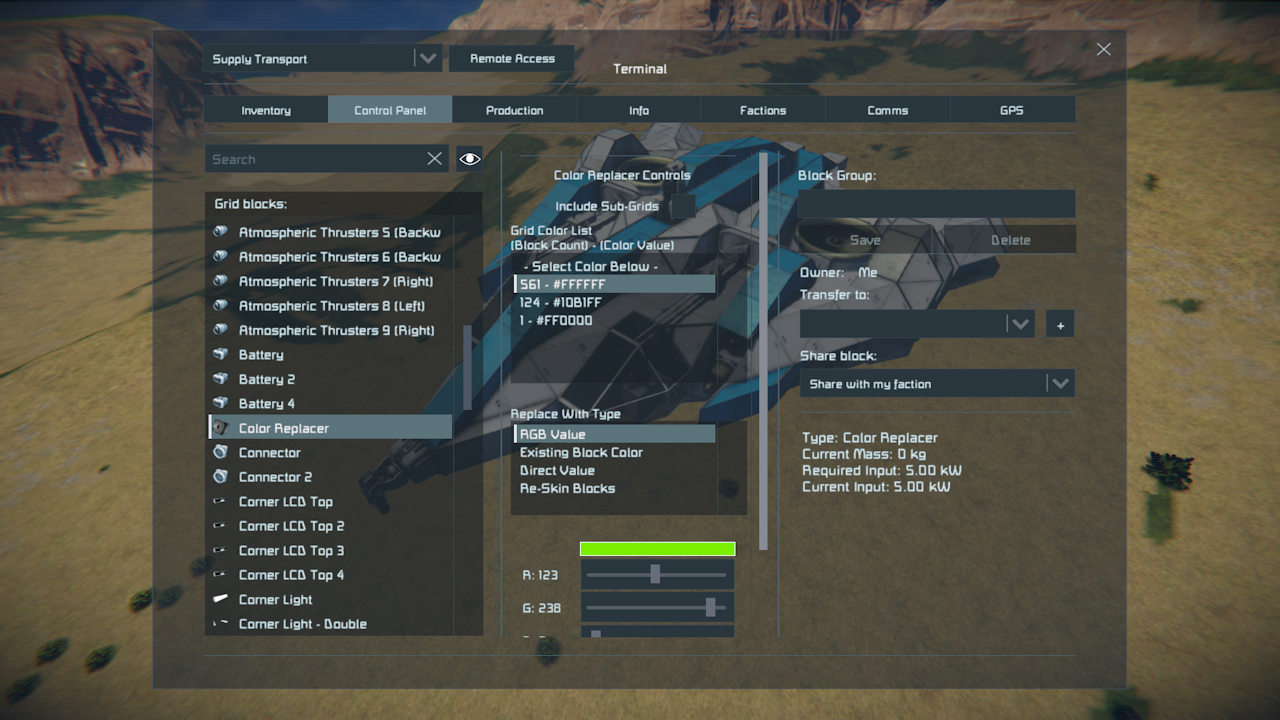
Begin by building the block and accessing it in the terminal menu. The first list you see is a reference to all the current colors on the grid and how many blocks use that color (list items are formatted [block count] - [color]).
Below the Grid Color List, there is another list that allows you to select what you want to replace colors with. When you select an item from that list, the controls below it will be changed to fit that selection.
The default method to change block colors is using the RGB Value sliders. Beneath the RGB sliders, there's a button that will set the sliders to the currently selected grid color as well.
The Existing Block Color option allows you to instead select a color that already exists on the grid to be used for replacement. It displays a list that should be identical to the Grid Color List to select values from. This is useful for getting colors that appear to be duplicate (eg: off by 0.0001 internally), and matching them to the rest of your color scheme.
Direct Value is useful if you've acquired the ColorMaskHSV value from a prefab file or other related definition. The format provided must be {X:0 Y:0 Z:0} - Most people probably will not need to use this feature.
Re-Skin Blocks displays a list of all the Armor Skins for applying them to the selected blocks. The skins will only apply properly if you own the skin in your Steam Inventory. Attempting to paint with a skin that you do not own will result in the default armor skin being used instead.
Random Paint allows you to select a color, skin, block count, paint size, and color variance. With those options selected, it will randomly paint parts of your grid. Works great with rusty/battered skins, and can be used in all sorts of combinations!
Once you've made your selections, press the "Replace Now" button at the bottom to execute the changes!
Known Issues and Quirks
- Gold and Silver Skins - Strange behavior can be observed when using a Gold or Silver armor skin, the block color becomes locked to a specific color until you change it back to a paintable skin. This won't break anything, but may look strange in the Grid Color List.
Modular Encounters Collection Links
Click Here For The General FAQ About The Mods I Curate. Click Here For My Rules Regarding Mod Republishing. Click Here For The Modular Encounters Admin and Modders Guide. Click Here To Join The Modular Encounters Collection Discord Server. Click Here If You'd Like To Support My Work On Patreon.
Highlights
From source dataFootprint
Rated a light load on a server.
Last update
Its author last shipped an update 4 yr ago.
Color Replacer Blocks - V2 on Nxeon
From our catalogue- One-click install
- Not available. One-click install isn't available for this game's mods yet. Download it and upload it to your server in Files.
- Server load
- light
- Smallest plan we suggest
- Space Engineers — 8 GB (8 GB RAM). This follows our own load rating above, not a benchmark.
- Latest build
- 2023-04-13, released 2023-04-13
Game versions by loader
| Loader | Game versions | Newest |
|---|---|---|
| Workshop |
From 1 recorded build of Color Replacer Blocks - V2.
Run Color Replacer Blocks - V2 on a Space Engineers server
Deploy a server above, then upload the file in Files.
What kind of mod it is
From the catalogBuilding & decoration
Blocks, furniture, decorations and building tools.
Compatibility
- Game
- Space Engineers
Verified at the source
- ✓Steam WorkshopOfficial listing, checked 2026-11-01Open ↗
- ✓AuthorMeridius_IX / Lucas, as published on Steam Workshop
- ✓LicenseNot published by the sourceFree












