






About Dragon's Inventory Manager
From Steam WorkshopDragon's Inventory Manager (DIM) — open beta Current version: v1.3.6 (10/08/2026) A single programmable-block script that sorts your base by container tags, keeps refineries on the ore you need most,…
Dragon's Inventory Manager (DIM) — open beta
Current version: v1.3.6 (10/08/2026)
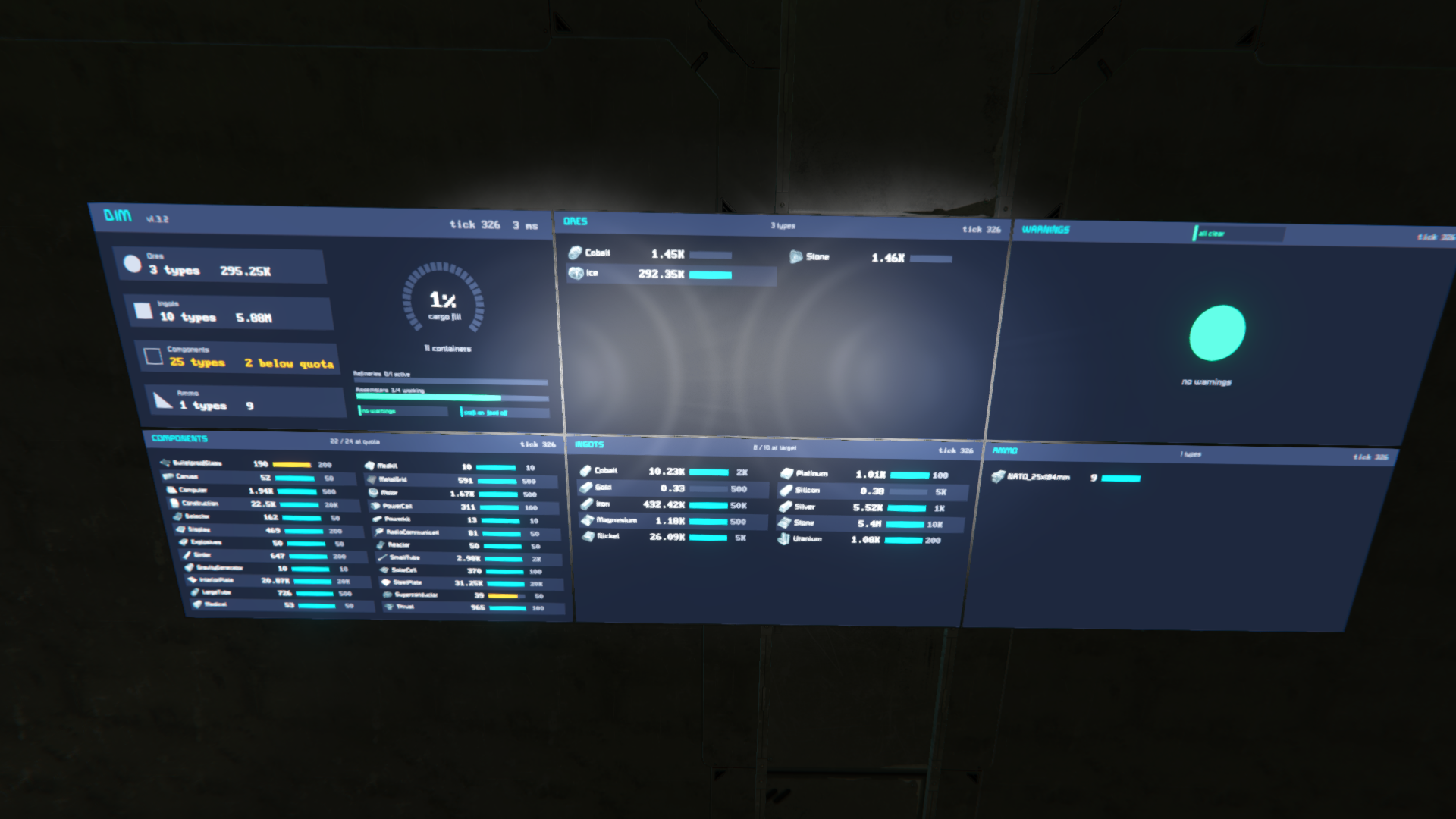
A single programmable-block script that sorts your base by container tags, keeps refineries on the ore you need most, keeps components at quota, empties and refuels docked ships, and shows it all on graphical LCDs. Current game content, Apex food and seeds included. No timer block, no setup beyond naming containers.
This is a beta. It runs clean on a 135-block survival base with two ships docked. What it has not yet seen is a large base, a dedicated server, or a heavily modded grid. That is what I am asking you to throw at it. Details on what to report are at the bottom.
[hr][/hr]
Quick start
[olist] [*]Open a Programmable Block, Edit, paste the script, Check Code, OK & Exit. It runs itself every 100 ticks (about 1.67 s). [*]Name three cargo containers with these tags anywhere in the name: [noparse][DIM Ore][/noparse], [noparse][DIM Ingot][/noparse], [noparse][DIM Component][/noparse]. Items start moving. [*]Add more tags as you need them. The PB's detail panel shows DIM v1.3.6 tick N | M ms while it is healthy. [/olist]
Container tags
- [noparse][DIM Ore][/noparse] — ores, Scrap Metal, and Ice unless you have an Ice container
- [noparse][DIM Ingot][/noparse] — ingots, Gravel, Prototech Scrap
- [noparse][DIM Component][/noparse] — components, Zone Chips, Prototech components, plushies
- [noparse][DIM Ammo][/noparse] — every magazine, flare clip and firework, vanilla and DLC
- [noparse][DIM Tool][/noparse] — hand tools and weapons, Medkits, Powerkits, Radiation Kits
- [noparse][DIM Bottle][/noparse] — oxygen and hydrogen bottles
- [noparse][DIM RawFood][/noparse] — Food Processor ingredients: fruit, vegetables, mushrooms, grain, algae, raw and cooked meat (also Raw, Ingredient)
- [noparse][DIM Food][/noparse] — meal packs, Clang Cola, Cosmic Coffee (also Prepared, Meal)
- [noparse][DIM Seeds][/noparse] — every seed and spore (also Seed)
- [noparse][DIM Ice][/noparse] — ice only; without one, ice goes to Ore
Plurals work (Ores, Components...). A misspelt tag word is reported on the PB panel, not silently ignored.
Item filters: [noparse][DIM Ingot:Iron,Gold,Silver][/noparse] accepts only those. Priority: [noparse][DIM P1 Component][/noparse] fills before P5 (the default) and P9. They combine: [noparse][DIM P2 Ingot:Iron,Gold][/noparse]. Control: [noparse][DIM Ignore][/noparse] leaves a block alone, a refinery or assembler included (no jobs, no feeding, no output clearing); [noparse][DIM Source][/noparse] force-drains a protected block. A tagged container holds only its category: anything misfiled in it is moved to the right place.
What it does without being asked
- Sorting from drills, connectors, collectors, cockpits and untagged cargo into your tagged containers, 20 moves per run.
- Refineries fed from [noparse][DIM Ore][/noparse] with the scarcest ingot's ore pushed to the front; inputs balanced across refineries.
- Assemblers keep 22 components plus Medkits and Powerkits at quota: every short item gets a 10 % batch each run, on an assembler that can actually build it (Basic Assembler limits respected; Food Processor, Prototech Assembler and Survival Kits are never given component jobs). Ingots stay in storage; assemblers pull what their jobs need, and an idle assembler hands leftovers back.
- Adaptive quotas learn your burn rate and raise the target up to 5x base while you are building, then fall back over 30 minutes. Steel Plate, Interior Plate and Construction hold a 20,000 floor.
- Docked ships (v1.3): a ship locked to a base connector is emptied into your tagged containers, ore from its drills included. A ship with an O2/H2 generator keeps 25,000 ice aboard, topped up from the base. Its hydrogen tanks are refuelled from the base's tanks. Put [noparse][DIM Ignore][/noparse] on either connector to exempt a ship. A tagged container on the ship is never drained.
- Protected: reactors, turrets and weapons, O2/H2 generators, tanks, jump drives, ship welders, Survival Kits, Safe Zones, parachutes, store and contract blocks, target dummies. Their contents are never touched.
LCDs
Tag an LCD's name. Wide LCDs get the graphical panel, square ones get text; add the word Text to force text.
- [noparse][DIM LCD][/noparse] — overview: category tiles, cargo gauge, refinery and assembler bars, warning pill
- [noparse][DIM LCD Component][/noparse] — every quota item with icon, amount, bar and target
- [noparse][DIM LCD Ore][/noparse], [noparse][DIM LCD Ingot][/noparse], [noparse][DIM LCD Ammo][/noparse] — stock with icons and bars
- [noparse][DIM LCD Warnings][/noparse] — full containers, low stock, blocked moves, stage errors, docked-ship status
- [noparse][DIM LCD Cargo][/noparse] — every container with its fill bar and percentage, near-full ones in red
- [noparse][DIM LCD Status][/noparse] — block counts, an instruction gauge with the peak run against the game's limit, per-stage bars, toggle pills
Known limits in this beta
- Settings (quotas, toggles) are edited at the top of the script. Editing quotas from an LCD is the next release.
- The game cuts any script at 50,000 instructions per run. From v1.3.3 DIM skips a stage and warns at 60 % instead of dying, and the PB panel's instr line shows where the budget goes. A 140-block base with six refineries runs at about 8,000.
Highlights
From source dataFootprint
Rated a light load on a server.
Last update
Its author last shipped an update 27d ago.
Dragon's Inventory Manager on Nxeon
From our catalogue- One-click install
- Not available. One-click install isn't available for this game's mods yet. Download it and upload it to your server in Files.
- Server load
- light
- Smallest plan we suggest
- Space Engineers — 8 GB (8 GB RAM). This follows our own load rating above, not a benchmark.
- Latest build
- 2026-10-09, released 2026-10-09
Game versions by loader
| Loader | Game versions | Newest |
|---|---|---|
| Workshop |
From 1 recorded build of Dragon's Inventory Manager.
Run Dragon's Inventory Manager on a Space Engineers server
Deploy a server above, then upload the file in Files.
What kind of mod it is
From the catalogCreatures & NPCs
Adds or changes creatures, NPCs and how they behave.
Compatibility
- Game
- Space Engineers
Verified at the source
- ✓Steam WorkshopOfficial listing, checked 2026-10-17Open ↗
- ✓AuthorDragonSoul9000, as published on Steam Workshop
- ✓LicenseNot published by the sourceFree












