







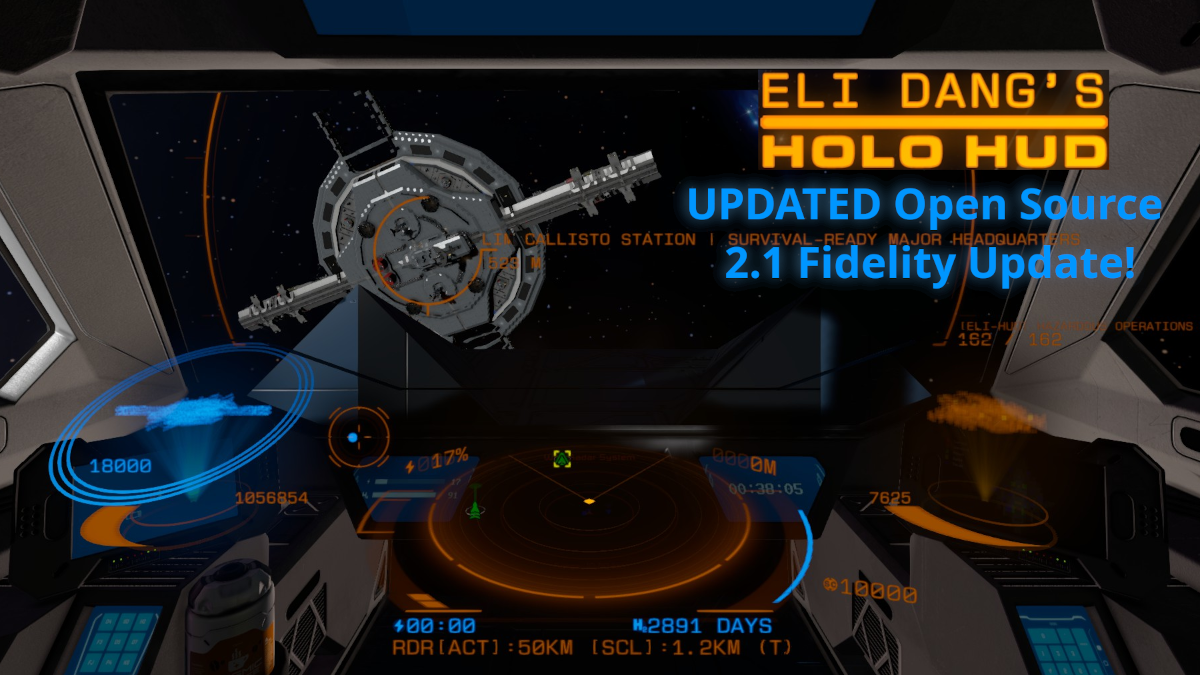
About Eli Dang's Holo Hud [Open Source]
From Steam WorkshopEli Dang's Holo Hud - Open Source Edition v2.1 This is an open source updated branch of Polygon Cherub's original Eli Dang's Holo Hud =D I've made quite a few changes (Including Active vs Passive…
Eli Dang's Holo Hud - Open Source Edition v2.1
This is an open source updated branch of Polygon Cherub's original Eli Dang's Holo Hud =D
I've made quite a few changes (Including Active vs Passive radar, and holotable projected holograms and radar, also keybinds for selecting targets and rotating holograms), and many optimizations.
Changes/Features for this release are below:
Configuration
Global settings are stored in the World Save folder, eg SaveGameName\Storage\3540066597_EliDangHud\EDHH_settings.xml
See configuration example: https://github.com/FenixPK/EliDangHUD?tab=readme-ov-file#example-settings-edhh_settingsxml
Relevant Tags: [ELI_HUD] for cockpit HUD, [ELI_HOLO] for holo radar above terminal blocks, [ELI_LOCAL] for local grid hologram above terminal blocks.
Features
- Holographic HUD with radar and various ship stats including speed, energy, hydrogen, integrity holograms for local grid and target, planet orbit lines, velocity vector lines, visor effects, and more. Enabled on any control seat with either the tag [ELI_HUD] (default) or by setting main cockpit (optional config setting). All settings are configurable at the global level, and most also per-cockpit (or terminal block) via CustomData.
- Some actions like toggling display of unpowered grids, voxels, holograms, or entire HUD can be toggled via toolbar actions if you assign the cockpit to your toolbar. More actions to be added in the future.
- Holographic radar projection can be displayed above any terminal block (like a holo table, LCD, control panel etc.) using [ELI_HOLO] tag in the block custom name, then use CustomData to tweak position, scale, rotation, and what it detects. Can use keybinds for nearest/next/previous target to select a target on the closest holo radar table!
- Seated HUD Missile Warning if WeaponCore is enabled. Shows count of inbound missiles. Radar and holotable radar will show blips for each missile.
- Holographic local grid projection can be displayed above any terminal block using [ELI_LOCAL] tag in the block custom name, then use CustomData to tweak position, scale, rotation, and color. Can change CustomData of block to show target hologram instead as well.
- Holographic projections for the local grid and the selected target grid showing hull integrity and shield status (technically jump drives right now, to be overhauled for modern shield mods). These projections use "block clustering" which defaults to a range of 1x1x1 to 2x2x2 for grids below a certain block count (and increases to 1x1x1 to 3x3x3 after) to reduce the squares drawn on screen for performance. Damage is reflected immediately by color changes to the cluster, and block removal/addition triggers a complete recluster after a wait period of no further changes to reduce stutter. It does this over multiple ticks to further reduce stutter. There are complex settings to tweak this behaviour in the global config file, documentation on this below.
- SigInt lite logic for radar detections, uses powered antenna on your grid to determine radar range and whether you are in Passive or Active mode based on if any antenna is broadcasting. Largest broadcast distance of any antenna on the grid becomes your max Passive detection range. Largest broadcast distance of broadcasting antenna becomes your Active detection range. This means increasing/decreasing antenna broadcast distance changes your radar range and thus the "zoom" of the radar projection. Use "Range Brackets" to determine the zoom level.
- Radar zooms in upon selecting a target so it fits better on screen. Uses configurable "Range Brackets" to determine zoom level. Ie if a target is 245m away and you have 200m brackets it will zoom to a 400m max range. If you had 50m brackets it would zoom to 250m max range. This makes it easier to see your position in relation to the target on the radar screen.
- Radar uses custom blip icons for various ship sizes. Different icon sets are used for small grids and large grids. Then based on block count the icon changes to represent the size of the ship. The block counts for each tier are configurable. Blip icons are from an X4 Mod with permission, link in the credits section below.
- Grid flares (white glints) behind distant grids in space, configurable.
- Keybinds to rotate the holograms (local and target) around all three axes, reset the view, and for target only you can cycle between orbit cam, perspective, or static view you can rotate manually. Configurable.
- Mouse button or keybind to target the entity in the center of your view. Configurable. Keybinds to target nearest grid, target previous grid, and target next grid. (Defaults: R for nearest, B for previous, N for next. Hold Ctrl for hostiles only.). Also works for holo radar tables!
- Huge optimizations for Radar and Holograms versus the original mod.
- Further improved holograms versus my prior releases as well for both performance and fidelity by using event handlers after initialization, block clustering, and occlusion culling.
- Everything configurable! You can turn off planet orbits, velocity lines, local hologram, target hologram, radar, visor effects, cockpit dust, grid flares etc. You can tweak the clustering logic, and the performance vs fidelity balance. You can tweak how quickly the holograms recluster after block add/removal, and how many clusters it processes per tick to spread the load out. All explained further below.
- Chat commands to edit global settings in-game! Type "/elidang help" in chat to see available commands. Type "/elidang <setting_name> help" for help with a specific setting. Type "/elidang <setting_name> <value>" to change a setting.
Full changelog is in the Update Notes section of Workshop
GitHub
This project is available here under GPL 3.0 license https://github.com/FenixPK/EliDangHUD
Highlights
From source dataFootprint
Rated a light load on a server.
Last update
Its author last shipped an update 13 mo ago.
Eli Dang's Holo Hud [Open Source] on Nxeon
From our catalogue- One-click install
- Not available. One-click install isn't available for this game's mods yet. Download it and upload it to your server in Files.
- Server load
- light
- Smallest plan we suggest
- Space Engineers — 8 GB (8 GB RAM). This follows our own load rating above, not a benchmark.
- Latest build
- 2025-10-10, released 2025-10-10
Game versions by loader
| Loader | Game versions | Newest |
|---|---|---|
| Workshop |
From 1 recorded build of Eli Dang's Holo Hud [Open Source].
Run Eli Dang's Holo Hud [Open Source] on a Space Engineers server
Deploy a server above, then upload the file in Files.
What kind of mod it is
From the catalogQuality of life & UI
Small conveniences, tweaks and interface improvements players notice straight away.
Compatibility
- Game
- Space Engineers
Verified at the source
- ✓Steam WorkshopOfficial listing, checked 2026-11-01Open ↗
- ✓Author0-Elly-0, as published on Steam Workshop
- ✓LicenseNot published by the sourceFree












