






About Environmental Events
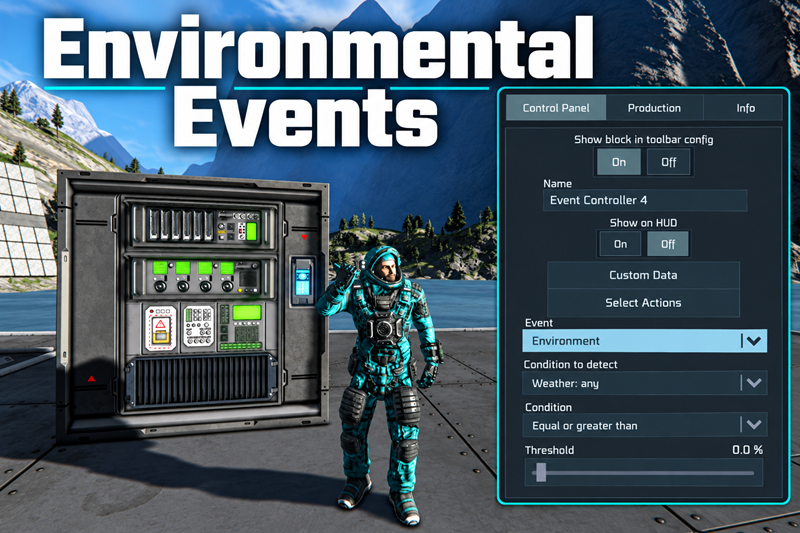
From Steam WorkshopAdds an "Environment" event to the Event Controller: sunlight, weather, radiation, temperature, oxygen, atmosphere and wind. Floodlights that come on at dusk and off at dawn. Hangar doors that close…
Adds an "Environment" event to the Event Controller: sunlight, weather, radiation, temperature, oxygen, atmosphere and wind.
Floodlights that come on at dusk and off at dawn. Hangar doors that close when a sandstorm rolls in and reopen when it passes. An airlock that seals when radiation climbs. Atmospheric thrusters that hand over to hydrogen as the air thins. All with the vanilla Event Controller.
Conditions
- Sunlight (day / night) - 0% at the game's own night threshold, 100% with the sun well up, dimmed by weather; eclipse-aware in space.
- Weather - any, clear skies, rain, snow, thunderstorm / electric storm, hailstorm, sandstorm / dust storm, fog, high or low winds, heat wave, cold front, other (modded). The slider is the weather's intensity at the block.
- Radiation level - read from the game's own hazard system: planetary radiation (Europa), solar radiation with atmosphere and shielding, radioactive weather and nearby reactors. 100% = a large reactor at point blank; medium solar is 20%, Europa's surface 24%.
- Temperature - the game's suit temperature scale: 0% extreme freeze, 50% comfortable, 100% extreme heat.
- Oxygen in atmosphere, Atmosphere density, Wind speed (100% = 100 m/s).
Features
- A real Event Controller event - "Environment" appears in the block's own event dropdown next to the vanilla events, is saved with the block and works with the normal Yes/No action rows.
- Threshold + condition - the controller's threshold slider is 0-100% of the chosen measurement and the condition dropdown picks Greater or Lower-or-equal.
- Live readout - the block's detailed info shows the reading at the block ("night, sun 12 deg below horizon", "SandStormHeavy 82%", "0.60 /s", "62% air density", "34 m/s"...), whether the condition is met, and what 100% means.
- Modded content works - modded weather is classified by name, modded planets use the same queries.
- Multiplayer ready - triggering runs on the server, the dropdown syncs to clients, no dependencies, no new blocks.
How to use
[olist] [*]Place an Event Controller and pick Environment from its event list. [*]Choose what to measure in the Condition to detect dropdown that appears below it. [*]Set the threshold slider and the condition (Greater / Lower or equal).
[/olist]
Examples:
- Floodlights on at dusk, off at dawn: Sunlight, 20%, Lower or equal
- Close doors when any storm arrives and reopen after: Weather: any, 30%, Greater
- Seal the airlock and light the warning sign when radiation climbs: Radiation level, 20%, Greater
- Switch atmospheric thrusters off and hydrogen on as the air thins: Atmosphere density, 30%, Lower or equal
- Heater on when it gets cold: Temperature, 25%, Lower or equal
- Storm lights during a thunderstorm: Weather: thunderstorm, 40%, Greater
- Reopen the solar array once hail has passed: Weather: hailstorm, 10%, Lower or equal
- Retract wind turbines in a gale: Wind speed, 60%, Greater
- Helmet reminder when leaving breathable air: Oxygen in atmosphere, 50%, Lower or equal
Weather intensity ramps up over the first ~15 seconds of an effect and down at the end, and it is strongest at the centre of the effect, so weather thresholds work like a "how bad is it" dial. Oxygen reads the planet's atmosphere, not pressurised rooms - use an air vent for those. Radiation needs to be enabled in the world settings.
Highlights
From source dataFootprint
Rated a light load on a server.
Last update
Its author last shipped an update 39d ago.
Environmental Events on Nxeon
From our catalogue- One-click install
- Not available. One-click install isn't available for this game's mods yet. Download it and upload it to your server in Files.
- Server load
- light
- Smallest plan we suggest
- Space Engineers — 8 GB (8 GB RAM). This follows our own load rating above, not a benchmark.
- Latest build
- 2026-09-26, released 2026-09-26
Game versions by loader
| Loader | Game versions | Newest |
|---|---|---|
| Workshop |
From 1 recorded build of Environmental Events.
Run Environmental Events on a Space Engineers server
Deploy a server above, then upload the file in Files.
What kind of mod it is
From the catalogGameplay & overhauls
New mechanics, content and overhauls that change how the game plays.
Compatibility
- Game
- Space Engineers
Verified at the source
- ✓Steam WorkshopOfficial listing, checked 2026-10-05Open ↗
- ✓AuthorAnt, as published on Steam Workshop
- ✓LicenseNot published by the sourceFree












