






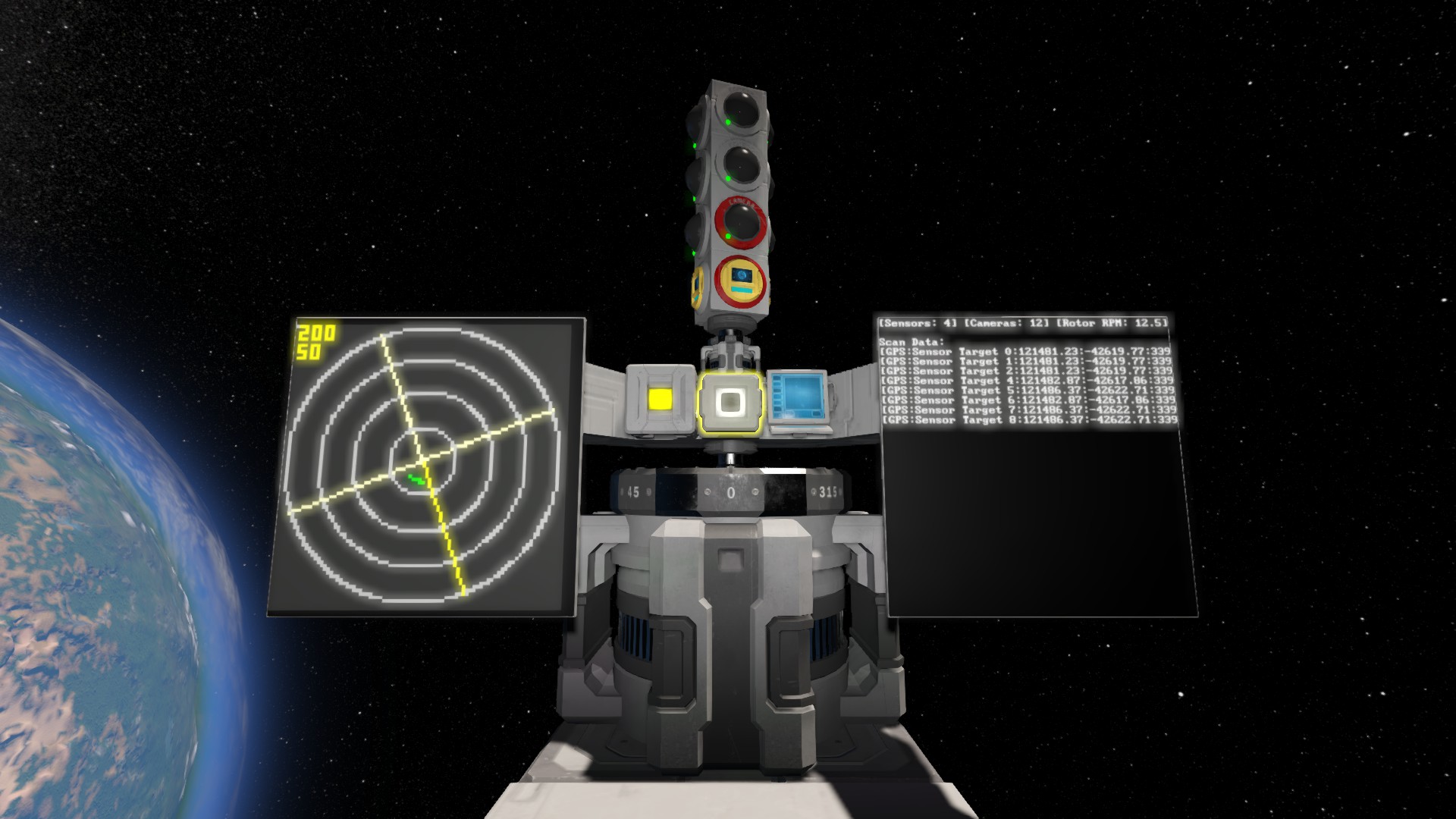

About Graphical Radar Mark III
From Steam Workshop──────────────────────────────────────────── Graphical Radar Script Mark III In-Game Script ⚠ This script is out of support - no new features or fixes will be added. IMPORTANT: READ THE LIMITATIONS.…
────────────────────────────────────────────
Graphical Radar Script Mark III
In-Game Script
⚠ This script is out of support - no new features or fixes will be added.
IMPORTANT: READ THE LIMITATIONS. Credits to sysigy for large amounts of backend logic.
This script is a rebuild of Graphical Radar Script Mark II by alex-thatradarguy. It uses sensors and cameras on a rotor to detect targets - up to all four directions - and outputs them to any available radar displays.
The original script used a remote control's GetFreeDestination() - a function which was removed.
This script replaces it with a camera's Raycast() function. Advantages of this include slightly easier implementation and the ability to see anything with collision (ships, terrain, trees, spiders, players, etc.). Disadvantages include a scan delay proportional to scan range, and the ability to see anything with collision (like the ship it's attached to!).
Features
All of the features of the original, and more!
Detectors Sensor support - One sensor per direction is supported. Camera support - Can support an infinite amount of cameras per direction! This allows for less delay between scans, and thus higher detail at range - at the cost of high overhead.
Automated configuration - The script automatically detects and sets up everything necessary except for what sensors pick up. It is possible to have only a sensor in one direction, and only a camera in another.
Displays Monospace colour support - Updated monospace colours courtesy of Whiplash141. The original visuals are also available. Multiple displays - Can render to any display with the appropriate name tag - including large displays. Enemy ID - Distinguishes between hostile and non-hostile targets.
Status display - Outputs formatted GPS coordinates of hits. Adjustable resolution - Minimum of 40x, maximum of 160x. Large displays use 2x the set resolution. Large displays - Can spread a single display's contents over four displays. Multiple radar support - Change radar search tag in settings.
Backend Argument handling - Configure camera range and rotor RPM through arguments. Adjustable refresh rate - Higher rate => higher overhead.
Limitations
Excessive amounts of any: - LCDs - LCD resolution - Cameras - Things in the general area can cause the game to freeze - especially in combination. Use with caution.
Cameras use raycasts - i.e. will return the first thing directly in front if it. This means the camera array will only detect things in a flat-ish (dependent on the shape of the array) circle. It also means if any parts of the ship are on that circle, that's what the camera will see.
The multi-screen mode runs at 2x normal resolution. This may cause problems at high resolutions.
User Manual
Required blocks - 1 Rotor [Radar - Rotor] - 1 Sensor [Radar - Sensor Front] OR 1 Camera [Radar - Camera Front] - 1 LCD [See Optional Blocks for possible LCDs] (text panels are also LCDs) - 1 Programming Block with this code - 1 Power Source
Optional blocks - 1-4 Sensors
- Radar - Sensor Front
- Radar - Sensor Back
- Radar - Sensor Left
- Radar - Sensor Right
- Multiple Cameras [Radar - Camera <Front/Back/Left/Right>...]
- Radar - Camera Front 1
- Radar - Camera Back 1
- Radar - Camera Left 1
- Radar - Camera Right 1
- Radar - Camera Front 2
- Radar - Camera Back 2
- etc...
- Multiple LCDs [Radar - <type> (position)...]
- Radar - Display
- Radar - Status
- Radar - Multi NW
- Radar - Multi NE
- Radar - Multi SW
- Radar - Multi SE
Rotor Setup - Place rotor with name tag [Radar - Rotor]. - Place something to mount the sensors/cameras on the rotor. If the rotor is upside-down relative to the display, change the appropriate variable in the script.
LCD Setup - Place LCDs with any name tag:
- Radar - Display
- Radar - Status
- Radar - Multi NW
- Radar - Multi NE
- Radar - Multi SW
- Radar - Multi SE
Display is the single-screen radar display. Multi is four-screen radar display - Multi NW is top-left, Multi NE is top-right, Multi SW is bottom-left, Multi SE is bottom-right. Status is GPS position of detected objects.
Detector Setup - On rotor, place sensors with any name tag:
- Radar - Sensor Front
- Radar - Sensor Back
- Radar - Sensor Left
- Radar - Sensor Right
At most one for each direction. - On rotor, place cameras with any name tag:
- Radar - Camera Front 1
- Radar - Camera Back 1
- Radar - Camera Left 1
- Radar - Camera Right 1
- Radar - Camera Front 2
- Radar - Camera Back 2
- etc...
No limit for any direction apart from what your computer can take. At 0 degrees, Front is up on any radar display, and the other directions at 90 degree increments.
Available Arguments - inc c : increase camera range - dec c : decrease camera range - inc r : increase rotor RPM - dec r : decrease rotor RPM
Special Thanks
[alex-thatradarguy] Graphical Radar Script Mark II [sysigy] Graphical Radar [Whiplash141] Artifical Horizon
Highlights
From source dataFootprint
Rated a light load on a server.
Last update
Its author last shipped an update 9 yr ago.
Graphical Radar Mark III on Nxeon
From our catalogue- One-click install
- Not available. One-click install isn't available for this game's mods yet. Download it and upload it to your server in Files.
- Server load
- light
- Smallest plan we suggest
- Space Engineers — 8 GB (8 GB RAM). This follows our own load rating above, not a benchmark.
- Latest build
- 2018-02-06, released 2018-02-06
Game versions by loader
| Loader | Game versions | Newest |
|---|---|---|
| Workshop |
From 1 recorded build of Graphical Radar Mark III.
Run Graphical Radar Mark III on a Space Engineers server
Deploy a server above, then upload the file in Files.
What kind of mod it is
From the catalogTechnology & automation
Machines, power, logistics and automation.
Compatibility
- Game
- Space Engineers
Verified at the source
- ✓Steam WorkshopOfficial listing, checked 2026-11-01Open ↗
- ✓Authordagriefaa, as published on Steam Workshop
- ✓LicenseNot published by the sourceFree












