






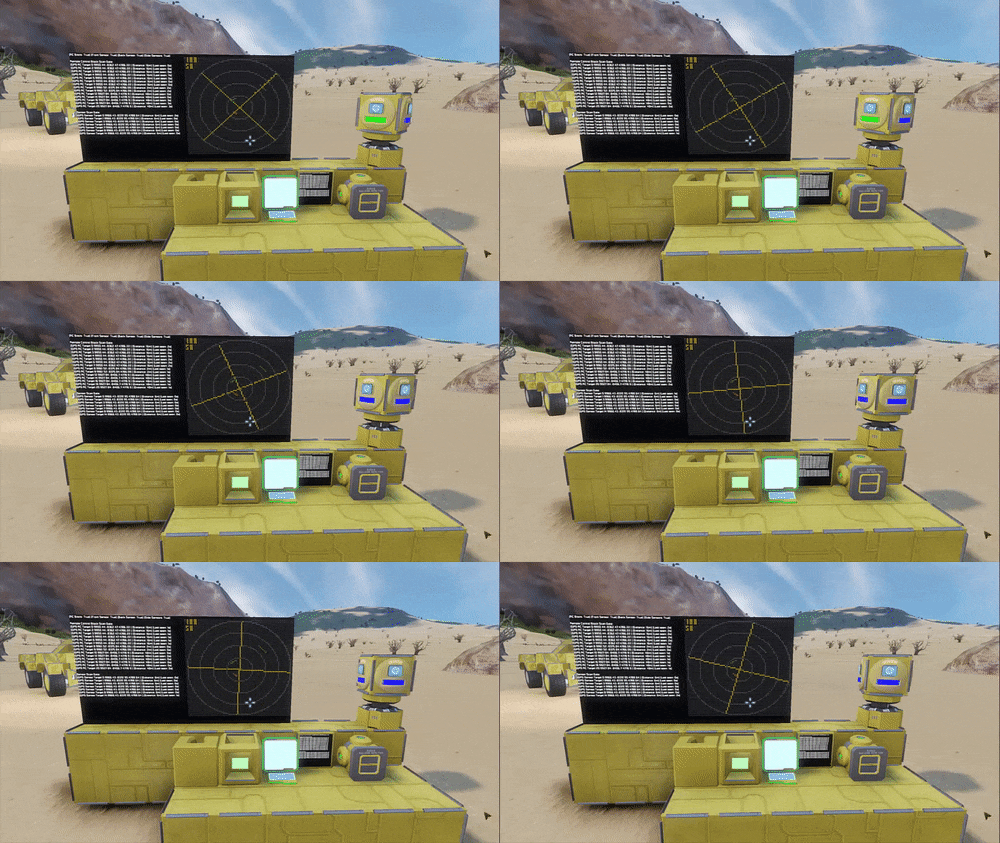

About Graphical Radar Script Mark II
From Steam WorkshopThis is a script for programming blocks. It will not show up in your mod list, it will only show up in your scripts list when you edit programming blocks. IMPORTANT! If you get an error saying…
This is a script for programming blocks. It will not show up in your mod list, it will only show up in your scripts list when you edit programming blocks.
IMPORTANT!
If you get an error saying "Caught exception during execution of script:Common language Runtime detected an invalid program.", it means you have an old version of .NET framework, and you need to upgrade.
Features:
- Combinatory scan block configuration - Adjustable colors - Adjustable lcd screen resolution, 40x40 - 160x160 - Adjustable script refresh rate - Simultanious RC Block + Sensors scanning mode - Status screen with formatted GPS coordinates - Upside-down rotor support mode - Automatic rotor and sensor configuration - Homemade number font - Support for multiple radars on the same grid by adjustable search tag - Argument handling: -- "increase" - increase remote block scan range -- "decrease" - decrease remote block scan range
How does it work?
Sensors has a function called LastDetectedEntity, and you can do GetPosition() on that to get 3d coordinates. Comparing the radar's coordinates with the target's coordinates we get the distance. Knowing the angle of the rotor and the distance to the target we can apply simple trigonometry to imagine a triangle, and get 2D x and y coordinates to plot on the radar screen.
The Remote Control block has an autopilot feature, which has a function to detect obstacles called GetFreeDestination(). We can use that function to get the distance to the obstacle. Unlike sensors, we can tell the Remote Control block which direction to look at, so we don't need an actual rotor, we can simulate one in the code. We then apply the same basic trigonometry to get 2D x and y coordinates.
Instructions - Simple Rotorless Mode:
- Place a power source, a Timer, a Programmable Block, a Remote Control block, and a Text Panel - Edit the programmable block, Browse workshop and find this script in the list, "ok", "Remember & Exit" - Rename the Remote Control Block so it contains "RADAR" - Rename the LCD / Text panel so it contains "RADAR DISPLAY" (you can have more than one) - Setup Actions in the Timer Block like this: -> add the Programmable Block -> add the Timer Block itself and set it to "Trigger Now" - Trigger the Timer Block with "Trigger Now"
[h1]Visual Guide:[/h1] http://imgur.com/a/eLqZi
[h1] Video Guide by Mirrowel:[/h1] https://youtu.be/KZBdZWZ0H7k
Instructions - Combined Scanning Mode, Remote Control + 1 Sensor:
- Do everything in Rotorless mode - Add one Rotor - Place a block on the rotor - Rename the rotor so it contains "RADAR" - Place a sensor on the forward facing side of the block on the rotor - Rename the sensor so it contains "RADAR FRONT" - Recompile the script by editing and pressing "Remember & Exit" - Trigger the Timer
Instructions - Combined Scanning Mode, Remote Control + 4 Sensors:
- Do everything in the previous list - Add a sensor to the back of the block on the rotor - Rename it so it contains "RADAR BACK" - Add a sensor to the left side of the block - Rename it so it contains "RADAR LEFT" - Add a sensor to the right side of the block - Rename it so it contains "RADAR RIGHT" - Recompile the script by editing and pressing "Remember & Exit" - Trigger the Timer
Instructions for extra GPS Stats Display
- Follow instructions for any scanning mode - Add an LCD / Text panel, rename it so it contains "RADAR STATS" (you can have more than one) - Recompile the script by editing and pressing "Remember & Exit" - Trigger the Timer
Instructions for spanning radar image across multiple screens (experimental):
- Set up the Programmable block, Timer, Remote Block, and/or Sensors according to previous instructions - Place 4 LCD's or Text panels (wide screens will probably not look right) - Rename the upper left screen so it contains "RADAR MULTI1" - Rename the upper right screen so it contains "RADAR MULTI2" - Rename the lower left screen so it contains "RADAR MULTI3" - Rename the lower right screen so it contains "RADAR MULTI4" - Set the "multiScreenMode" variable in the script to "true" - Press "Remember & Exit" - Trigger the Timer
Need-to-know stuff and limitations:
- The remote control block is capable of detecting obstacles hundreds of kilometers away, but the detection rate is limited by the speed of the scan rotation, and by how many times the script is running per second. The actual max scanning range is unknown at this point, but it should be able to scan several kilometers. - The remote control block is very touchy about grid placement, many different blocks prevents it from scanning at all. - The remote control block scans in a very flat circle around you, so you need to be horizontally aligned with your targets to detect them. - Targets detected with Remote Control and targets detected with Sensors will show up at the same time with different colors. - The screen will scale the ratio automatically depending on the range settings. - If a red target is displayed next to a green target, it doesn't necessarily mean that they are next to each other in the game, because where they are placed on the screen depends on the individual separate range settings of the remote control and sensors. - Increased resolution = more calculations = bigger FPS cost - Increase refresh rate = more calculations per second = bigger FPS cost
Update 2.1
- Added support for multiple Remote Control blocks, (you can put them on different heights to detect more targets) - Added compatibility with stupid old glitchy .net frameworks that can't even handle foreach loops - Fixed a multiscreen bug where it wouldn't work if you didn't have an additional "RADAR DISPLAY" - Added more sensor options and maxed top and bottom extent - Improved automatic fontsize
Update 2.2
- Fixed inaccurate screen scaling
Highlights
From source dataFootprint
Rated a light load on a server.
Last update
Its author last shipped an update 10 yr ago.
Graphical Radar Script Mark II on Nxeon
From our catalogue- One-click install
- Not available. One-click install isn't available for this game's mods yet. Download it and upload it to your server in Files.
- Server load
- light
- Smallest plan we suggest
- Space Engineers — 8 GB (8 GB RAM). This follows our own load rating above, not a benchmark.
- Latest build
- 2016-07-10, released 2016-07-10
Game versions by loader
| Loader | Game versions | Newest |
|---|---|---|
| Workshop |
From 1 recorded build of Graphical Radar Script Mark II.
Run Graphical Radar Script Mark II on a Space Engineers server
Deploy a server above, then upload the file in Files.
What kind of mod it is
From the catalogTechnology & automation
Machines, power, logistics and automation.
Compatibility
- Game
- Space Engineers
Verified at the source
- ✓Steam WorkshopOfficial listing, checked 2026-11-01Open ↗
- ✓Authoralex, as published on Steam Workshop
- ✓LicenseNot published by the sourceFree












