About Graphical Resource Bars
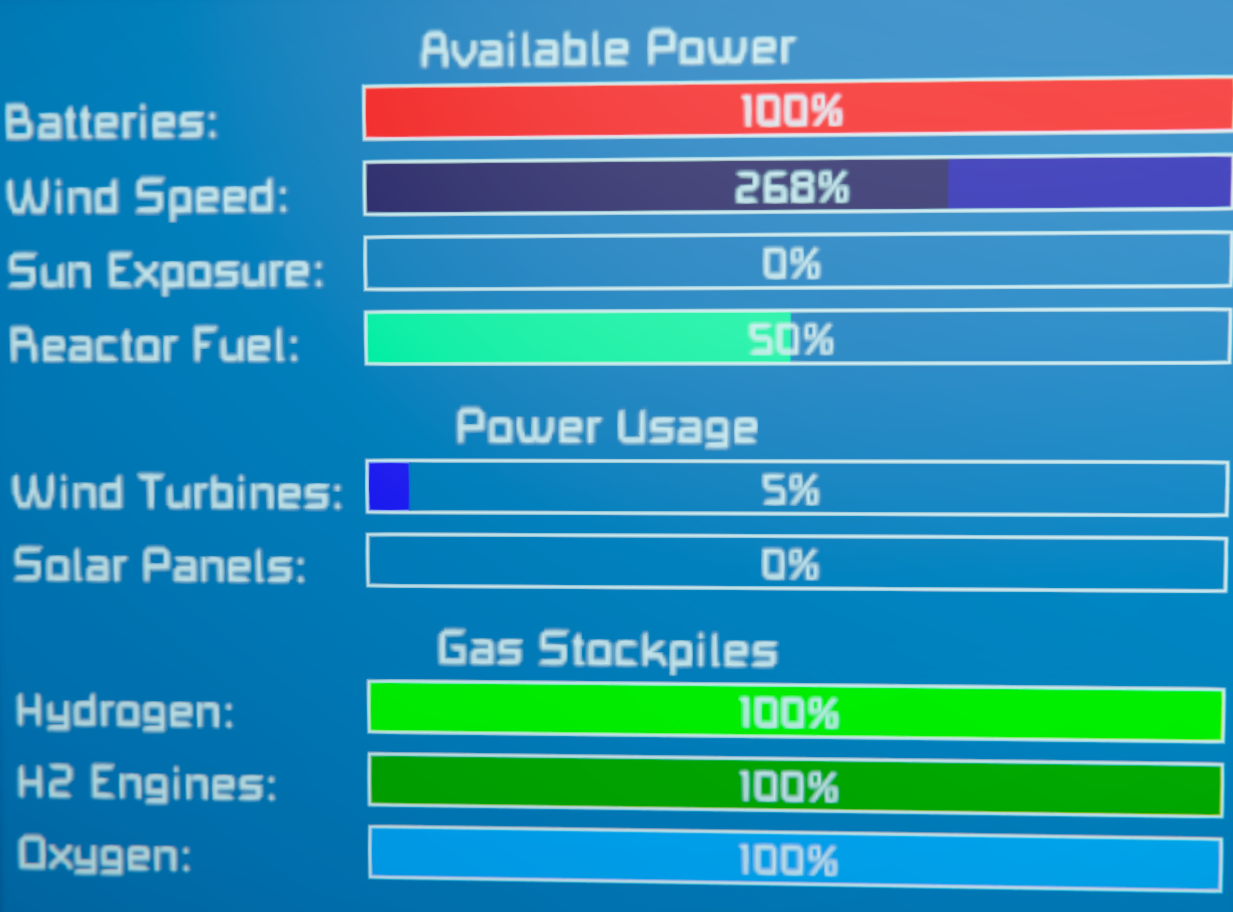
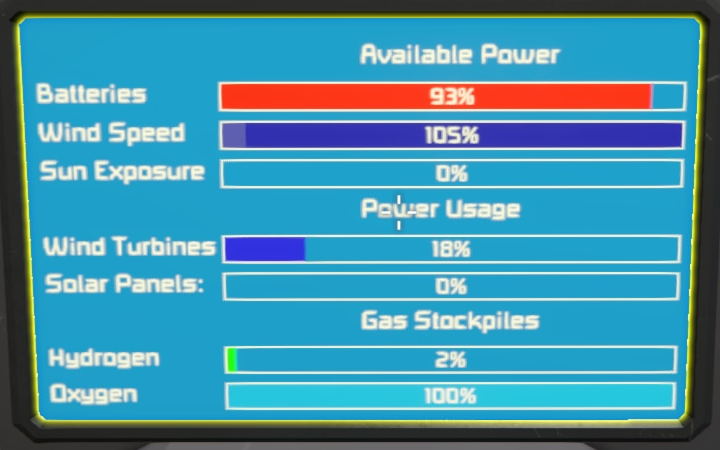
From Steam WorkshopA Script that displays a grids resources as graphical bars. The colours of the bars are customizable for those (Like me) who like to color code your grids. UPDATE 05 October 2025: Changeable Border…
A Script that displays a grids resources as graphical bars. The colours of the bars are customizable for those (Like me) who like to color code your grids. [hr][/hr] UPDATE 05 October 2025: Changeable Border Offsets UPDATE 08 October 2025: Themes!!!
https://youtu.be/gjx0RVto-Jk?si=eIBouY8rxJ2I2ZuD
Options:
To make it display on a screen go to the block in the control panel Press 'Custom Data' Paste in this next line
[Graphical Resource Bars]
Then Press 'Recompile' on the Programming Block that has the script in it.
There are several more options you can paste in after that line, though they are ALL optional These are the supported options so far
- To tell the script which LCD screen on the block to use (0 is default, which is the first screen)
- [code]
- ScreenNumber=0
- [/code]
- To Make a screen only use text mode make the following true
- [code]
- TextMode=false
- [/code]
- To adjust where the information appears on the screen use:
- [code]
- TopOffset=20
- LeftOffset=0
- RightOffset=10
- [/code]
- To Let the script decorate the screen for you choose a theme like so:
- [code]
- Theme=1
- [/code]
- To choose which Bars are shown on a specific block, use the following (true is default, false means don't show it)
- [code]
- ShowBatteries=true
- ShowWindSpeed=true
- ShowSunExposure=true
- ShowWindTurbines=true
- ShowSolarPanels=true
- ShowHydrogen=true
- ShowHydrogenEngines=true
- ShowOxygen=true
- ShowReactorFuel=true
- ShowWater=true
- [/code]
- As the script is getting too many features you can now set it to Whitelist Mode to make defaults for the above "ShowBars" false (So it only shows the ones you specify as true) - defaults to false so you can ignore this if you don't want to use it.
- [code]
- WhitelistMode=false
- [/code]
- To choose custom colours for each bar, use the following entries (Below shows the default colors)
- [code]
- BatteryColor=255,0,0
- WindSpeedColor=255,255,0
- SunExposureColor=0,255,0
- ReactorFuelColor=0,255,128
- WindTurbineColor=0,255,255
- SolarPanelColor=128,0,0
- HydrogenColor=128,128,0
- HydrogenEngineColor=0,128,0
- OxygenColor=0,128,0
- WaterColor=0,255,255
- [/code]
- To stop it showing the titles between each category, set this to false (defaults to true)
- [code]
- ShowCategoryTitles=true
- [/code]
- To stop it showing the titles on the left of the bars, set this to false (defaults to true)
- [code]
- ShowTitles=true
- [/code]
- To change what the text on the screen says (e.g. put it in your language) change the following
- [code]
- AvailablePowerName=Доступная мощность
- BatteryName=Аккумуляторы
- WindSpeedName=Скорость ветра
- SunExposureName=воздействие солнца
- PowerUsageName=Потребление энергии
- WindTurbinesName=Ветряные турбины
- SolarPanelsName=Солнечные панели
- GasStockpilesName=Запасы газа
- HydrogenName=Водород
- OxygenName=кислород
- [/code]
- PLEASE NOTE: I used google translate to get this Russian Text so let me know if it doesn't say what I think it does.
if you want an option to stay as the default value, you can just skip the entry all together. [hr]
NOTES:
[olist] [*] If you use this in Multiplayer on a server - There is known bugs in the game for screen updates. The only fix for this is to cross your fingers and hope that Keen finally fix it (It's been over half of a decade so far)
[*] More settings and features to come... I'll keep you up to date. It is my hopes to keep updates so they won't need you to adjust anything to keep the same output. I'll add notes at the top if changes are unavoidable. [/olist]
Themes
[table] [tr] [th]Index[/th] [th]Theme Name[/th] [/tr] [tr] [td]0[/td] [td]No Theme (Default)[/td] [/tr] [tr] [td]1[/td] [td]Amiga Workbench 1.3.2[/td] [/tr] [/table] Let me know if you want to see more themes and what they might be
Highlights
From source dataFootprint
Rated a light load on a server.
Last update
Its author last shipped an update 13 mo ago.
Graphical Resource Bars on Nxeon
From our catalogue- One-click install
- Not available. One-click install isn't available for this game's mods yet. Download it and upload it to your server in Files.
- Server load
- light
- Smallest plan we suggest
- Space Engineers — 8 GB (8 GB RAM). This follows our own load rating above, not a benchmark.
- Latest build
- 2025-10-07, released 2025-10-07
Game versions by loader
| Loader | Game versions | Newest |
|---|---|---|
| Workshop |
From 1 recorded build of Graphical Resource Bars.
Run Graphical Resource Bars on a Space Engineers server
Deploy a server above, then upload the file in Files.
What kind of mod it is
From the catalogQuality of life & UI
Small conveniences, tweaks and interface improvements players notice straight away.
Compatibility
- Game
- Space Engineers
Verified at the source
- ✓Steam WorkshopOfficial listing, checked 2026-11-01Open ↗
- ✓AuthorKiasanth, as published on Steam Workshop
- ✓LicenseNot published by the sourceFree