






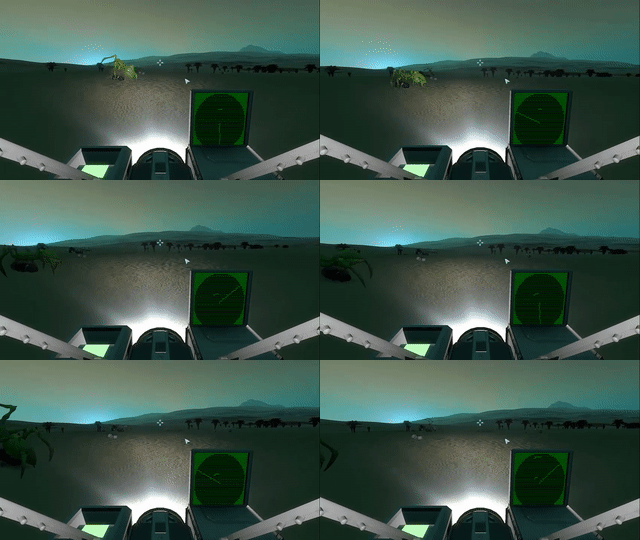

About Graphical Sensor Radar
From Steam WorkshopThis is an InGame Programming Script that simply uses a sensor mounted on a rotor. It can detect anything that sensors can detect, including spiders. It works with or without sensor mods. You only…
This is an InGame Programming Script that simply uses a sensor mounted on a rotor. It can detect anything that sensors can detect, including spiders. It works with or without sensor mods.
You only need: 1 timer block 1 programming block 1 rotor 1 sensor 1 text panel (1 power source, obviously) optional: 1 Remote Control block for long range scanning
1) Put a block on the rotor, and put a sensor on the block facing forward on your grid. 1.5) Optional: Place a remote control block somewhere else on your grid, facing forward, preferably with free line of sight in horizontal directions. It can't be too close to wheels, rotors, pistons or other screwy multigrid blocks. 2) Tweak sensor values to your liking. Front Extent is the important scanning range value. Left and right could improve detection. Top and bottom could find more things in 3D space. 3) Turn the rotor off and set it to ~10-20rpm. The faster it rotates, the less chance the rotor will pick up small objects at long range. 4) Put the script in the programming block, and edit the script to confirm the block name settings are accurate. 5) Put the programming block in the timer. 6) Put the timer in the timer so it triggers itself with TriggerNow and thereby loops 7) Turn the rotor on 8) Trigger the timer
Example Radar Car: http://steamcommunity.com/sharedfiles/filedetails/?id=615964700
Update 1: - I Implemented a "remoteMode" setting to use a Remote Control block instead of sensor, for very long ranges. It's turned off by default, because it's very difficult to get working, the reason i assume is that it detects it's own grid, just like some issues with the sensor. [Edit: Improved] It does not detect life-forms. - I also added an "upsideDown" setting if you want to turn the rotor upside down and attach it to the underside of your ship, you can now do that as well. Update 2: - I made a new version that can handle 4 sensors or remotes in each direction: http://steamcommunity.com/sharedfiles/filedetails/?id=616541074
Update 3: - Better Remote Control Block detection (Thank you Skleroz). You don't need to put the Remote Control Block on the rotor anymore, you can place it anywhere you want. The remote gets the vector from the sensor instead, which works better. But this means you always need a sensor now. - More automated block assignment. If it can't find a block of the correct name, it now grabs the first block on your grid of the correct type. - A few performance optimizations and added max limits.
Update 4: - I made a different version that doesn't need rotors. It can't detect life forms, though. http://steamcommunity.com/sharedfiles/filedetails/?id=617905251
Update 1.5: - I added a refresh rate limit setting to save computing resources and to hopefully fix Script Complexity Errors. Let me know if this worked. - I fixed some detection problems with the long range scanner and it now has a separate virtual rotation speed. - You can now switch between long range and short range scanning by passing the argument "switch" from a toolbar button - You can now change long range scanning range by passing arguments "increase" and "decrease". It steps 100m by default, but can be changed in the settings. - It now sets the font size to 0.4 automatically
Highlights
From source dataFootprint
Rated a light load on a server.
Last update
Its author last shipped an update 11 yr ago.
Graphical Sensor Radar on Nxeon
From our catalogue- One-click install
- Not available. One-click install isn't available for this game's mods yet. Download it and upload it to your server in Files.
- Server load
- light
- Smallest plan we suggest
- Space Engineers — 8 GB (8 GB RAM). This follows our own load rating above, not a benchmark.
- Latest build
- 2016-02-08, released 2016-02-08
Game versions by loader
| Loader | Game versions | Newest |
|---|---|---|
| Workshop |
From 1 recorded build of Graphical Sensor Radar.
Run Graphical Sensor Radar on a Space Engineers server
Deploy a server above, then upload the file in Files.
What kind of mod it is
From the catalogTechnology & automation
Machines, power, logistics and automation.
Compatibility
- Game
- Space Engineers
Verified at the source
- ✓Steam WorkshopOfficial listing, checked 2026-11-01Open ↗
- ✓Authoralex, as published on Steam Workshop
- ✓LicenseNot published by the sourceFree












